• Products
    • Isadora
    • Get It
    • ADD-ONS
    • IzzyCast
    • Get It
  • Forum
  • Help
  • Werkstatt
  • Newsletter
  • Impressum
  • Dsgvo
  • Press
  • Isadora
  • Get It
  • ADD-ONS
  • IzzyCast
  • Get It
  • Press
  • Dsgvo
  • Impressum

Navigation

    • Register
    • Login
    • Search
    • Categories
    • Recent
    • Popular
    • Tags

    My stage goes black when pressing Force Stage Preview Output.

    How To... ?
    3
    9
    2969
    Loading More Posts
    • Oldest to Newest
    • Newest to Oldest
    • Most Votes
    Reply
    • Reply as topic
    Log in to reply
    This topic has been deleted. Only users with topic management privileges can see it.
    • A
      alosidne last edited by

      Hello again Isadora Community,

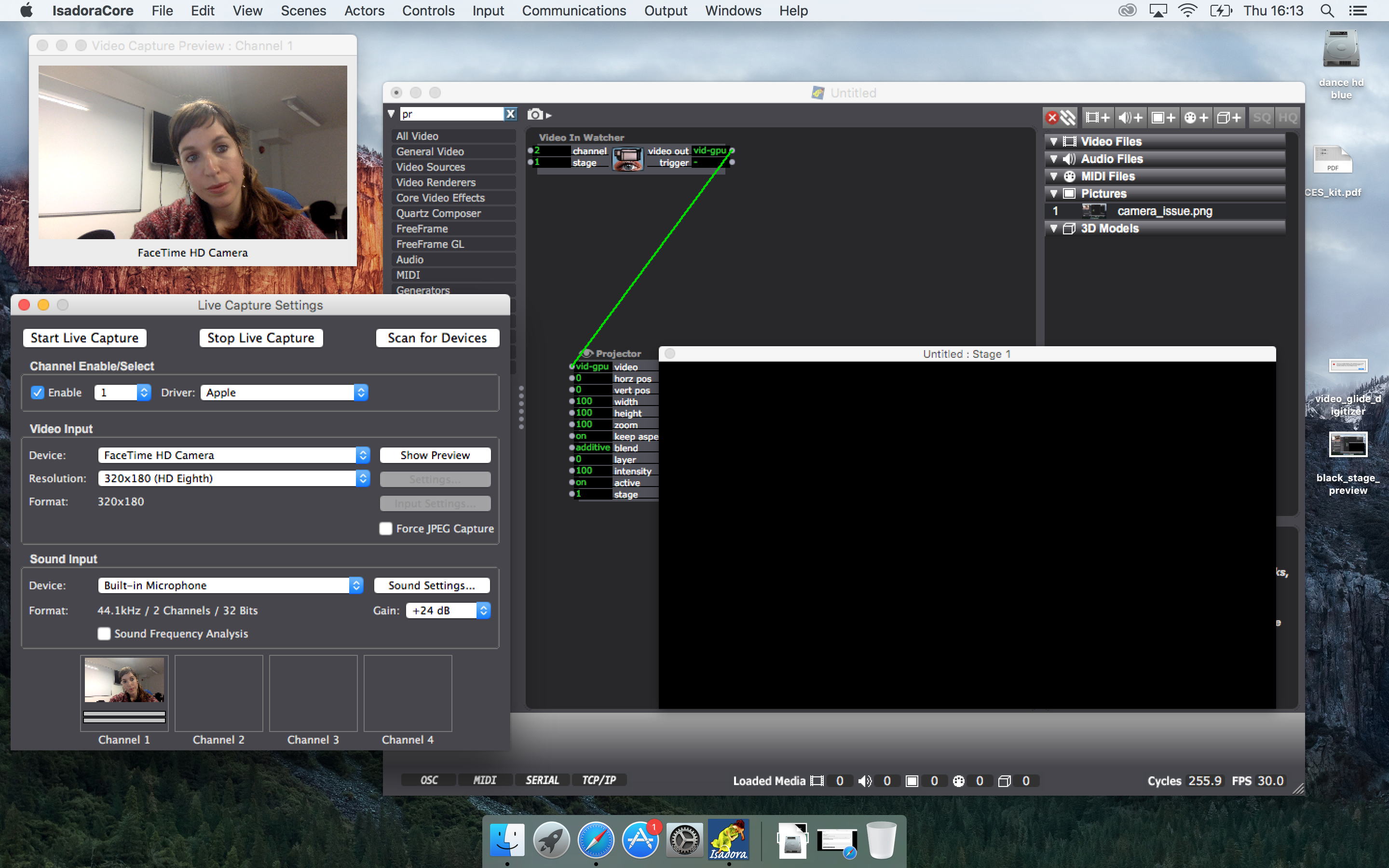
      I have a new issue related with the Force Stage Preview Output. When using live video, I am able to get a clear video capture preview, but when I shift to the Force Stage Preview the image outcome turns black. 
      Please see the attached screenshot for more information.
      Any ideas for the reasons that this happens?
      I have noticed that I have the same issue when using movie and picture player.
      Thank you in advanced for the help,
      Best,
      a

      18e229-black_stage_preview.png

      1 Reply Last reply Reply Quote 0
      • DusX
        DusX Izzy Guru last edited by

        It look like your 'channel' input of the Video In Watcher is set to the incorrect capture channel.

        You have your video feed coming in channel 1.

        🎛️ TroikaTronix Professional Services
        https://troikatronix.com/professional-services

        🎫 Support Tickets
        https://support.troikatronix.com/support/tickets/new

        💻 Add-ons
        https://troikatronix.com/add-ons/?u=dusx

        🧪 GitHub Projects
        https://github.com/rwebber

        🖥️ Win11 | i7 | RTX 4070 | 32GB RAM | Ontario, Canada

        1 Reply Last reply Reply Quote 0
        • A
          alosidne last edited by

          Dear DusX,

          Thank you for your respond.
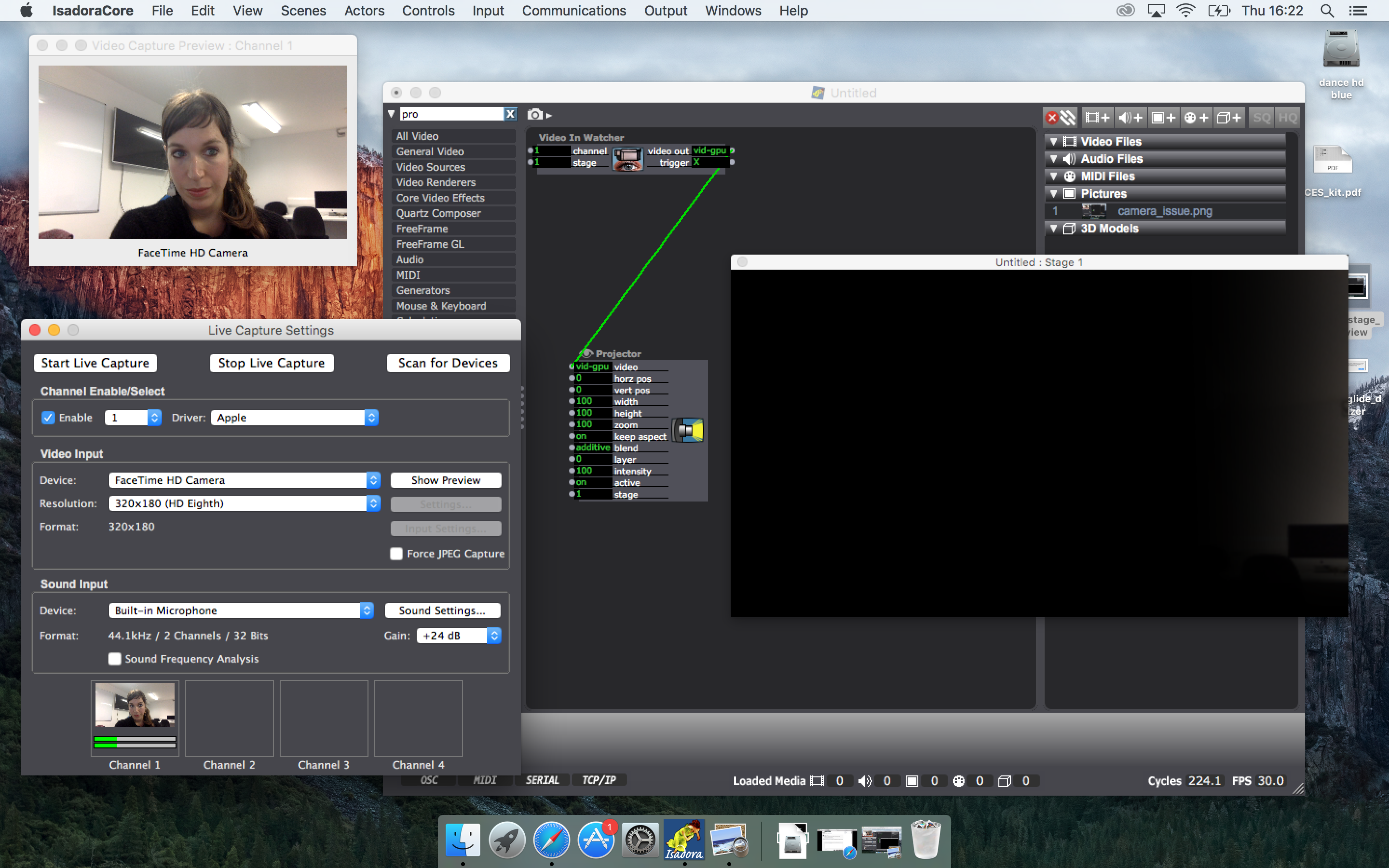
          Actually, yes you are right, but I am still having the same issue even if I turn the channel to correspond my capturing channel. Please, see new attachment.
          Any further ideas?
          Thank you in advanced.

          f685a4-black_stage_preview2.png

          1 Reply Last reply Reply Quote 0
          • DusX
            DusX Izzy Guru last edited by

            interesting, I can see your video slightly, so we know you are getting a feed.

            What do you see, when you roll over the patch cable between the 2 actors (should show a thumbnail view)? Is it similar to the capture preview window?
            What version of Isadora are you running?

            🎛️ TroikaTronix Professional Services
            https://troikatronix.com/professional-services

            🎫 Support Tickets
            https://support.troikatronix.com/support/tickets/new

            💻 Add-ons
            https://troikatronix.com/add-ons/?u=dusx

            🧪 GitHub Projects
            https://github.com/rwebber

            🖥️ Win11 | i7 | RTX 4070 | 32GB RAM | Ontario, Canada

            1 Reply Last reply Reply Quote 0
            • A
              alosidne last edited by

              Dear DusX,

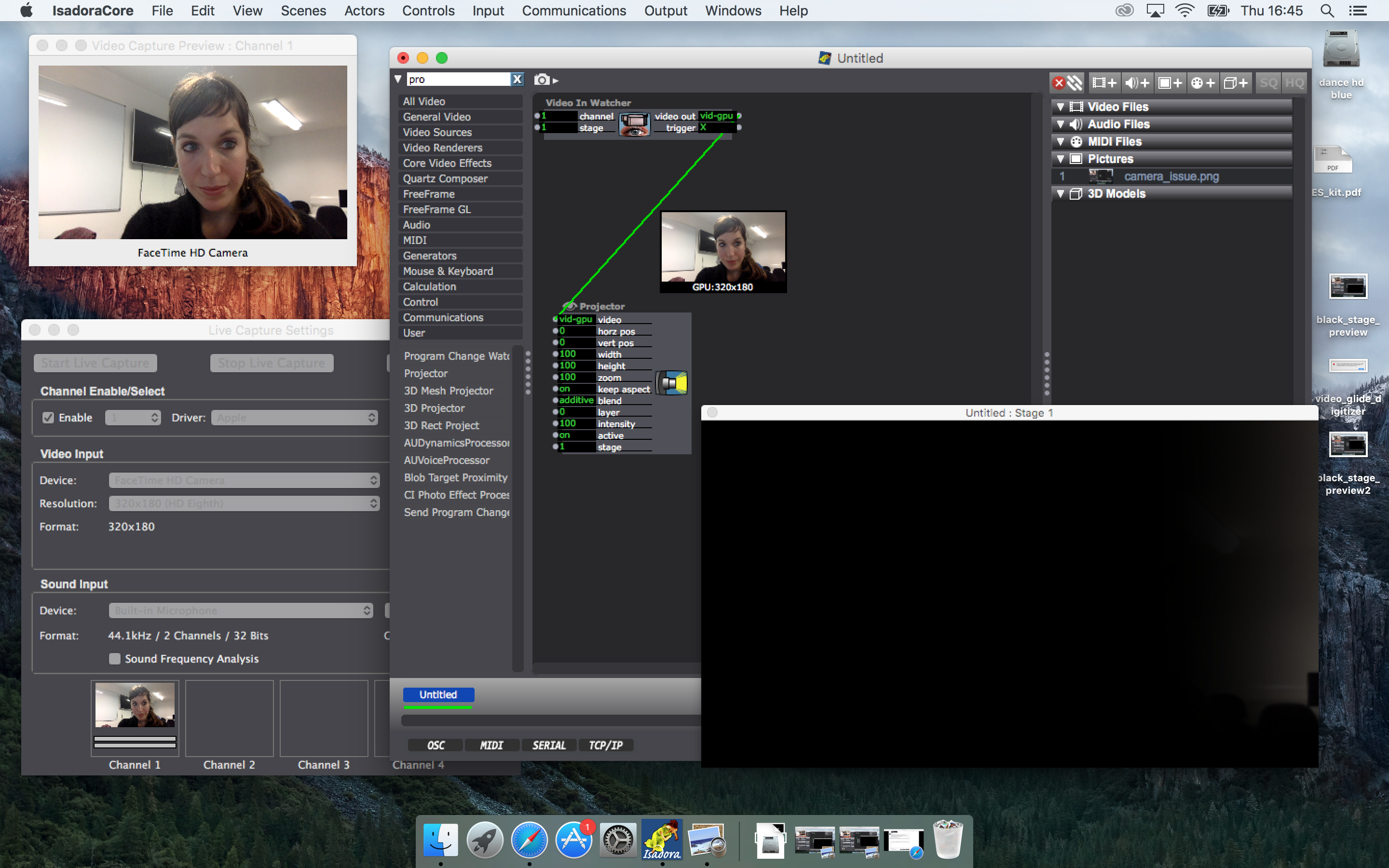
              In this new screenshot you will see that the thumbnail view is the same with the capture preview window.
              I am using the 2.1 version of Isadora.
              I cannot understand what goes wrong!
              Thanks again,a

              f52685-black_stage_preview3.png

              1 Reply Last reply Reply Quote 0
              • DusX
                DusX Izzy Guru last edited by

                OK, it looks like maybe you have some extreme edge blending setting in your stage settings.

                Go to Output/Stage Setup,
                and ensure the edge blend section for stage 1 has all fields set to Zero

                See my screen capture. I have set the width setting so that I start to get a display like yours.

                Setting the 90 back to Zero fixes this.
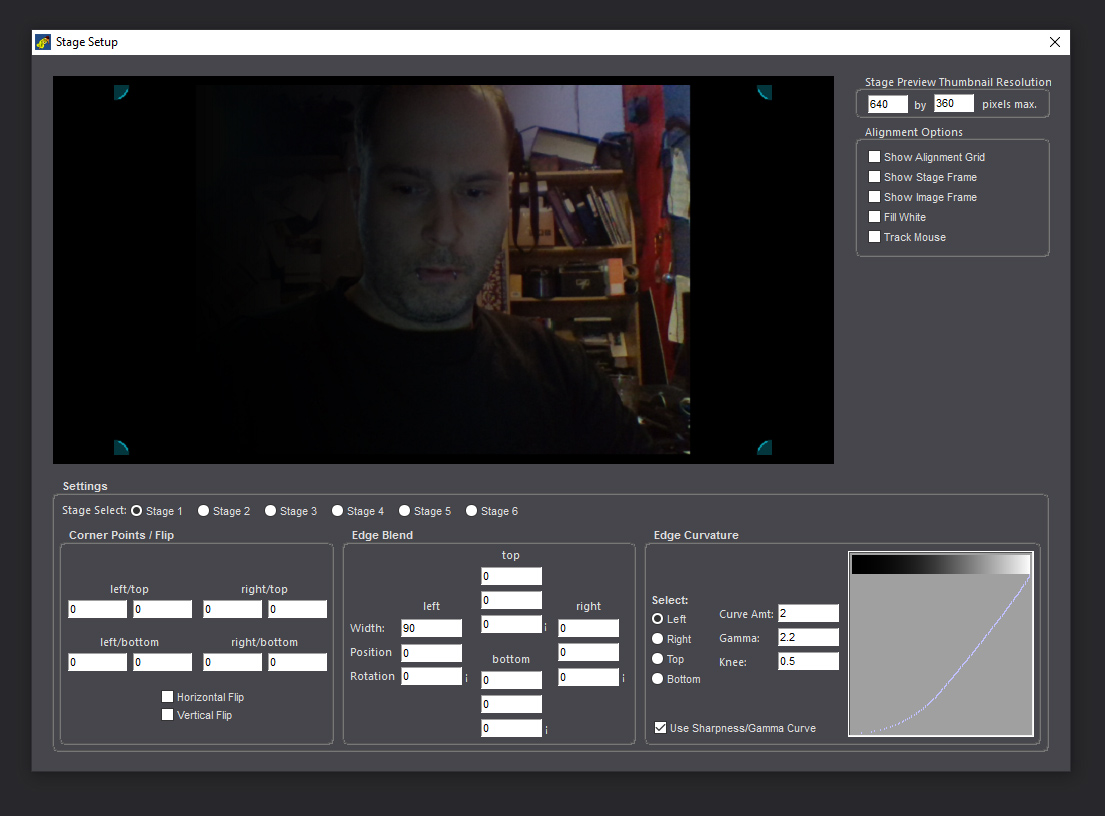
                2673c1-stage-settings.jpg

                🎛️ TroikaTronix Professional Services
                https://troikatronix.com/professional-services

                🎫 Support Tickets
                https://support.troikatronix.com/support/tickets/new

                💻 Add-ons
                https://troikatronix.com/add-ons/?u=dusx

                🧪 GitHub Projects
                https://github.com/rwebber

                🖥️ Win11 | i7 | RTX 4070 | 32GB RAM | Ontario, Canada

                1 Reply Last reply Reply Quote 0
                • A
                  alosidne last edited by

                  That was the problem DusX!!!

                  Thank you so much!!!
                  It has been a great help!!!
                  All the best,
                  a
                  1 Reply Last reply Reply Quote 0
                  • Skulpture
                    Skulpture Izzy Guru last edited by

                    @DusX maybe a 'reset' button would be handy to eliminate this problem?

                    Graham Thorne | www.grahamthorne.co.uk
                    RIG 1: Custom-built PC: Windows 11. Ryzen 7 7700X, RTX3080, 32G DDR5 RAM. 2 x m.2.
                    RIG 2: Laptop MSI Vector 16 HX AI: Windows 11, Intel Ultra 9. RTX5070ti, 32G RAM (DDR5 6000htz), NVME M.2 SSD.
                    RIG 3: Apple Laptop: rMBP i7, 8gig RAM 256 SSD, HD, OS X 10.12.12

                    1 Reply Last reply Reply Quote 0
                    • DusX
                      DusX Izzy Guru last edited by

                      This section is under major development, so little changes are unlikely in the short term I think.

                      🎛️ TroikaTronix Professional Services
                      https://troikatronix.com/professional-services

                      🎫 Support Tickets
                      https://support.troikatronix.com/support/tickets/new

                      💻 Add-ons
                      https://troikatronix.com/add-ons/?u=dusx

                      🧪 GitHub Projects
                      https://github.com/rwebber

                      🖥️ Win11 | i7 | RTX 4070 | 32GB RAM | Ontario, Canada

                      1 Reply Last reply Reply Quote 0
                      • First post
                        Last post