• Products
    • Isadora
    • Get It
    • ADD-ONS
    • IzzyCast
    • Get It
  • Forum
  • Help
  • Werkstatt
  • Newsletter
  • Impressum
  • Dsgvo
  • Press
  • Isadora
  • Get It
  • ADD-ONS
  • IzzyCast
  • Get It
  • Press
  • Dsgvo
  • Impressum

Navigation

    • Register
    • Login
    • Search
    • Categories
    • Recent
    • Popular
    • Tags

    Stage Background with GPU Video

    Off-Topic Discussion
    2
    5
    2810
    Loading More Posts
    • Oldest to Newest
    • Newest to Oldest
    • Most Votes
    Reply
    • Reply as topic
    Log in to reply
    This topic has been deleted. Only users with topic management privileges can see it.
    • marcusbastos
      marcusbastos last edited by

      Hi,

      I am updating a patch to Isadora 2.2.2, and the new Shapes actor (which is GPU video as opposed to CPU video of Classic Shapes) does not seem to react to Stage Background anymore. Anyone has ideas or suggestions?
      best
      Marcus

      http://eventualidades.net

      1 Reply Last reply Reply Quote 0
      • DusX
        DusX Izzy Guru last edited by

        In what way do you mean it doesn't react?

        πŸŽ›οΈ TroikaTronix Professional Services
        https://troikatronix.com/professional-services

        🎫 Support Tickets
        https://support.troikatronix.com/support/tickets/new

        πŸ’» Add-ons
        https://troikatronix.com/add-ons/?u=dusx

        πŸ§ͺ GitHub Projects
        https://github.com/rwebber

        πŸ–₯️ Win11 | i7 | RTX 4070 | 32GB RAM | Ontario, Canada

        1 Reply Last reply Reply Quote 0
        • marcusbastos
          marcusbastos last edited by

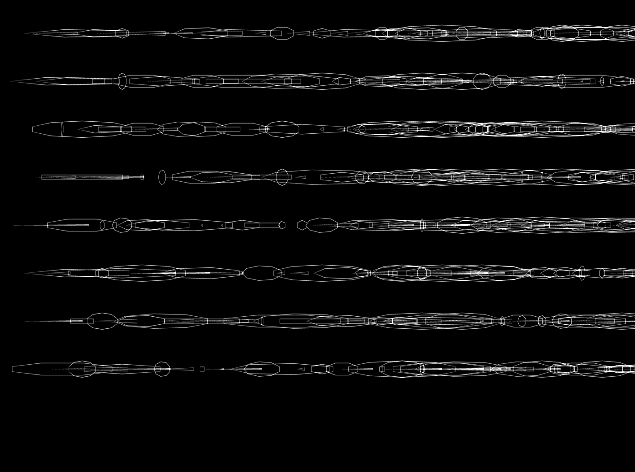
          I mean that in the Old patch, adjusting Horizontal Offset and Feedback Intensity would generate a trail of the Shapes, such as below.
          ![](http://www.eventualidades.net/wp-content/uploads/2016/09/02_2.png)
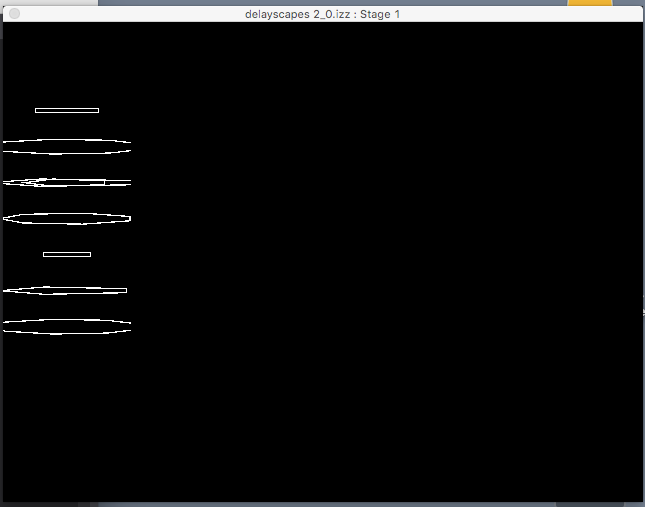
          On the new patch, the Shapes remain as originally output, even when I change Horizontal Offset and Feedback Amount (as well as any other parameters, actually)
          ![](http://www.eventualidades.net/wp-content/uploads/2016/09/delayscapes_2_0.png)

          http://eventualidades.net

          1 Reply Last reply Reply Quote 0
          • marcusbastos
            marcusbastos last edited by

            Dus,

            I already solved the problem here: if I paste the actor from the old patch to the new it does not work. If I insert a new Stage Background instead of pasting the old one, it DOES work. Not sure why. Would be curious to understand it, even if the problem is solved.
            best
            Marcus

            http://eventualidades.net

            1 Reply Last reply Reply Quote 0
            • DusX
              DusX Izzy Guru last edited by

              @mark

              Can you give any insight why pasting a 'Stage Background' actor from an old patch would behave differently?


              πŸŽ›οΈ TroikaTronix Professional Services
              https://troikatronix.com/professional-services

              🎫 Support Tickets
              https://support.troikatronix.com/support/tickets/new

              πŸ’» Add-ons
              https://troikatronix.com/add-ons/?u=dusx

              πŸ§ͺ GitHub Projects
              https://github.com/rwebber

              πŸ–₯️ Win11 | i7 | RTX 4070 | 32GB RAM | Ontario, Canada

              1 Reply Last reply Reply Quote 0
              • First post
                Last post