• Products
    • Isadora
    • Get It
    • ADD-ONS
    • IzzyCast
    • Get It
  • Forum
  • Help
  • Werkstatt
  • Newsletter
  • Impressum
  • Dsgvo
  • Press
  • Isadora
  • Get It
  • ADD-ONS
  • IzzyCast
  • Get It
  • Press
  • Dsgvo
  • Impressum

Navigation

    • Register
    • Login
    • Search
    • Categories
    • Recent
    • Popular
    • Tags

    Changing movie in movie player

    How To... ?
    3
    14
    3837
    Loading More Posts
    • Oldest to Newest
    • Newest to Oldest
    • Most Votes
    Reply
    • Reply as topic
    Log in to reply
    This topic has been deleted. Only users with topic management privileges can see it.
    • DusX
      DusX Izzy Guru last edited by

      If you could include a screen capture of your patch design it may help. One movie play should not effect the other.

      🎛️ TroikaTronix Professional Services
      https://troikatronix.com/professional-services

      🎫 Support Tickets
      https://support.troikatronix.com/support/tickets/new

      💻 Add-ons
      https://troikatronix.com/add-ons/?u=dusx

      🧪 GitHub Projects
      https://github.com/rwebber

      🖥️ Win11 | i7 | RTX 4070 | 32GB RAM | Ontario, Canada

      1 Reply Last reply Reply Quote 0
      • N
        niknaim last edited by

        Hey Ryan,
        i extracted the main part of my patch.I just dont get into it, sometimes there is this video-pause, sometimes not.
        So finally I used the preload-actor to preoad the file that will be send to the input of the the changing movieplayer (upper movieplayer in the screenshot). Now the preloading itself causes the videopause always of the shown movie. So it seems alse the preloading of a movie effetcs the the running one ever time.
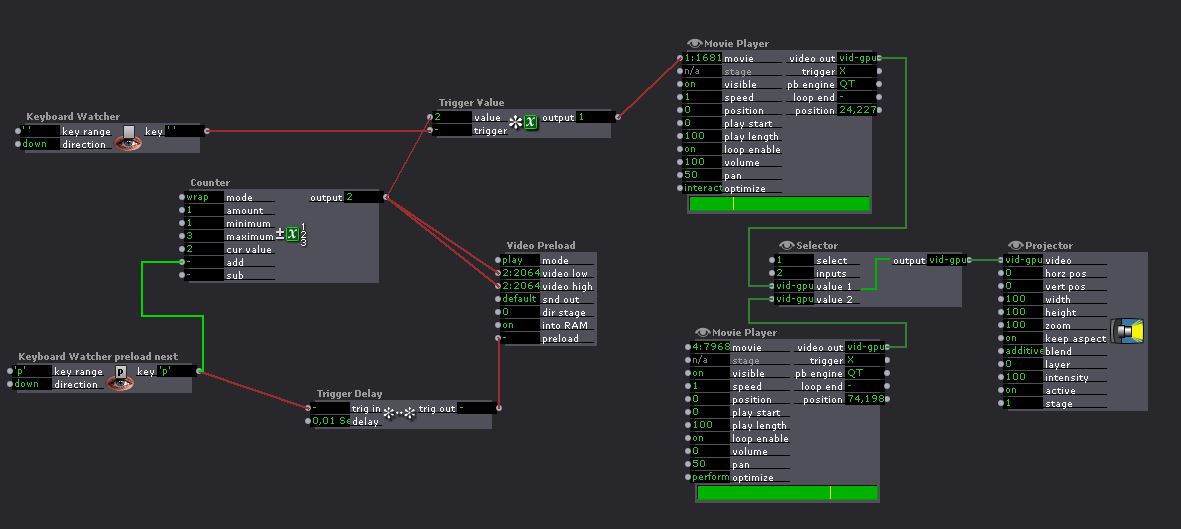
        96cc08-change-movie.jpg

        Win 8 64, i7, 8gb, nVidia GT 640M

        1 Reply Last reply Reply Quote 0
        • DusX
          DusX Izzy Guru last edited by

          Are your videos loading from the same drive?
          Is the drive HDD or SSD?

          It maybe that the data transfer capabilities of the drive is being maxed.
          All the codec types you list are large file formats (h264 / wmv is much smaller)
          That would explain the pause being caused by the preloader.
          What resolution are the videos?

          🎛️ TroikaTronix Professional Services
          https://troikatronix.com/professional-services

          🎫 Support Tickets
          https://support.troikatronix.com/support/tickets/new

          💻 Add-ons
          https://troikatronix.com/add-ons/?u=dusx

          🧪 GitHub Projects
          https://github.com/rwebber

          🖥️ Win11 | i7 | RTX 4070 | 32GB RAM | Ontario, Canada

          1 Reply Last reply Reply Quote 0
          • N
            niknaim last edited by

            Yes, all files are played from my SSD-Drive. Its the only drive I have in my notebook. My resolution is 1280x720. I tryed H264, but it there is the same problem. You notice when there is a video loaded in the background. And sometimes it even causes crashes.

            Win 8 64, i7, 8gb, nVidia GT 640M

            1 Reply Last reply Reply Quote 0
            • N
              niknaim last edited by

              but i also notice that using H264 semms to be more stable  when working with my original patch described in my first post. I will do further tests, so mybe I will not need any proloading of the videofile then.

              Win 8 64, i7, 8gb, nVidia GT 640M

              1 Reply Last reply Reply Quote 0
              • dbini
                dbini last edited by

                @niknaim - have you tried using a Video Mixer actor instead of the Selector? you could Trigger Values of 0 and 100 to switch between video streams.

                John Collingswood
                taikabox.com
                2021 M1PRO 32GB OSX 26.3.1 & 2019 MBPT 2.6GHZ i7 OSX15.7.4 16GB
                plus an old iMac and assorted Mac Minis for installations

                1 Reply Last reply Reply Quote 0
                • N
                  niknaim last edited by

                  @dbini
                  the switching between the two movieplayers is/was? not the problem, its the changing the input movie of one of the players in the background.

                  Win 8 64, i7, 8gb, nVidia GT 640M

                  1 Reply Last reply Reply Quote 0
                  • dbini
                    dbini last edited by

                    I recreated the patch on a Mac machine - no problems with changing Mov numbers on background players. sounds like a Windows bug??

                    John Collingswood
                    taikabox.com
                    2021 M1PRO 32GB OSX 26.3.1 & 2019 MBPT 2.6GHZ i7 OSX15.7.4 16GB
                    plus an old iMac and assorted Mac Minis for installations

                    1 Reply Last reply Reply Quote 0
                    • N
                      niknaim last edited by

                      hard to say. Sometimes it happens, sometimes it works fine.

                      Win 8 64, i7, 8gb, nVidia GT 640M

                      1 Reply Last reply Reply Quote 0
                      • DusX
                        DusX Izzy Guru last edited by

                        If you create support request / bug report, we can try to reproduce the issue on my test machine.

                        I would need your video files shared (dropbox or similar)

                        🎛️ TroikaTronix Professional Services
                        https://troikatronix.com/professional-services

                        🎫 Support Tickets
                        https://support.troikatronix.com/support/tickets/new

                        💻 Add-ons
                        https://troikatronix.com/add-ons/?u=dusx

                        🧪 GitHub Projects
                        https://github.com/rwebber

                        🖥️ Win11 | i7 | RTX 4070 | 32GB RAM | Ontario, Canada

                        1 Reply Last reply Reply Quote 0
                        • N
                          niknaim last edited by

                          I will prepare the main extract of my patch and the fileupload and then do the request. But first I will do some more tests.

                          Win 8 64, i7, 8gb, nVidia GT 640M

                          1 Reply Last reply Reply Quote 0
                          • N
                            niknaim last edited by

                            still fighting with that issue. I jusr filed a bug report. Where to shall I send the files?

                            Win 8 64, i7, 8gb, nVidia GT 640M

                            1 Reply Last reply Reply Quote 0
                            • DusX
                              DusX Izzy Guru last edited by

                              Please wait for a reply from the bug report. Thanks

                              🎛️ TroikaTronix Professional Services
                              https://troikatronix.com/professional-services

                              🎫 Support Tickets
                              https://support.troikatronix.com/support/tickets/new

                              💻 Add-ons
                              https://troikatronix.com/add-ons/?u=dusx

                              🧪 GitHub Projects
                              https://github.com/rwebber

                              🖥️ Win11 | i7 | RTX 4070 | 32GB RAM | Ontario, Canada

                              1 Reply Last reply Reply Quote 0
                              • First post
                                Last post
