• Products
    • Isadora
    • Get It
    • ADD-ONS
    • IzzyCast
    • Get It
  • Forum
  • Help
  • Werkstatt
  • Newsletter
  • Impressum
  • Dsgvo
  • Press
  • Isadora
  • Get It
  • ADD-ONS
  • IzzyCast
  • Get It
  • Press
  • Dsgvo
  • Impressum

Navigation

    • Register
    • Login
    • Search
    • Categories
    • Recent
    • Popular
    • Tags

    Multiple shapes

    How To... ?
    3
    3
    1635
    Loading More Posts
    • Oldest to Newest
    • Newest to Oldest
    • Most Votes
    Reply
    • Reply as topic
    Log in to reply
    This topic has been deleted. Only users with topic management privileges can see it.
    • N
      nesPes last edited by

      Hello all,

      I am new to Isadora and was wondering if I could get some help from you for something I need to do...  Is it possible to have the shape actor producing not just a single shape but many of them? I also need to animate their positions (x, y and z). This is not like the particle actor (which is constantly emiting particles) I need specific numbers that will come from a sensor and they need to be always visible, almost as if the edges of the screen were the boundaries until which the particles can go...

      Thank you and I hope you can help X

      dbini 1 Reply Last reply Reply Quote 0
      • dbini
        dbini @nesPes last edited by

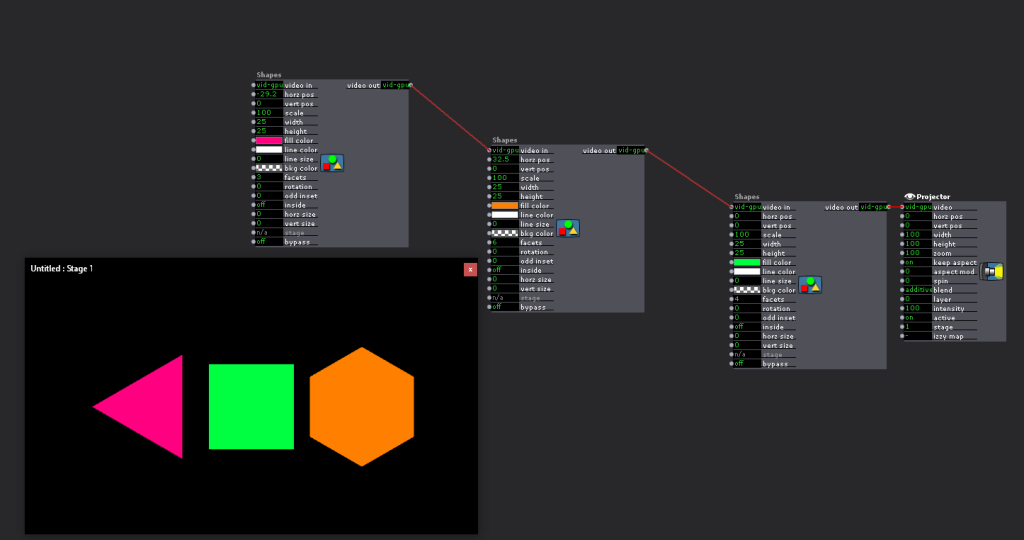
        @nespes - the Shapes actor only creates one shape, but its easy to string a number of Shapes actors together, just daisychain the video out of one to the video in of the next one.

        to make sure your shapes stay within a boundary, you should set the MIN and MAX of your horizontal and vertical position inputs. the default is -50 to 50, which should be OK for most applications, but might need tweaking. Shapes doesn't have a z input, but you can approximate this by changing the scale. again, you will need to set MIN and MAX to suitable values.

        John Collingswood
        taikabox.com
        2021 M1PRO 32GB OSX 26.3.1 & 2019 MBPT 2.6GHZ i7 OSX15.7.4 16GB
        plus an old iMac and assorted Mac Minis for installations

        1 Reply Last reply Reply Quote 2
        • Skulpture
          Skulpture Izzy Guru last edited by

          Not sure if this helps?

          Graham Thorne | www.grahamthorne.co.uk
          RIG 1: Custom-built PC: Windows 11. Ryzen 7 7700X, RTX3080, 32G DDR5 RAM. 2 x m.2.
          RIG 2: Laptop MSI Vector 16 HX AI: Windows 11, Intel Ultra 9. RTX5070ti, 32G RAM (DDR5 6000htz), NVME M.2 SSD.
          RIG 3: Apple Laptop: rMBP i7, 8gig RAM 256 SSD, HD, OS X 10.12.12

          1 Reply Last reply Reply Quote 0
          • First post
            Last post