• Products
    • Isadora
    • Get It
    • ADD-ONS
    • IzzyCast
    • Get It
  • Forum
  • Help
  • Werkstatt
  • Newsletter
  • Impressum
  • Dsgvo
  • Press
  • Isadora
  • Get It
  • ADD-ONS
  • IzzyCast
  • Get It
  • Press
  • Dsgvo
  • Impressum

Navigation

    • Register
    • Login
    • Search
    • Categories
    • Recent
    • Popular
    • Tags

    Map Projector to Internal projector through the External projector using HDMI

    How To... ?
    4
    5
    1532
    Loading More Posts
    • Oldest to Newest
    • Newest to Oldest
    • Most Votes
    Reply
    • Reply as topic
    Log in to reply
    This topic has been deleted. Only users with topic management privileges can see it.
    • M
      Mac last edited by

      Having trouble connecting to a external projector using HDMI

      1 Reply Last reply Reply Quote 0
      • Juriaan
        Juriaan Tech Staff last edited by

        Hi there,


        We need a lot more info then that to help you out. What version of isadora are you using, what kind of operating system are you using ? A screenshot of your patch would help !

        Isadora 4.x, Windows 11 Dell XPS 17 5010 or my MacBook Pro M3 Max (Tahoe)
        Interactive Performance Designer, Freelance Artist, Scenographer, Lighting Designer, TroikaTronix Community moderator
        Always in for chatting about interaction in space / performance design. Drop me an email at hello@juriaan.me

        M 1 Reply Last reply Reply Quote 1
        • DusX
          DusX Izzy Guru last edited by DusX

          does your computer see the connected projector as a system display?

          🎛️ TroikaTronix Professional Services
          https://troikatronix.com/professional-services

          🎫 Support Tickets
          https://support.troikatronix.com/support/tickets/new

          💻 Add-ons
          https://troikatronix.com/add-ons/?u=dusx

          🧪 GitHub Projects
          https://github.com/rwebber

          🖥️ Win11 | i7 | RTX 4070 | 32GB RAM | Ontario, Canada

          1 Reply Last reply Reply Quote 1
          • M
            Mac @Juriaan last edited by

            @juriaan I believe it would not connect to a projector because I was trying to send HDMI into an older analog projector.

            I have that problem solved by registering my copy of 2.6 and using a VGA extender in stead of a HDMI extender.  I see it through the projector but now I have another issue. This time I'm on a mac book pro, older model. The projection shows the desktop on the outer edges of the frame.  How can I get this software to fully project the image without parts of the desktop showing?

            bonemap 1 Reply Last reply Reply Quote 0
            • bonemap
              bonemap Izzy Guru @Mac last edited by bonemap

              @mac said:

              The projection shows the desktop on the outer edges of the frame.  How can I get this software to fully project the image without parts of the desktop showing?

               hi @mac,

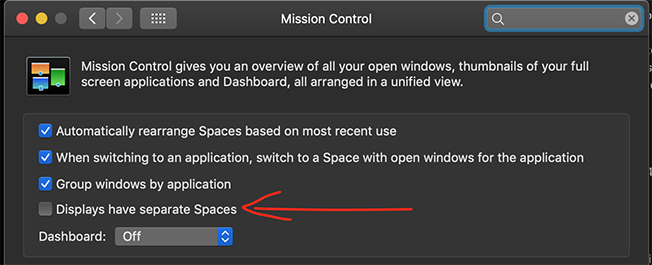
              I think you need to disable 'Displays have separate spaces' in your Mac OS System Preferences - look for Mission Control.
              Best Wishes

              bonemap

              http://bonemap.com | Australia
              Izzy STD 4.1.3 | USB 4.1.3 | + Beta
              MBP 14” 2022 M2 16GB | 26.1 Tahoe
              Mac Studio 2023 M2 Ultra 128GB | 26.1 Tahoe
              Mac Mini 2025 M4 Pro 64GB | 26.1 Tahoe
              MBP 16” 2026 M5 Max 128GB | 26.5 Tahoe

              A range of deployable older Macs

              1 Reply Last reply Reply Quote 1
              • First post
                Last post