• Products
    • Isadora
    • Get It
    • ADD-ONS
    • IzzyCast
    • Get It
  • Forum
  • Help
  • Werkstatt
  • Newsletter
  • Impressum
  • Dsgvo
  • Press
  • Isadora
  • Get It
  • ADD-ONS
  • IzzyCast
  • Get It
  • Press
  • Dsgvo
  • Impressum

Navigation

    • Register
    • Login
    • Search
    • Categories
    • Recent
    • Popular
    • Tags

    [ANSWERED] Activating/Deactivating a Madmapper quad from Isadora via OSC

    How To... ?
    2
    3
    670
    Loading More Posts
    • Oldest to Newest
    • Newest to Oldest
    • Most Votes
    Reply
    • Reply as topic
    Log in to reply
    This topic has been deleted. Only users with topic management privileges can see it.
    • eight
      eight last edited by Woland

      I am able to change the opacity of a given quad in Madmapper sending an OSC command from Isadora to the quad's opacity parameter address (/surfaces/Quad-3/opacity).

      However, the venue technicians prefer a more crude way to activate/deactivate entire quad from Isadora. In other words they would like to tick off/on the checkbox in the picture:
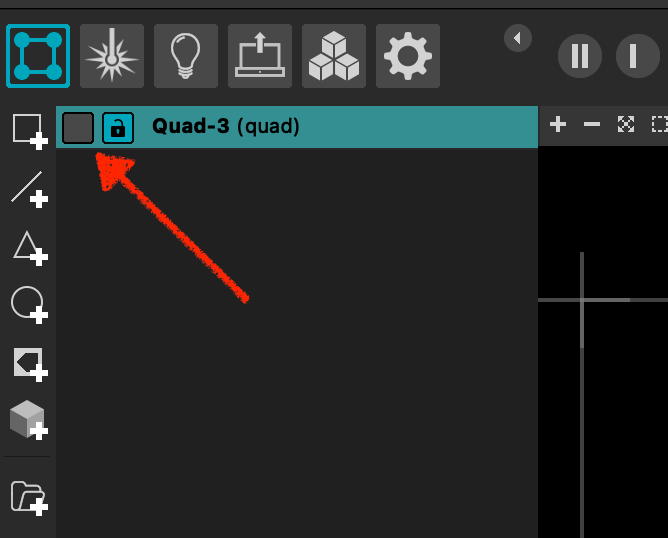
      The problem with this approach is that in order for a given MadMapper parameter to be controlled by OSC signal, one has to attach an "Osc Control" to it in MadMapper. In the case of quad's opacity one right-clicks on a opacity slider and selects "Add OSC control" option from the popup.

      Has anybody achieved this in the case activation/deactivation?

      Thanks.

      P.S. What would be even better is to fade from one Scene to another Scene in Madmapper, using OSC.

      MulchCam: https://mulchcam.web.app |
      Augmented Theatre: https://augmented-theatre.web.app |
      What About Phase? https://whataboutphase.web.app |
      nowucme https://nowucme.web.app |
      O Horatio https://horatio.web.app |

      J 1 Reply Last reply Reply Quote 0
      • J
        jandraka @eight last edited by

        @eight

        Hi,

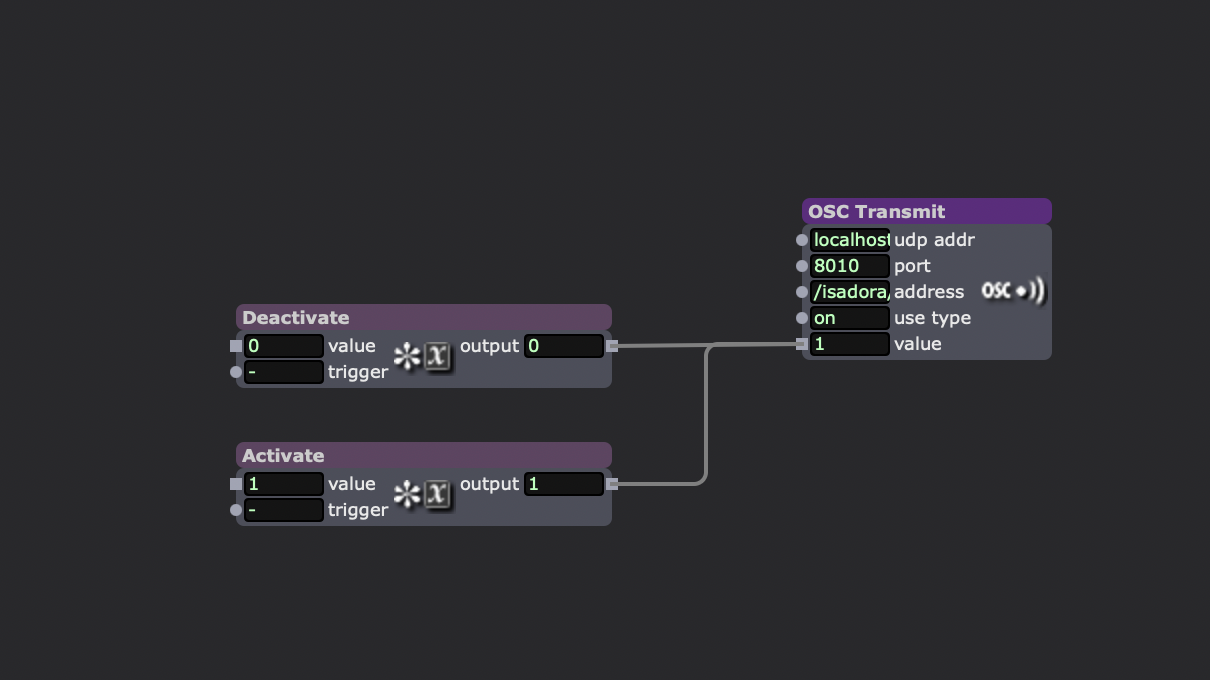
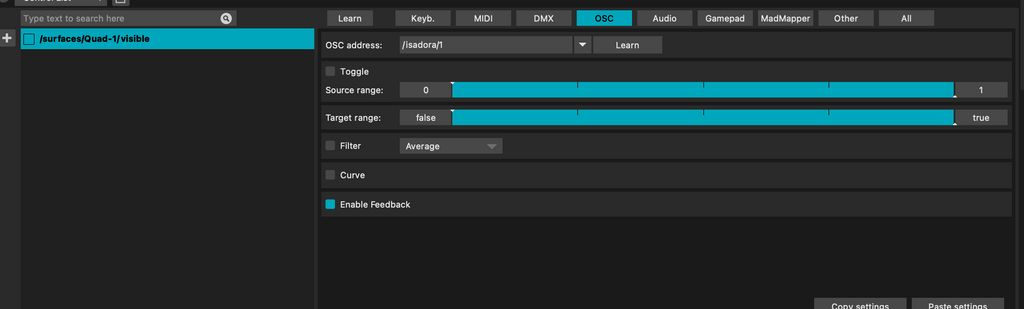
        It's the same process: right-click on the checkbox, select "Add Control," choose "OSC," then "Learn," and send the OSC message from Isadora. Sending 0 or 1 will activate or deactivate the quad.
        Best regards

        Javi

        MBP M2 Max 32 GB. MacOS 13.7.3 Isadora 3.2.6 - 4.0.7

        1 Reply Last reply Reply Quote 2
        • eight
          eight last edited by

          That works perfectly!

          I guess I was clicking on the quad instead of its checkbox, trying to add an OSC control.

          Thanks, @jandraka

          MulchCam: https://mulchcam.web.app |
          Augmented Theatre: https://augmented-theatre.web.app |
          What About Phase? https://whataboutphase.web.app |
          nowucme https://nowucme.web.app |
          O Horatio https://horatio.web.app |

          1 Reply Last reply Reply Quote 0
          • First post
            Last post