• Products
    • Isadora
    • Get It
    • ADD-ONS
    • IzzyCast
    • Get It
  • Forum
  • Help
  • Werkstatt
  • Newsletter
  • Impressum
  • Dsgvo
  • Press
  • Isadora
  • Get It
  • ADD-ONS
  • IzzyCast
  • Get It
  • Press
  • Dsgvo
  • Impressum

Navigation

    • Register
    • Login
    • Search
    • Categories
    • Recent
    • Popular
    • Tags

    How lo lower my load easily? Urgent!

    Troubleshooting and Bug Reports
    5
    11
    257
    Loading More Posts
    • Oldest to Newest
    • Newest to Oldest
    • Most Votes
    Reply
    • Reply as topic
    Log in to reply
    This topic has been deleted. Only users with topic management privileges can see it.
    • dbini
      dbini @Eva last edited by

      @eva

      check that you are using the same resolution throughout your patch. hover your mouse over vid gpu patchlines to see a preview of the signal. check that everything matches, and if there's any differences, you can try using a Scaler straight after the Movie Player that's playing the wrong resolution.

      John Collingswood
      taikabox.com
      2019 MBPT 2.6GHZ i7 OSX15.3.2 16GB
      plus an old iMac and assorted Mac Minis for installations

      1 Reply Last reply Reply Quote 0
      • DusX
        DusX Tech Staff @Eva last edited by

        @eva said:

        I need to very soon be able to export my work into a video

         One option that can help, is to use a 3rd party screen recorder (I sometimes use OBS studio) to capture and record a stage output. This allows Isadora to focus on rending the output, and provides a completely separate process (and very optimized) for recording. I have found this useful when I am pushing the LOAD on Isadora to the max.
        Another trick I use is the add User Actor On/Off to all my user actors, and disable them when not in use, this can lower CPU processing a lot depending on your patches logic.

        Troikatronix Technical Support

        • New Support Ticket Link: https://support.troikatronix.com/support/tickets/new
        • My Add-ons: https://troikatronix.com/add-ons/?u=dusx
        • Profession Services: https://support.troikatronix.com/support/solutions/articles/13000109444-professional-services

        Running: Win 11 64bit, i7, M.2 PCIe SSD's, 32gb DDR4, nVidia GTX 4070 | located in Ontario Canada.

        1 Reply Last reply Reply Quote 1
        • Woland
          Woland Tech Staff @Eva last edited by

          @eva

          It's really not possible to give you a quick fix, useful suggestions, or diagnose the problem without actually seeing the patch. 

          TroikaTronix Technical Support
          New Support Ticket: https://support.troikatronix.com/support/tickets/new
          Support Policy: https://support.troikatronix.com/support/solutions/articles/13000064762
          Add-Ons: https://troikatronix.com/add-ons/ & https://troikatronix.com/add-ons/?u=woland
          Professional Services: https://support.troikatronix.com/support/solutions/articles/13000109444

          | Isadora Version: all of them | Mac Pro (Late 2013), macOS 10.14.6, 3.5GHz 6-core, 1TB SSD, 64GB RAM, Dual AMD FirePro D700s |

          1 Reply Last reply Reply Quote 0
          • E
            Eva last edited by

            Hello,

            Thank you very much so far. 
            I so far cut the scene in 3, that helped then I need to merge them afterwards. @woland: I have added my patch I have put the first scene as the on that is over loaded, the next three are the ones cut into three and then edited further. Here is the file: the patch:)

            Thank you for helping.

            All the best 
            Eva

            Eva Esmann Behrens
            Labtop: Macbook pro (Retina) 2015, 2,7 GHz,8 GB, MacOS Mojave
            Mac Studio

            Woland 1 Reply Last reply Reply Quote 0
            • E
              Eva last edited by

              PS: About the video size, so some videos are higher resolution than HD some are in Full HD - the final product should at least be HD, so when I use videos or images that I zoom in I suppose they should be higher resolution in the input right??? How do I manage that then?

              Thank you ;)

              Eva Esmann Behrens
              Labtop: Macbook pro (Retina) 2015, 2,7 GHz,8 GB, MacOS Mojave
              Mac Studio

              E 1 Reply Last reply Reply Quote 0
              • Woland
                Woland Tech Staff @Eva last edited by

                @eva

                The file doesn't seem to have attached properly. Could you try again?

                TroikaTronix Technical Support
                New Support Ticket: https://support.troikatronix.com/support/tickets/new
                Support Policy: https://support.troikatronix.com/support/solutions/articles/13000064762
                Add-Ons: https://troikatronix.com/add-ons/ & https://troikatronix.com/add-ons/?u=woland
                Professional Services: https://support.troikatronix.com/support/solutions/articles/13000109444

                | Isadora Version: all of them | Mac Pro (Late 2013), macOS 10.14.6, 3.5GHz 6-core, 1TB SSD, 64GB RAM, Dual AMD FirePro D700s |

                1 Reply Last reply Reply Quote 0
                • E
                  Eva @Eva last edited by

                  @eva

                  @woland ok, now I try again, with another one, its also really loaded it seems but I am actually surprised.
                  I have put the scene in Q1This is the file: Esther

                  All the best

                  Eva

                  Eva Esmann Behrens
                  Labtop: Macbook pro (Retina) 2015, 2,7 GHz,8 GB, MacOS Mojave
                  Mac Studio

                  Woland 1 Reply Last reply Reply Quote 0
                  • Woland
                    Woland Tech Staff @Eva last edited by

                    @eva

                    My bet is that it has to do with the Video Delay actors you have after your two 4k videos that have the 'frames' inputs set to '21' and '30' respectively.

                    In the righthand side of this screenshot is some relevant info from the help text of the Video Delay actor's 'frames' input:
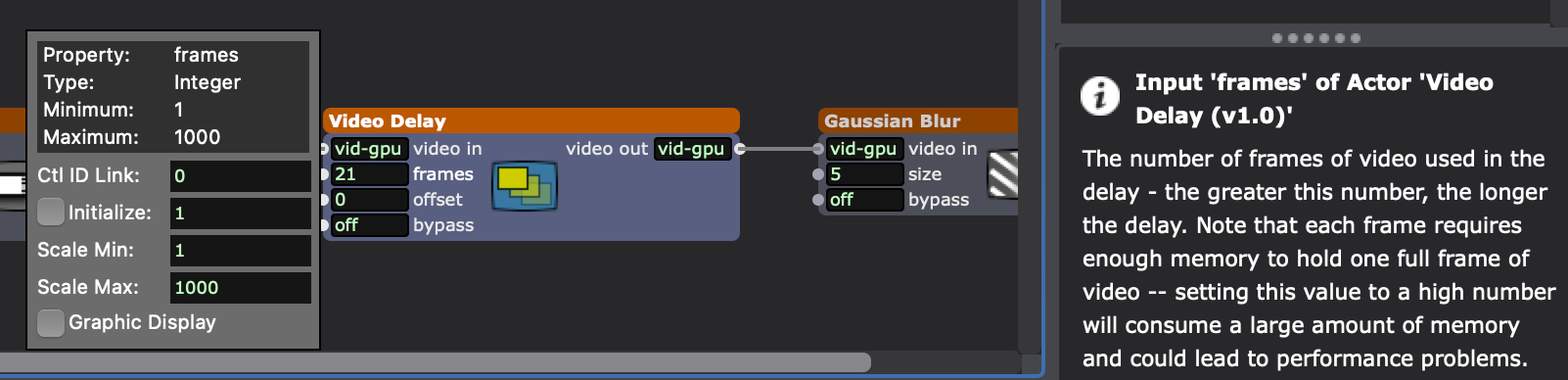
                    Try deleting the Video Delay actors and see if the LOAD drops.

                    Also what computer are you running this on?

                    TroikaTronix Technical Support
                    New Support Ticket: https://support.troikatronix.com/support/tickets/new
                    Support Policy: https://support.troikatronix.com/support/solutions/articles/13000064762
                    Add-Ons: https://troikatronix.com/add-ons/ & https://troikatronix.com/add-ons/?u=woland
                    Professional Services: https://support.troikatronix.com/support/solutions/articles/13000109444

                    | Isadora Version: all of them | Mac Pro (Late 2013), macOS 10.14.6, 3.5GHz 6-core, 1TB SSD, 64GB RAM, Dual AMD FirePro D700s |

                    Skulpture DusX 2 Replies Last reply Reply Quote 0
                    • Skulpture
                      Skulpture Izzy Guru @Woland last edited by Skulpture

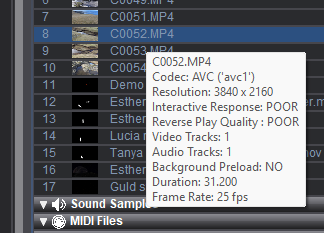
                      I can see lots of mixed-resolution video in your media bin. 

                      Some are 4k, and some are not. Some are 30fps, and some seem 25fps, so Isadoara will be working mega hard to process those Videos. 

                      I would suggest making them all the same resolution (if possible) and converting them all to a more usable format such as HAP.
                      Graham Thorne | www.grahamthorne.co.uk
                      RIG 1: Custom-built PC: Windows 11. Ryzen 7 7700X, RTX3080, 32G DDR5 RAM. 2 x m.2.
                      RIG 2: Laptop Dell G15: Windows 11, Intel i9 12th Gen. RTX3070ti, 16G RAM (DDR5), 2 x NVME M.2 SSD.
                      RIG 3: Apple Laptop: rMBP i7, 8gig RAM 256 SSD, HD, OS X 10.12.12

                      1 Reply Last reply Reply Quote 0
                      • DusX
                        DusX Tech Staff @Woland last edited by

                        @woland said:

                        Video Delay actors

                         Video Delay eats up video memory, and at 4k it will be bad. This is an actor I am VERY careful with when using it because it  always introduces load. Just watch your framerates. Reduce the video delay usage, until you have a good framerate, that will be the max you can use.

                        Troikatronix Technical Support

                        • New Support Ticket Link: https://support.troikatronix.com/support/tickets/new
                        • My Add-ons: https://troikatronix.com/add-ons/?u=dusx
                        • Profession Services: https://support.troikatronix.com/support/solutions/articles/13000109444-professional-services

                        Running: Win 11 64bit, i7, M.2 PCIe SSD's, 32gb DDR4, nVidia GTX 4070 | located in Ontario Canada.

                        1 Reply Last reply Reply Quote 0
                        • First post
                          Last post