cube LUT colorgrading
-
I just posted an update to my DX – Cube2LUT – ColorGrading user actors (demo file).
It now includes a user actor that allows you to CREATE a 64^ CUBE LUT via 8 color inputs.
These basically allow you to remap colors within the grade to a new range
Please give it a try (requires a Pythoner virtual environment is setup, and numpy and cv2 are installed)
I see this has had a few hundred downloads, but I haven't received any feedback. I'm happy to continue to make updates to these tools if they are proving useful to you. -
Hello.
I am trying this patch, but can't get past the file browse step.I have the Python environment is set up and active.. But I cannot load a cube file. My browser lets me select a file, but the actor says, "No file selected." And once, and I cannot tell exactly how and why, I had an ASCII error as follows: Error: 'ascii' codec can't decode byte 0xe2 in position 197: ordinal not in range(128).
I tried a multitude of LUT files, all with the .cube extension, but no success.
What am I missing out?
Any help would be appreciated :)
MacBook Pro 16" 2021, M1 Max, 32 GB / Isadora 4.5
@karlakr8 ---> Karla Kracht | www.karlakracht.com |
MacBook Pro M1 Max, 32 GB, OS X 15.7.9 | located between Barcelona, Spain and Taiwan. -
The file has a number of User Actors, from your description I am not sure which one is the root of the failure.
DX - PY - Browse for File (win+mac) :- does this user actor allow you to select a file on your hardrive?
- does the filepath get inserted to the next user actors 'cube_path' input?
DX - PY - Load .Cube for Color Grading :
- does the 'status' output change if you click the 'load' input trigger
- if you open this user actor to look inside, do you see a red Hazard symbol on the Pythoner actor?
- is the status output = "status: ❌ LUT file not found"
I suspect you will see the red hazard on the pythoner actor once you look inside the "status: ❌ LUT file not found" actor.
Like this: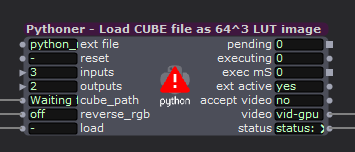
If you do, then the Python environment is not setup correctly. Scene one requires Numpy be installed, and scene 2 requires Numpy and OpenCV.
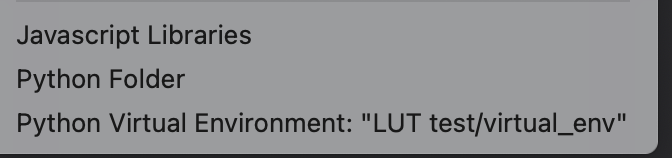
If you go to Help/Open Plugin folder in the menu, and read the last line on that menu you should see 'Python Virtual Environment' ...
What does the rest of that line say?
note: The asci error might have been due to unexpected characters in a file name/path.🎛️ TroikaTronix Professional Services
https://troikatronix.com/professional-services🎫 Support Tickets
https://support.troikatronix.com/support/tickets/new💻 Add-ons
https://troikatronix.com/add-ons/?u=dusx🧪 GitHub Projects
https://github.com/rwebber🖥️ Win11 | i7 | RTX 4070 | 32GB RAM | Ontario, Canada
-
Hi, thanks for the quick answer
DX - PY - Browse for File (win+mac) :
- it offers me to select a file from my hard drive
- when I select a .cube file from my hard drive, it doesn’t display a file path, but “file not selected,”.
DX - PY - Load .Cube for Color Grading :
- Status doesn’t change. It says “LUT file not found”

There is no red hazard on the Python actor.

Help/Open Plugin: It points to the virtual environment i. my project folder that I set up for this project. (LUT test….)
@karlakr8 ---> Karla Kracht | www.karlakracht.com |
MacBook Pro M1 Max, 32 GB, OS X 15.7.9 | located between Barcelona, Spain and Taiwan. -
@karlakr8 said:
when I select a .cube file from my hard drive, it doesn’t display a file path, but “file not selected,”.
OK, the file selector actor isn't working on your system.
I will have to move my project over to my mac and do some testing to fix this.
What macOS version are you running?You will need to disconnect it from the load Cube for Color Grading actor, and provide the full file path for the cube file for the 'cube_path' input, including the file extension.
🎛️ TroikaTronix Professional Services
https://troikatronix.com/professional-services🎫 Support Tickets
https://support.troikatronix.com/support/tickets/new💻 Add-ons
https://troikatronix.com/add-ons/?u=dusx🧪 GitHub Projects
https://github.com/rwebber🖥️ Win11 | i7 | RTX 4070 | 32GB RAM | Ontario, Canada
-
@dusx said:
What macOS version are you running?
I'm on Sequoia 15.7.9
Wonderful, without the file selector it works perfectly. Thank you!@karlakr8 ---> Karla Kracht | www.karlakracht.com |
MacBook Pro M1 Max, 32 GB, OS X 15.7.9 | located between Barcelona, Spain and Taiwan. -
@karlakr8 said:
Sequoia 15.7.9
Thanks. I'll see if I can fix this for macOS this week.
Is the Load Cube actor with the python working for you once you enter a filepath?🎛️ TroikaTronix Professional Services
https://troikatronix.com/professional-services🎫 Support Tickets
https://support.troikatronix.com/support/tickets/new💻 Add-ons
https://troikatronix.com/add-ons/?u=dusx🧪 GitHub Projects
https://github.com/rwebber🖥️ Win11 | i7 | RTX 4070 | 32GB RAM | Ontario, Canada
-
Yes, simply putting the file path and deactivating the "DX - PY - Browse for File", everything works fine :)
Thank you