• Products
    • Isadora
    • Get It
    • ADD-ONS
    • IzzyCast
    • Get It
  • Forum
  • Help
  • Werkstatt
  • Newsletter
  • Impressum
  • Dsgvo
  • Press
  • Isadora
  • Get It
  • ADD-ONS
  • IzzyCast
  • Get It
  • Press
  • Dsgvo
  • Impressum

Navigation

    • Register
    • Login
    • Search
    • Categories
    • Recent
    • Popular
    • Tags

    about .iua file

    How To... ?
    4
    7
    2805
    Loading More Posts
    • Oldest to Newest
    • Newest to Oldest
    • Most Votes
    Reply
    • Reply as topic
    Log in to reply
    This topic has been deleted. Only users with topic management privileges can see it.
    • P
      ppp586 last edited by

      Hi all,  how to use some .iua file?   

      Running in : Razer Laptop, GeForce RTX2060,6GB VRAM, 9th Gen intel Core i7-9750H 6 Cores,16G RAM, Windows 10 Home-1903Version || Kinect Xbox One-- Model 1520 || Isadora 3.07 USB key

      1 Reply Last reply Reply Quote 0
      • Juriaan
        Juriaan Tech Staff last edited by

        Hi there,

        A .iua file is an Isadora User Actor (iua) to open this file do one of the following :

        Drag and drop

        1. Open a new Isadora document, drag the file and drop it inside the Isadora window.

        or

        1. Open a new Isadora document
        2. Go to Actors in the Top bar > Place User Actor / Macro

        Isadora 4.x, Windows 11 Dell XPS 17 5010 or my MacBook Pro M3 Max (Tahoe)
        Interactive Performance Designer, Freelance Artist, Scenographer, Lighting Designer, TroikaTronix Community moderator
        Always in for chatting about interaction in space / performance design. Drop me an email at hello@juriaan.me

        P 1 Reply Last reply Reply Quote 0
        • P
          ppp586 @Juriaan last edited by

          @juriaan said:

          Hi there,
          A .iua file is an Isadora User Actor (iua) to open this file do one of the following :
          Drag and drop
          1. Open a new Isadora document, drag the file and drop it inside the Isadora window.
          or
          1. Open a new Isadora document
          2. Go to Actors in the Top bar > Place User Actor / Macro

           Hi Juriaan, Thank you so much!  Happy new year!

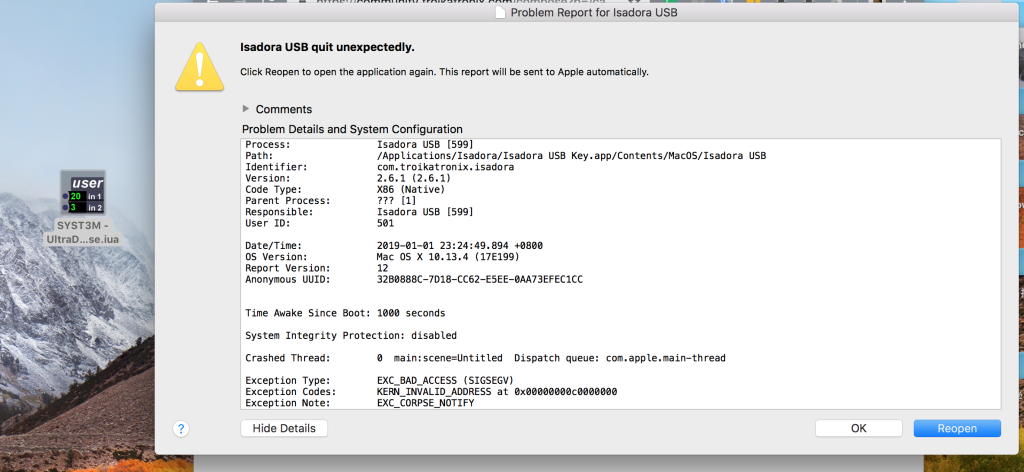
          Maybe this .iua file is not fit to isadora v2.61. this file is maded by DusXproductions.

          when i open it , isadora will  quit unexpectedly. or after i open a new isadora document,  i try to drag and drop, but i don't drop it.

          Running in : Razer Laptop, GeForce RTX2060,6GB VRAM, 9th Gen intel Core i7-9750H 6 Cores,16G RAM, Windows 10 Home-1903Version || Kinect Xbox One-- Model 1520 || Isadora 3.07 USB key

          Michel 1 Reply Last reply Reply Quote 0
          • Juriaan
            Juriaan Tech Staff last edited by

            Hi there,


            If you open a new Isadora Document, Isadora should open a little dialog that tells you that you have errors that you can send to the Isadora staff, please do that :) They will be able to address the issues.
            @DusX mind to give this user a hand regarding your user actor ?

            Isadora 4.x, Windows 11 Dell XPS 17 5010 or my MacBook Pro M3 Max (Tahoe)
            Interactive Performance Designer, Freelance Artist, Scenographer, Lighting Designer, TroikaTronix Community moderator
            Always in for chatting about interaction in space / performance design. Drop me an email at hello@juriaan.me

            1 Reply Last reply Reply Quote 0
            • Michel
              Michel Izzy Guru @ppp586 last edited by

              @ppp586

              Double click to open does not work. On Mac drag and drop does often crash. Please use the way via menu as @Juriaan suggested. 

              Michel Weber | www.filmprojekt.ch | rMBP (2019) i9, 16gig, AMD 5500M 8 GB, OS X 10.15 | located in Winterthur Switzerland.

              P 1 Reply Last reply Reply Quote 0
              • P
                ppp586 @Michel last edited by

                @michel said:

                @ppp586
                Double click to open does not work. On Mac drag and drop does often crash. Please use the way via menu as @Juriaan suggested. 

                 I figure it out via menu as @Juriaan suggested. Thank Michel and Juriaan.

                I fell warm here:)

                Running in : Razer Laptop, GeForce RTX2060,6GB VRAM, 9th Gen intel Core i7-9750H 6 Cores,16G RAM, Windows 10 Home-1903Version || Kinect Xbox One-- Model 1520 || Isadora 3.07 USB key

                1 Reply Last reply Reply Quote 2
                • DusX
                  DusX Izzy Guru last edited by

                  Glad its working for your now.

                  🎛️ TroikaTronix Professional Services
                  https://troikatronix.com/professional-services

                  🎫 Support Tickets
                  https://support.troikatronix.com/support/tickets/new

                  💻 Add-ons
                  https://troikatronix.com/add-ons/?u=dusx

                  🧪 GitHub Projects
                  https://github.com/rwebber

                  🖥️ Win11 | i7 | RTX 4070 | 32GB RAM | Ontario, Canada

                  1 Reply Last reply Reply Quote 0
                  • First post
                    Last post