• Products
    • Isadora
    • Get It
    • ADD-ONS
    • IzzyCast
    • Get It
  • Forum
  • Help
  • Werkstatt
  • Newsletter
  • Impressum
  • Dsgvo
  • Press
  • Isadora
  • Get It
  • ADD-ONS
  • IzzyCast
  • Get It
  • Press
  • Dsgvo
  • Impressum

Navigation

    • Register
    • Login
    • Search
    • Categories
    • Recent
    • Popular
    • Tags

    [ANSWERED] Timecode Question

    How To... ?
    timecode
    2
    6
    2309
    Loading More Posts
    • Oldest to Newest
    • Newest to Oldest
    • Most Votes
    Reply
    • Reply as topic
    Log in to reply
    This topic has been deleted. Only users with topic management privileges can see it.
    • craigw
      craigw last edited by Woland

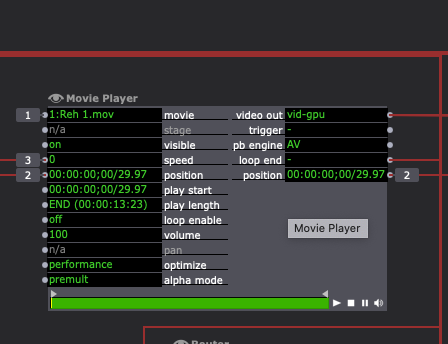
      Hi,working with TC,ย I want to be able to display time back out of a clip.

      The movie player has play start time, play length time and position. I don't know how to get the Play Length to a calc actor to subtract is from the position.
      Mac OS Isadora v4.13 Los Angeles CA

      DusX 1 Reply Last reply Reply Quote 0
      • DusX
        DusX Izzy Guru @craigw last edited by

        @craigw

        OK, I gave this a whirl. Let see if I understood what you wanted correctly.
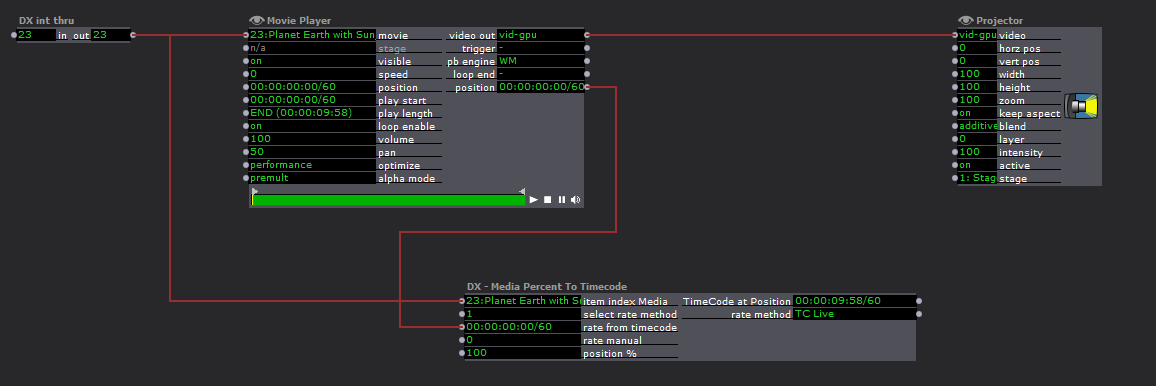
        The above will provide the Timecode for any Percentage position for a defined media item (video only).

        Requires:

        1. Media Index (as listed in media bin)
        2. framerate of media (enter manually, or get it from timecode)
        3. % position you want as timecode. 100% provides the END time.

        Here is the User Actor

        ๐ŸŽ›๏ธ TroikaTronix Professional Services
        https://troikatronix.com/professional-services

        ๐ŸŽซ Support Tickets
        https://support.troikatronix.com/support/tickets/new

        ๐Ÿ’ป Add-ons
        https://troikatronix.com/add-ons/?u=dusx

        ๐Ÿงช GitHub Projects
        https://github.com/rwebber

        ๐Ÿ–ฅ๏ธ Win11 | i7 | RTX 4070 | 32GB RAM | Ontario, Canada

        1 Reply Last reply Reply Quote 0
        • craigw
          craigw last edited by

          I'm using 3.08 Looks like you saved it in a newer version and I can't open it.

          Mac OS Isadora v4.13 Los Angeles CA

          DusX 1 Reply Last reply Reply Quote 0
          • DusX
            DusX Izzy Guru @craigw last edited by

            @craigw

            Damn... you are right, I used the latest beta. Sorry about that.

            I'm in the middle of a few tasks right now, so I don't have time to rebuild it this moment.
            Here is the guts of it.
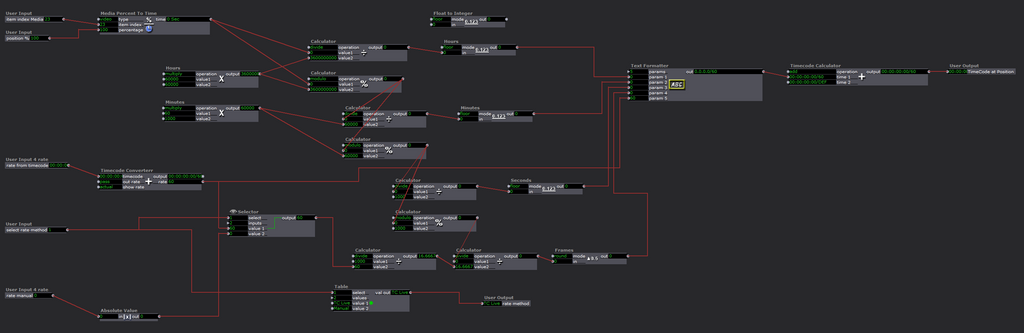
            I will recreate this in 3.0.8 later and post it. I think it may be useful to others.

            ๐ŸŽ›๏ธ TroikaTronix Professional Services
            https://troikatronix.com/professional-services

            ๐ŸŽซ Support Tickets
            https://support.troikatronix.com/support/tickets/new

            ๐Ÿ’ป Add-ons
            https://troikatronix.com/add-ons/?u=dusx

            ๐Ÿงช GitHub Projects
            https://github.com/rwebber

            ๐Ÿ–ฅ๏ธ Win11 | i7 | RTX 4070 | 32GB RAM | Ontario, Canada

            1 Reply Last reply Reply Quote 0
            • craigw
              craigw last edited by

              No Problem, Thanks

              Mac OS Isadora v4.13 Los Angeles CA

              DusX 1 Reply Last reply Reply Quote 0
              • DusX
                DusX Izzy Guru @craigw last edited by

                @craigw

                OK this one should work for you.

                You need to enter the frame rate manually (the other uses a new actor)

                ๐ŸŽ›๏ธ TroikaTronix Professional Services
                https://troikatronix.com/professional-services

                ๐ŸŽซ Support Tickets
                https://support.troikatronix.com/support/tickets/new

                ๐Ÿ’ป Add-ons
                https://troikatronix.com/add-ons/?u=dusx

                ๐Ÿงช GitHub Projects
                https://github.com/rwebber

                ๐Ÿ–ฅ๏ธ Win11 | i7 | RTX 4070 | 32GB RAM | Ontario, Canada

                1 Reply Last reply Reply Quote 1
                • First post
                  Last post
