• Products
    • Isadora
    • Get It
    • ADD-ONS
    • IzzyCast
    • Get It
  • Forum
  • Help
  • Werkstatt
  • Newsletter
  • Impressum
  • Dsgvo
  • Press
  • Isadora
  • Get It
  • ADD-ONS
  • IzzyCast
  • Get It
  • Press
  • Dsgvo
  • Impressum

Navigation

    • Register
    • Login
    • Search
    • Categories
    • Recent
    • Popular
    • Tags

    [ANSWERED] Text Actor inside User Actor?

    How To... ?
    2
    3
    716
    Loading More Posts
    • Oldest to Newest
    • Newest to Oldest
    • Most Votes
    Reply
    • Reply as topic
    Log in to reply
    This topic has been deleted. Only users with topic management privileges can see it.
    • Notdoc
      Notdoc last edited by DusX

      If I place a Text Actor inside a User Actor, is there any way I can input text content from the 'outside' via a User Input?

      At the moment I can't work out a way that avoids having to save a 'new instance' of the User Actor every time I want to change the text.

      Ventura 13.7.2 on Macbook Pro 14-in M1 Max 2022

      DusX 1 Reply Last reply Reply Quote 0
      • DusX
        DusX Izzy Guru @Notdoc last edited by DusX

        @notdoc

        Update: I read now that you are using User Input actors (like below) so, can't you just use Save and Update All to allow you to add this feature to each instance of this user actor?

        Yes you just need to add a User Input actor, and connect it to the text input of the Text Draw actor.
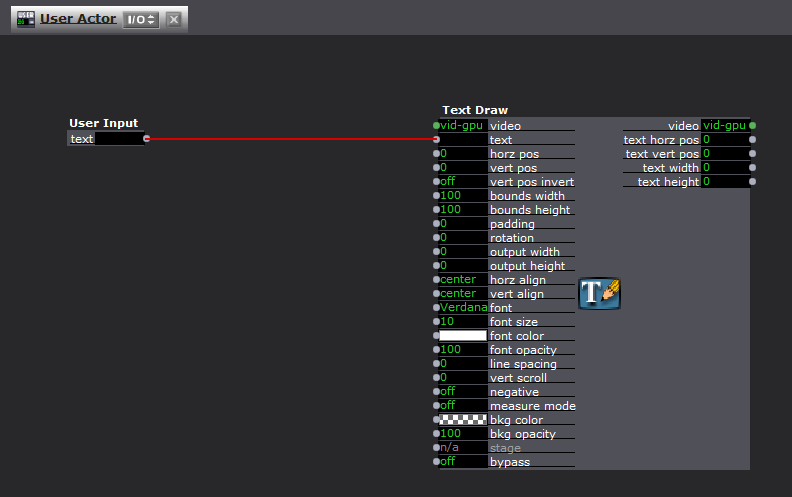

        You can also feed values out of the User Actor using the User Output actor.

        🎛️ TroikaTronix Professional Services
        https://troikatronix.com/professional-services

        🎫 Support Tickets
        https://support.troikatronix.com/support/tickets/new

        💻 Add-ons
        https://troikatronix.com/add-ons/?u=dusx

        🧪 GitHub Projects
        https://github.com/rwebber

        🖥️ Win11 | i7 | RTX 4070 | 32GB RAM | Ontario, Canada

        Notdoc 1 Reply Last reply Reply Quote 1
        • Notdoc
          Notdoc @DusX last edited by

          @dusx

          facepalm. 

          I was so simple but i couldn't see it! thanks

          Ventura 13.7.2 on Macbook Pro 14-in M1 Max 2022

          1 Reply Last reply Reply Quote 0
          • First post
            Last post