• Products
    • Isadora
    • Get It
    • ADD-ONS
    • IzzyCast
    • Get It
  • Forum
  • Help
  • Werkstatt
  • Newsletter
  • Impressum
  • Dsgvo
  • Press
  • Isadora
  • Get It
  • ADD-ONS
  • IzzyCast
  • Get It
  • Press
  • Dsgvo
  • Impressum

Navigation

    • Register
    • Login
    • Search
    • Categories
    • Recent
    • Popular
    • Tags

    Rokoko Studio Beta - Isadora Data Streaming

    Interfacing
    rokoko motion capture motion tracking osc add-ons
    8
    21
    4532
    Loading More Posts
    • Oldest to Newest
    • Newest to Oldest
    • Most Votes
    Reply
    • Reply as topic
    Log in to reply
    This topic has been deleted. Only users with topic management privileges can see it.
    • E
      emullis @mark last edited by

      @mark

      Oh my goodness, I'll be able to sleep tonight. I received a grant to buy two new suits and got very worried that I wouldn't be able to stream to Izzy come August. Thank you so much for working on it, and I hope your partner's project goes great.

      Best,

      E.

      mark 1 Reply Last reply Reply Quote 2
      • mark
        mark @emullis last edited by

        @emullis said:

        I hope your partner's project goes great.

         Well, if it doesn't, I'll be in the dog house. ;-)

        Best Wishes,
        Mark

        Media Artist & Creator of Isadora
        Macintosh SE-30, 32 Mb RAM, MacOS 7.6, Dual Floppy Drives

        D 2 Replies Last reply Reply Quote 0
        • D
          decca @mark last edited by

          @mark Hi. I am new to this but catching up. Watched all the tutes and guru sessions - Tried to use the latest patch between isadora 3 and Rokoko studio but cannot get them to talk. Is there anyway to get the two connected? Des

          Isadora 3.2.6 Windows 10. AMD Ryzen & Quadro p4000. Videographer and Theatre Projections. Australia.

          1 Reply Last reply Reply Quote 0
          • D
            decca @mark last edited by

            @mark further to this...i have downloaded the latest patch for Rokoko from Troikatronixs plugins ins. followed all instryuctions. Both port numbers match and i have 'X' in the received pkt...but no data in the Skeleton Decoder....not sure from here...

            Isadora 3.2.6 Windows 10. AMD Ryzen & Quadro p4000. Videographer and Theatre Projections. Australia.

            Armando 1 Reply Last reply Reply Quote 0
            • Armando
              Armando Beta Gold @decca last edited by

              @decca. Hello,

              what Isadora version you have ? Mac or pc? The is nothing on your signature to understand. I ask you this because it happens to me on the 327 b 20 on a mac un der Ventura if I don't put my Rokoko gloves on. I have a production this week so I can't be more specific but this has happened. And also the network part can be tricky if you have other devices to which you send data to fixed ip adresses. 

              More on that soon 

              Armando Menicacci
              www.studiosit.ca
              MacBook Pro 16-inch, 2021 Apple M1 Max, RAM 64 GB, 4TB SSD, Mac OS Sonoma 14.4.1 (23E224)

              D 1 Reply Last reply Reply Quote 0
              • D
                decca @Armando last edited by decca

                @armando ok thanks. 

                As an update. I am using Windows 10. I have managed to get data across to Isadora using Rokoko Studio Legacy but not the current Rokoko Studio. So I know the link is working and network is open and not interfered by other software etc.As a last resort I would use R Legacy but I am having difficulty linking in the suit to Legacy (no problems in the current R Studio version). I have tested the Live Link between Rokoko Legacy and Isadora using prerecorded MC clips. I have installed the latest patch from the Isadora ( March 2023).I am using a Smartsuit Pro 2 with gloves.


                I sent an email to Rokoko but a bit overwhelmed with their response and what that means - see below

                "I understood that the LZ4 data is sent as a frame, which requires a "decompression context" in coordination with the function LZ4F_decompress(ctx, dstBuffer, dstBufferLen, srcBuffer, srcBufferLen, &decompressionOptions)."

                They are following up they say. :(

                Isadora 3.2.6 Windows 10. AMD Ryzen & Quadro p4000. Videographer and Theatre Projections. Australia.

                Woland 1 Reply Last reply Reply Quote 0
                • Woland
                  Woland Tech Staff @decca last edited by

                  @decca

                  You need the beta version of the Rokoko Studio Live Watcher in order to work with the new Rokoko Studio software I believe.

                  rokoko-studio-live-watcher-actors-v1.0.1.zip

                  TroikaTronix Technical Support
                  New Support Ticket: https://support.troikatronix.com/support/tickets/new
                  Support Policy: https://support.troikatronix.com/support/solutions/articles/13000064762
                  Add-Ons: https://troikatronix.com/add-ons/ & https://troikatronix.com/add-ons/?u=woland
                  Professional Services: https://support.troikatronix.com/support/solutions/articles/13000109444

                  | Isadora Version: all of them | Mac Pro (Late 2013), macOS 10.14.6, 3.5GHz 6-core, 1TB SSD, 64GB RAM, Dual AMD FirePro D700s |

                  D 1 Reply Last reply Reply Quote 0
                  • D
                    decca @Woland last edited by decca

                    @woland

                    Thank you for your time. I had installed the patch you mentioned. v1.0.1

                    What I found was the problem to be was - in the Isadora Plugins Folder, under the properties for the RokokoStudio Live Watcher, Skelton Decoder etc, the various .dll and .qtr files, their Attributes had been blocked by Windows 10 because "it was downloaded from another computer". I checked  on the unblock option and hit apply and - magic -  they are talking to each other. 

                    Big thanks Isadora Community. 

                    As an aside Rokoko tech support advised to use Json in Rokoko's Livestreaming. That was wrong for me. JsonLz4 worked not Json.They also advised to avoid Mac.....??

                    Thanks Again

                    Isadora 3.2.6 Windows 10. AMD Ryzen & Quadro p4000. Videographer and Theatre Projections. Australia.

                    1 Reply Last reply Reply Quote 1
                    • W
                      wedkim last edited by

                      Hi, could you help me how did you connect Rokoko and Isadora together? I followed all the steps from the tutorial but it is not streaming. if it is okay with you could you share the screenshot of how the nodes are connected? 

                      Please let me know.

                      Thanks.

                      Juriaan Woland 2 Replies Last reply Reply Quote 0
                      • Juriaan
                        Juriaan Tech Staff @wedkim last edited by Juriaan

                        @wedkim

                        Hi!

                        To stream Rokoko data you need the Rokoko Studio software and a active subscription for their Plus software, this unlocks the capability of transmitting data to other programs. Isadora can then interface with that stream of data with the Rokoko actors that you can find in our software.


                        Happy to run you thru it, Rokoko has changed a couple steps with their latest software offerings 

                        Isadora 3.1.1, Dell XPS 17 9710, Windows 10
                        Interactive Performance Designer, Freelance Artist, Scenographer, Lighting Designer, TroikaTronix Community moderator
                        Always in for chatting about interaction in space / performance design. Drop me an email at hello@juriaan.me

                        1 Reply Last reply Reply Quote 0
                        • Woland
                          Woland Tech Staff @wedkim last edited by

                          @wedkim

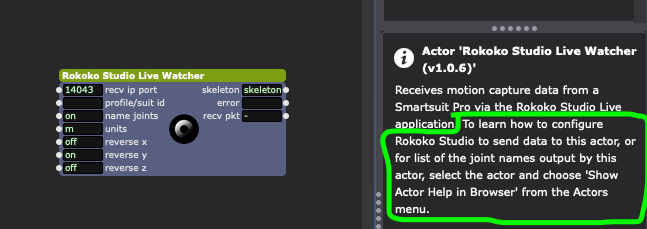
                          As I wrote in your ticket (just re-writing it here for the benefit of others) the instructions for this can be found by right-clicking the Rokoko Studio Live Watcher actor and selecting the top menu option "Show Actor Help in Browser". The actor's help text also says this (though it tells you to use the top menu, which is not my preferred method).
                          TroikaTronix Technical Support
                          New Support Ticket: https://support.troikatronix.com/support/tickets/new
                          Support Policy: https://support.troikatronix.com/support/solutions/articles/13000064762
                          Add-Ons: https://troikatronix.com/add-ons/ & https://troikatronix.com/add-ons/?u=woland
                          Professional Services: https://support.troikatronix.com/support/solutions/articles/13000109444

                          | Isadora Version: all of them | Mac Pro (Late 2013), macOS 10.14.6, 3.5GHz 6-core, 1TB SSD, 64GB RAM, Dual AMD FirePro D700s |

                          1 Reply Last reply Reply Quote 0
                          • First post
                            Last post