[ANSWERED] Manually trigger a GLSL shader to activate
-
is there a way to program a glsl shader to be able to listen for a trigger, and activate the shader. For example https://www.shadertoy.com/view... this shockwave shader. My goal is to program the shader to a button on a midi board.
-
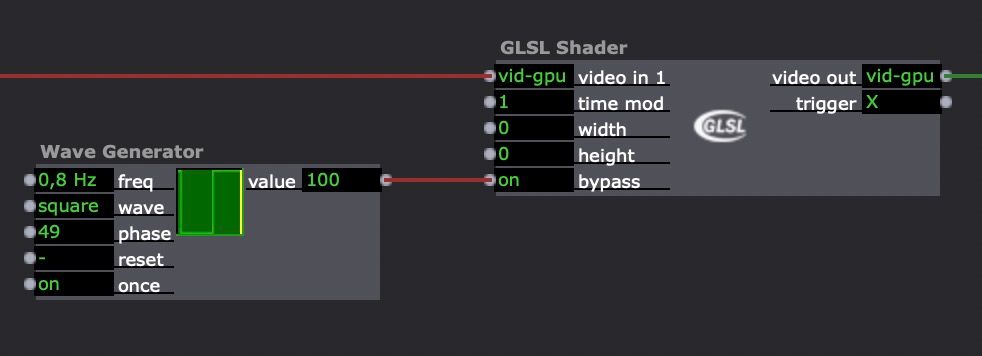
click on "reset" in the Wave generator and don't forget to set the phase to 49 or to invert on/off in bypass of the GLSL actor
Best regards,
Jean-François
• Izzy 4
- MacBook Pro M1 Max 16" 64GB RAM, Mac OS 15.3.2 Sequoia
- Mac Pro 5.1 middle 2012 (3,33 GHz 6-Core Intel Xeon, 32GB RAM, Radeon RX 580 8 GB ),
Mac OS 10.14.6 (Mojave)
- Mac mini Pro M4, Mac OS 15.3.2 Sequoia- A range of deployable older Macs
Located in Bremen, Germany
- A range of deployable older Macs
-
Hi @fofojo,
As @jfg already demonstrated, by utilizing the bypass input you can simple toggle it on or off.
If you want to connect it to a MIDI button you can use the Trigger value actor. (1 = On, 0 = Off), that gets triggered by a Note Watcher
Isadora 4.x, Windows 11 Dell XPS 17 5010 or my MacBook Pro M3 Max (Tahoe)
Interactive Performance Designer, Freelance Artist, Scenographer, Lighting Designer, TroikaTronix Community moderator
Always in for chatting about interaction in space / performance design. Drop me an email at hello@juriaan.me -
@juriaan said:
If you want to connect it to a MIDI button you can use the Trigger value actor. (1 = On, 0 = Off), that gets triggered by a Note Watcher
or if your MIDI board sends MIDI CC then you can use a Control Watcher. Make sure you configure your MIDI device in the MIDI Setup menu, accessed from the Communications menu.
-
Great! thanks for the help.