[SOLVED] wrong video file shows
-
Hello there,
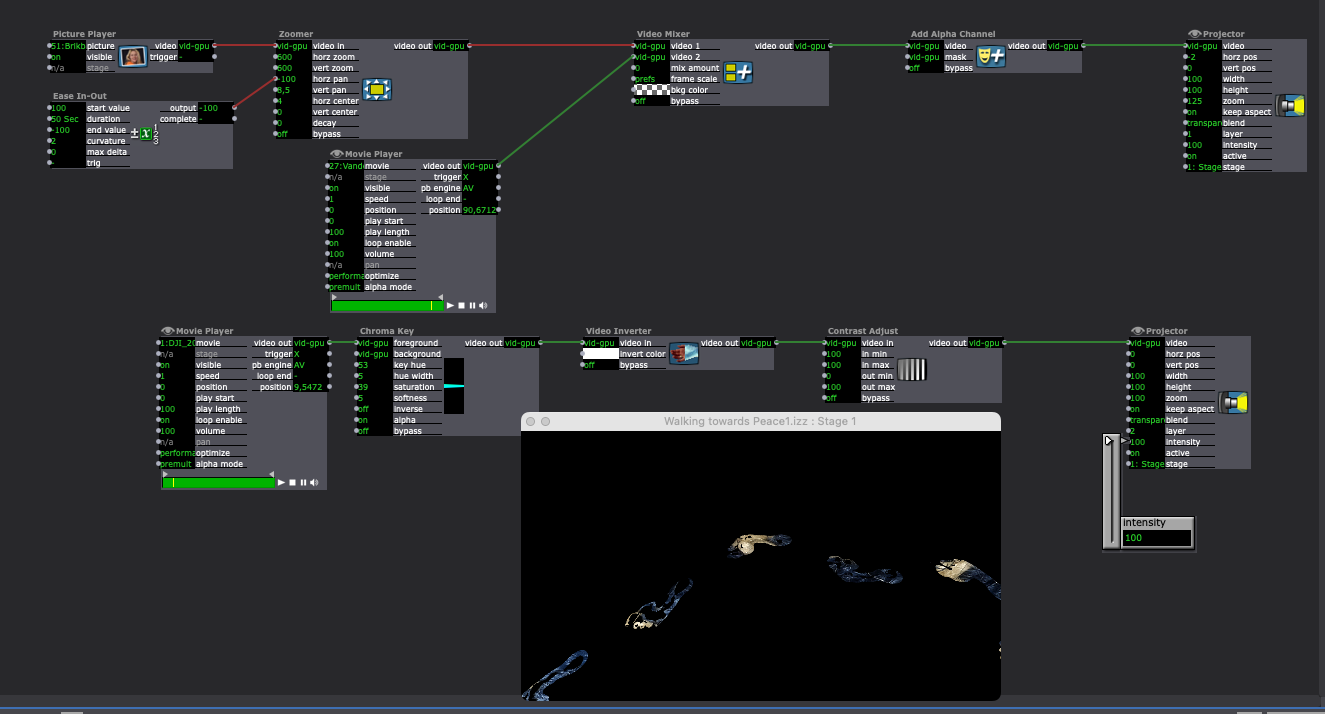
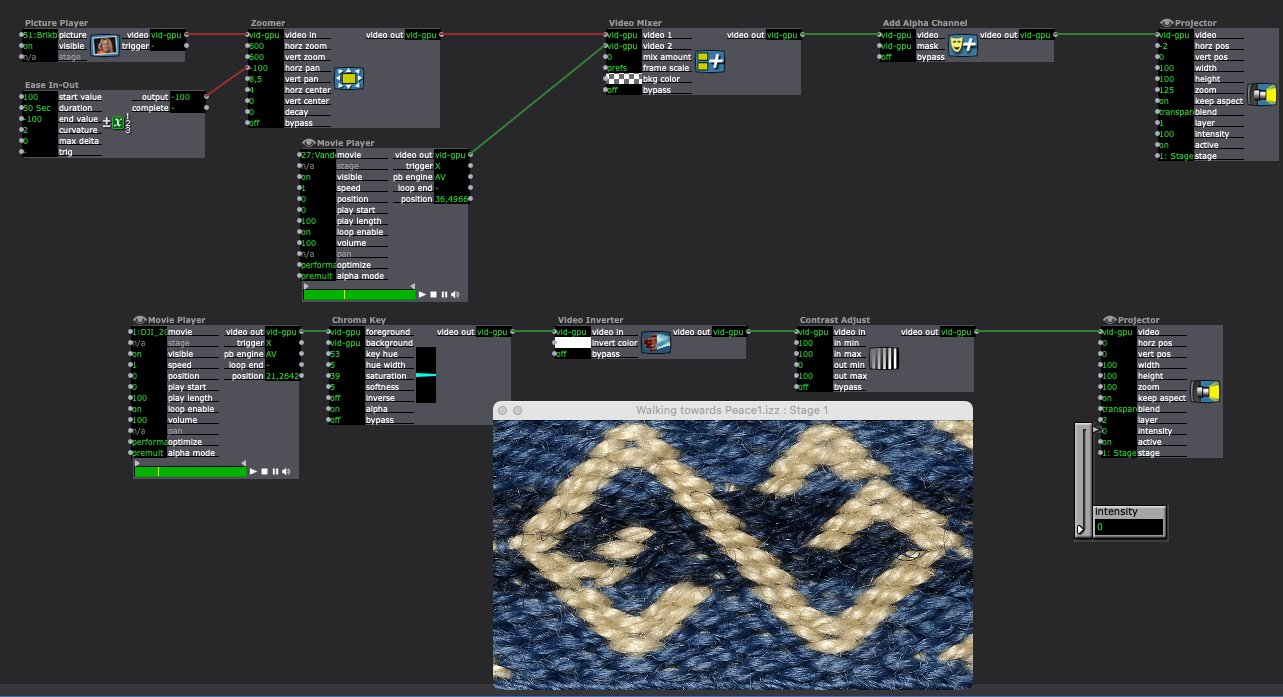
I am working in Isadora3, and I am having some troubles, with a video file that keeps showing something else than I have put in there. I have tried rebuilding it, same thing happens. I use a videomixer and mix two files, one shows as the real video, another shows as something else. Can you help me? And, what should I send? I have quite a few photos and videos in there.I have added 2 screenshots, one where you see the alpha chanel on, and one where its off, its two different videos?
All the best
Eva
Eva Esmann Behrens
Labtop: Macbook pro (Retina) 2015, 2,7 GHz,8 GB, MacOS Mojave
Mac Studio -
What video format are you using?
Do the video thumbnails look correct when you rollover the links from the Movie Players?
We first need to confirm that the video look correct before being processed by any other actors.
If you create a test scene with only a Movie Player and a Projector, can you see each movie correctly the preview if you set the movie player to play each? -
I can't tell from your description whether you're saying there's something wrong in both screenshots, or just one of them, but everything in the second screenshot looks correct:
- The chain of video actors from the bottom Movie Player with media number 1 has the 'intensity' set to '0' on the Projector, so we can't see any output from this chain of actors.
- If 'intensity' was at '100', because this Projector is set to 'layer' = '2' and 'blend' = 'transparent', this video stream would appear in front of the result of the top chain of actors (Picture Player + Movie Player with media number 27) and anywhere there was alpha in the video content coming out of the Contrast Adjust actor, we'd see the video output of the top chain of actors.
- The top chain of actors has the Projector set to 'layer' = 1', 'blend' = 'transparent', and 'intensity' = '100' so we can see this video content.
- The Video Mixer actor connected to the Zoomer and the Movie Player has 'mix amount' set to '0', so we're seeing only the video content from its 'video 1' input (so just the Picture Player, nothing from the Movie Player with media number 27).
- Setting 'mix amount' to '100' would show us the content from the 'video 2' input, and setting 'mix amount' to anything from '1' to '99' would show us a mixture of the two video streams.
- The Add Alpha Channel actor isn't doing anything because there's nothing connected to its 'mask' input.
- From the Add Alpha Channel help text: "Where the 'mask' pixels are white, the resulting pixels will be opaque. Where they are black, pixels will be completely transparent. Gray values will make pixels partially transparent depending on their brightness."
With current setup I can't tell what the content of either Movie Player looks like originally. (In topmost Movie Player, the Video Mixer has its 'mix amount' input set to '0' so we're only seeing the video stream from the Picture Player, and with the bottom Movie Player we can only see the video stream from the top chain of actors inside a mask made out of the very chroma-keyed, color-inverted, and contrast-adjusted result of the bottom chain of actors.) Without knowing what the content looks like though, it seems like what's happening in the first screenshot is correct as well, since we're seeing bits of the rope picture through alpha 'holes' in the end result of the bottom chain of actors.
- The chain of video actors from the bottom Movie Player with media number 1 has the 'intensity' set to '0' on the Projector, so we can't see any output from this chain of actors.
-
If none of the information in my previous comment is of any use to you in terms of diagnosing what issue you're having, it would be very helpful if you could attach a screenshot of what you see in the video preview when you hover your cursor over each of the links in these actors like this:

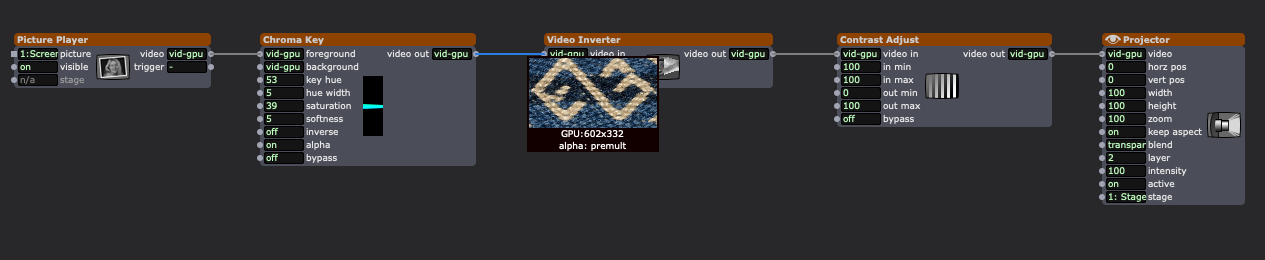
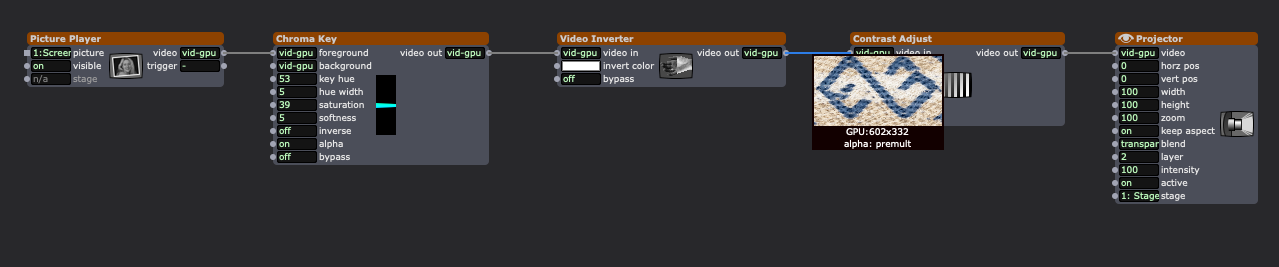

This way we can see what is happening at what step and actually deduce what might be going wrong. With the current screenshots we can only tell what two different final results look like but we don't know what your content looks like originally nor at any of the steps before the final output.
-
Is this all sorted or do you still need assistance?
-
Ok thank you very much
I somehow madd a work around but I will try and go back. Im sorry I was in the middle of production.
Thank you so much so far!
All the best
Eva

