[ANSWERED] Triggering several Videos with Keyboard Watchers in one Scene
-
In my project I want to show different interview video sequences spontaneously. So I thought I could put all the video snippets in one scene, connect each of the snippets with its own keyboard watcher and could start them with the keyboard in the right moment during the show.
Now I have the problem that all videos start at the beginning of the scene and I don't know where to switch this off...
I would also be happy to hear about other ideas how to manage the Triggering of different video snippets in one scene :)Thanks for the help!
-
Check out my comment here for some cueing examples: https://community.troikatronix.com/topic/9061/answered-reverse-cue-sheet/3?_=1770373876276
If the goal is to trigger the videos in a set order, I think your best bet will be connecting the output of a Keyboard Watcher actor to the input of a Sequential Trigger actor, then connecting each of the Sequential Trigger actor's outputs to a different Movie Player actor's 'visible' input. That'll let you hit the same key one at a time and trigger the videos in sequence.
You'll also need to initialize the 'visible' input of each Movie Player actor as 'off'.
You can learn about initializing values from our YouTube tutorial on initializing values in Isadora.
If you want to trigger the videos in an order that's not set in stone, you could initialize the 'visible' input of each Movie Player actor as 'off' with a separate Keyboard Watcher actor connected to the 'visible' input of each Movie Player actor. (You'll want to set the Keyboard Watchers for the different pairs of Keyboard Watcher+Movie Player actors to a different key so each video has a different key that triggers it). If you want to be able to turn them on and off with the same key, you can put a Toggle actor between each Keyboard Watcher actor and Movie Player actor.
-
@tarox said:
Now I have the problem that all videos start at the beginning of the scene and I don't know where to switch this off...
Now I have the problem that all videos start at the beginning of the scene and I don't know where to switch this off...
If I correctly understand what you're looking for, you may use the speed input instead of the visible input. The on/off of the visible input starts always at the beginning of the clip (play/stop). With the speed input, it works like play/pause, and if you hit the key later, it will start at the position you stopped it.
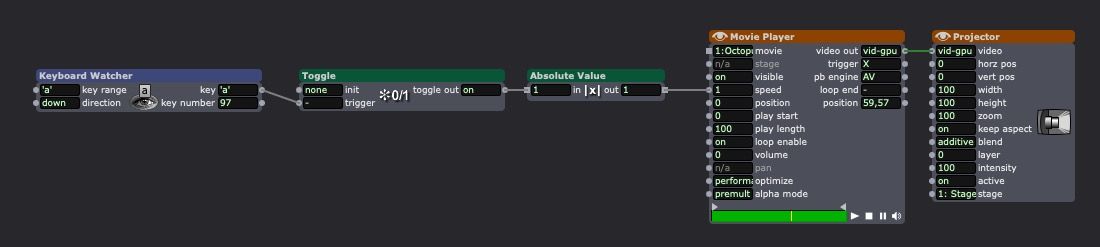
You need the absolute value to switch between 0 and 1. Without it will switch between -2/+2
• Izzy 4
- MacBook Pro M1 Max 16" 64GB RAM, Mac OS 15.3.2 Sequoia
- Mac Pro 5.1 middle 2012 (3,33 GHz 6-Core Intel Xeon, 32GB RAM, Radeon RX 580 8 GB ),
Mac OS 10.14.6 (Mojave)
- Mac mini Pro M4, Mac OS 15.3.2 Sequoia- A range of deployable older Macs
Located in Bremen, Germany
- A range of deployable older Macs
-
• Izzy 4
- MacBook Pro M1 Max 16" 64GB RAM, Mac OS 15.3.2 Sequoia
- Mac Pro 5.1 middle 2012 (3,33 GHz 6-Core Intel Xeon, 32GB RAM, Radeon RX 580 8 GB ),
Mac OS 10.14.6 (Mojave)
- Mac mini Pro M4, Mac OS 15.3.2 Sequoia- A range of deployable older Macs
Located in Bremen, Germany
- A range of deployable older Macs
-
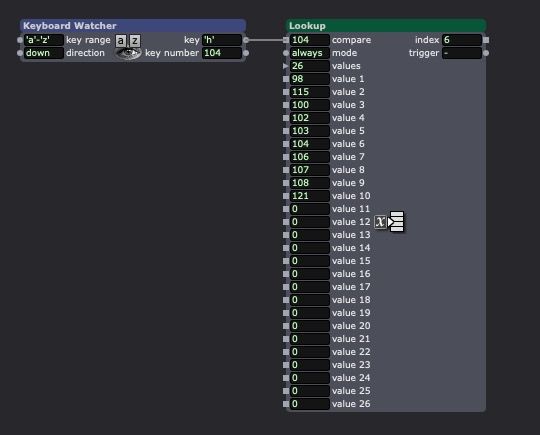
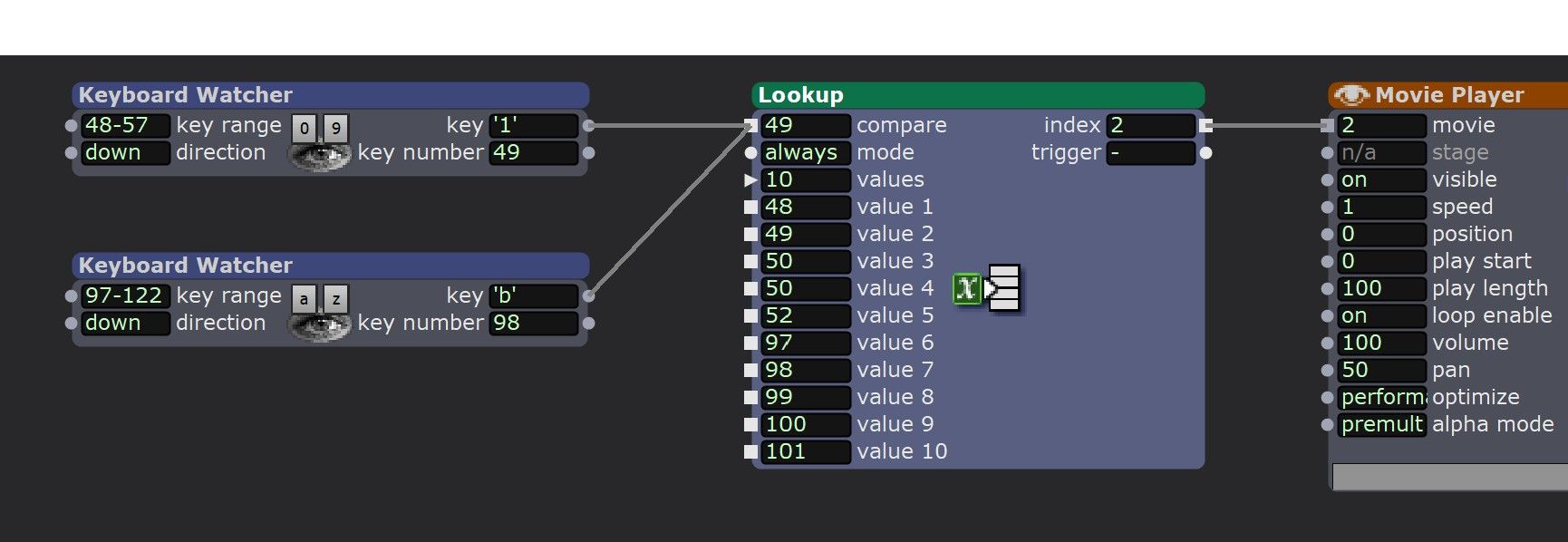
The better way if you want to use the letters key in another order than the alphabetical order is to use the lookup actor. It will output 1,2,3,4… for the value you give in the input.
• Izzy 4
- MacBook Pro M1 Max 16" 64GB RAM, Mac OS 15.3.2 Sequoia
- Mac Pro 5.1 middle 2012 (3,33 GHz 6-Core Intel Xeon, 32GB RAM, Radeon RX 580 8 GB ),
Mac OS 10.14.6 (Mojave)
- Mac mini Pro M4, Mac OS 15.3.2 Sequoia- A range of deployable older Macs
Located in Bremen, Germany
- A range of deployable older Macs
-
@jfg said:
<p>The better way if you want to use the letters key in another order than the alphabetical order is to use the lookup actor. It will output 1,2,3,4… for the value you give in the input.</p>
I learn something new every day!
-
@jfg said:
You need the absolute value to switch between 0 and 1. Without it will switch between -2/+2
You can also go into the property inspector and change the min and max of the 'speed' input from -2 to 2 > 0 to 1. Then you can connect a Toggle to it directly.