• Products
    • Isadora
    • Get It
    • ADD-ONS
    • IzzyCast
    • Get It
  • Forum
  • Help
  • Werkstatt
  • Newsletter
  • Impressum
  • Dsgvo
  • Press
  • Isadora
  • Get It
  • ADD-ONS
  • IzzyCast
  • Get It
  • Press
  • Dsgvo
  • Impressum

Navigation

    • Register
    • Login
    • Search
    • Categories
    • Recent
    • Popular
    • Tags

    movie player pan not working

    How To... ?
    3
    4
    60
    Loading More Posts
    • Oldest to Newest
    • Newest to Oldest
    • Most Votes
    Reply
    • Reply as topic
    Log in to reply
    This topic has been deleted. Only users with topic management privileges can see it.
    • Notdoc
      Notdoc last edited by

       i would like to be able to pan movie file output audio within Isadora, but whatever i do the 'pan' is greyed out. 

      my movie files have 2-channel stereo audio, which i am able to distinguish clearly in external output.

      tried with multiple output sources, if i play around too long Isadora crashes

      no project to show, just trying with a movie player in a freshly opened project

      ventura 13.7.2 on M1 Max '21

      Ventura 13.7.2 on Macbook Pro 14-in M1 Max 2022

      S 1 Reply Last reply Reply Quote 0
      • S
        skuven Beta Silver @Notdoc last edited by

        @notdoc why are you specifically wanting to use the video player for audio? Maybe convert the video to a .wav file and use the audio player instead - there may be more useful features on that?

        You could then still sync the playstart of both the sound and video player actors?

        Let me know how you get on!

        Notdoc 1 Reply Last reply Reply Quote 0
        • Notdoc
          Notdoc @skuven last edited by

          @skuven 

          thanks for quick response, but i don't want to do that, as i am working with multiple video files often at quite short notice, so additional processing is not desirable for the workflow.

          the sound actor pan works fine for me,  but I really want to pan movie file audio within Isadora 

          Ventura 13.7.2 on Macbook Pro 14-in M1 Max 2022

          jfg 1 Reply Last reply Reply Quote 0
          • jfg
            jfg @Notdoc last edited by jfg

            @notdoc

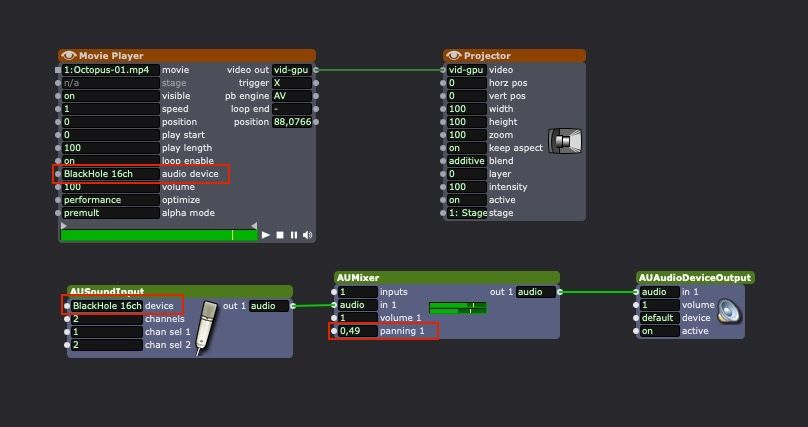
            Here is a workaround, as this function no longer works in Movie Player since Quicktime X. You must have Blackhole (or similar) installed, and if your Movie Player does not show "Audio Device", click on the eye to the left of Actor name and activate this input. 
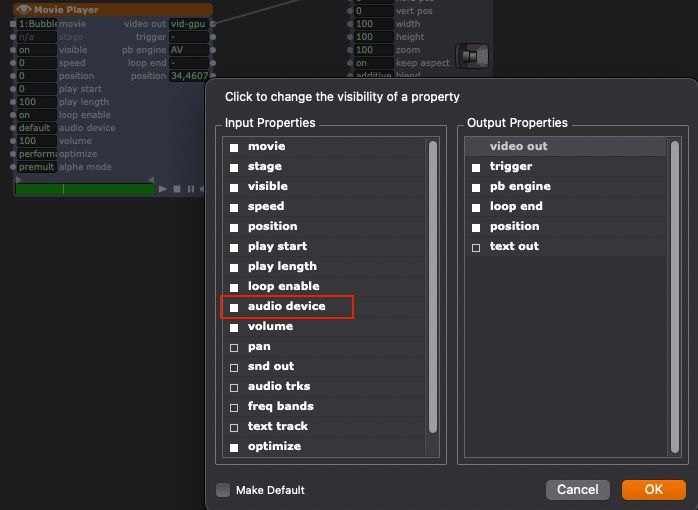
            Then select "Blackhole" as shown in the picture and you can adjust Pan and Volume in the AUMixer.
            Best regards, 

            Jean-François 

            • Izzy 4
            - MacBook Pro M1 Max 16" 64GB RAM, Mac OS 15.3.2 Sequoia
            - Mac Pro 5.1 middle 2012 (3,33 GHz 6-Core Intel Xeon, 32GB RAM, Radeon RX 580 8 GB ),
            Mac OS 10.14.6 (Mojave)
            - Mac mini Pro M4, Mac OS 15.3.2 Sequoia

            • A range of deployable older Macs
              Located in Bremen, Germany
            1 Reply Last reply Reply Quote 1
            • First post
              Last post