• Products
    • Isadora
    • Get It
    • ADD-ONS
    • IzzyCast
    • Get It
  • Forum
  • Help
  • Werkstatt
  • Newsletter
  • Impressum
  • Dsgvo
  • Press
  • Isadora
  • Get It
  • ADD-ONS
  • IzzyCast
  • Get It
  • Press
  • Dsgvo
  • Impressum

Navigation

    • Register
    • Login
    • Search
    • Categories
    • Recent
    • Popular
    • Tags

    How to warp a video mapping

    How To... ?
    5
    12
    240
    Loading More Posts
    • Oldest to Newest
    • Newest to Oldest
    • Most Votes
    Reply
    • Reply as topic
    Log in to reply
    This topic has been deleted. Only users with topic management privileges can see it.
    • JJHP3
      JJHP3 last edited by

      Wow - thanks you! I will attempt... what a wonderful group of people work with Isadora!

      MBP'21- M1-Max; Sonoma 14.7; Isadora: 4.0.7 (ARM) ---- artwork: terragizmo.net

      DusX 1 Reply Last reply Reply Quote 0
      • DusX
        DusX Tech Staff @JJHP3 last edited by

        @jjhp3

        Another option worth looking at is chaining together IzzyMap mappings. I find this adds more flexibility.
        I often use one projector to mask and place my mapping content. This projector is sending to a virtual stage.
        Then I use Get Stage Image to grab that IzzyMap work, and feed it into a second Projector where I use IzzyMap to Grid Warp as required.
        I find this 2 phase approach to be much less confusing and easier to update over time. 

        Troikatronix Technical Support

        • New Support Ticket Link: https://support.troikatronix.com/support/tickets/new
        • My Add-ons: https://troikatronix.com/add-ons/?u=dusx
        • Profession Services: https://support.troikatronix.com/support/solutions/articles/13000109444-professional-services

        Running: Win 11 64bit, i7, M.2 PCIe SSD's, 32gb DDR4, nVidia GTX 4070 | located in Ontario Canada.

        JJHP3 2 Replies Last reply Reply Quote 1
        • JJHP3
          JJHP3 @DusX last edited by

          @dusx Well I sure hadn't thought of that approach! I'll give it a try - thanks

          MBP'21- M1-Max; Sonoma 14.7; Isadora: 4.0.7 (ARM) ---- artwork: terragizmo.net

          1 Reply Last reply Reply Quote 0
          • JJHP3
            JJHP3 @DusX last edited by

            @dusx And a secondary question about grid mapping... not sure how to ask, but if one has a 6 x 6 square grid, is there any way to grab and move one of the corners and all the other grid lines will warp proportionally? Or is grid a point by point process?

            MBP'21- M1-Max; Sonoma 14.7; Isadora: 4.0.7 (ARM) ---- artwork: terragizmo.net

            dbini jfg Woland DusX 4 Replies Last reply Reply Quote 0
            • dbini
              dbini @JJHP3 last edited by

              @jjhp3

              as far as I know, grid mapping is done on individual points, but it would be really useful if other points could react - it would be a bit like the 'smudge' tool in photoshop.

              John Collingswood
              taikabox.com
              2021 M1PRO 32GB OSX 26.3.1 & 2019 MBPT 2.6GHZ i7 OSX15.7.4 16GB
              plus an old iMac and assorted Mac Minis for installations

              1 Reply Last reply Reply Quote 0
              • jfg
                jfg @JJHP3 last edited by

                @jjhp3

                Yes and no. If you select multiple points (using the Shift key) and hold and drag a line between the selected points, all the selected points will move together. No, you can’t change the curve for several points. You can only do this for each point individually. Unless I didn't find how.

                Best regards, 

                Jean-François

                • Izzy 4
                - MacBook Pro M1 Max 16" 64GB RAM, Mac OS 15.3.2 Sequoia
                - Mac Pro 5.1 middle 2012 (3,33 GHz 6-Core Intel Xeon, 32GB RAM, Radeon RX 580 8 GB ),
                Mac OS 10.14.6 (Mojave)
                - Mac mini Pro M4, Mac OS 15.3.2 Sequoia

                • A range of deployable older Macs
                  Located in Bremen, Germany
                1 Reply Last reply Reply Quote 0
                • jfg
                  jfg @JJHP3 last edited by jfg

                  @jjhp3

                  Attached is a column made with Izzy Map and the Global Edge Blend Mask to make a shadow. Works if you don't need another background as black
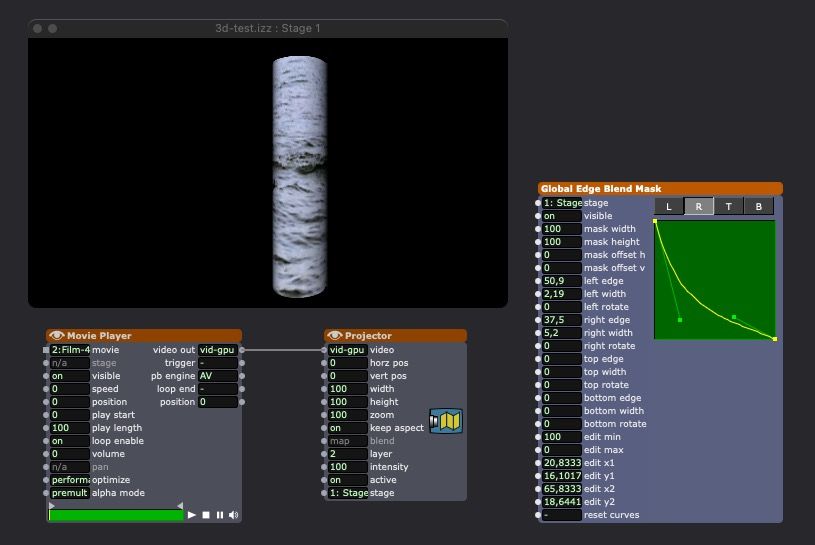
                  you can also use the Edge Blend Mask actor instead of the global one.
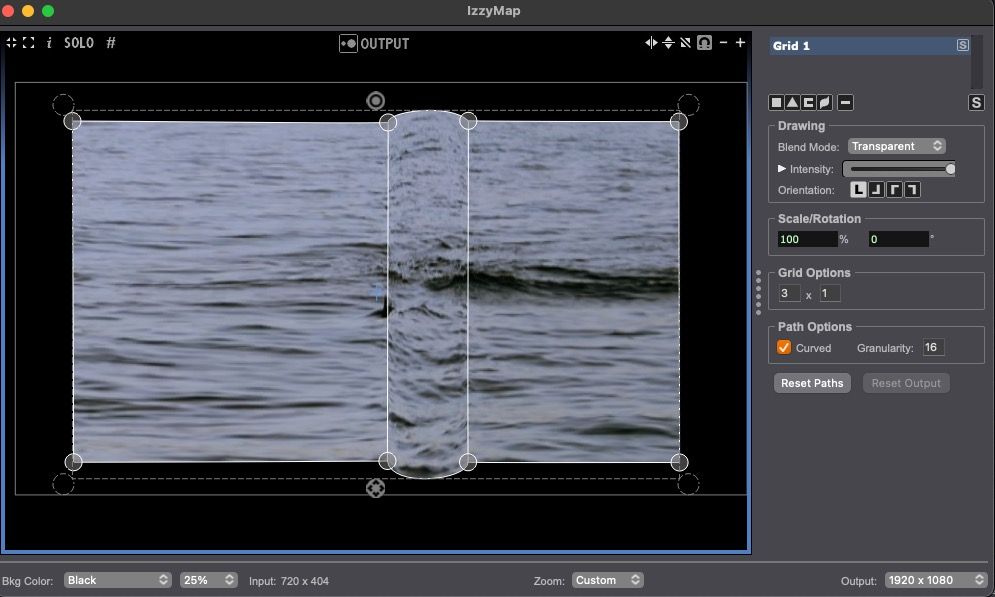

                  I join a 3ds column if you prefer to use a 3d projector. You don't need the jpg file for Isadora but you must use it (or another one) as a texture in the 3d programm for the video texture to work. If you don't have the jpg file in the same folder as the 3ds file, you will get an error message in Isadora. Don't care and go ahead. If you have the JPG file, it will no longer be visible afterwards.

                  column.zip

                  • Izzy 4
                  - MacBook Pro M1 Max 16" 64GB RAM, Mac OS 15.3.2 Sequoia
                  - Mac Pro 5.1 middle 2012 (3,33 GHz 6-Core Intel Xeon, 32GB RAM, Radeon RX 580 8 GB ),
                  Mac OS 10.14.6 (Mojave)
                  - Mac mini Pro M4, Mac OS 15.3.2 Sequoia

                  • A range of deployable older Macs
                    Located in Bremen, Germany
                  JJHP3 1 Reply Last reply Reply Quote 3
                  • JJHP3
                    JJHP3 @jfg last edited by

                    @jfg Thank you thank you! Not only did these insightful suggestions solve my problem, but they offer me new avenues and ideas about the next project / possibilities. Isadora is so deep, yet at times stubborn - but there is almost always a path to success.

                    MBP'21- M1-Max; Sonoma 14.7; Isadora: 4.0.7 (ARM) ---- artwork: terragizmo.net

                    1 Reply Last reply Reply Quote 0
                    • Woland
                      Woland Tech Staff @JJHP3 last edited by

                      @jjhp3 said:

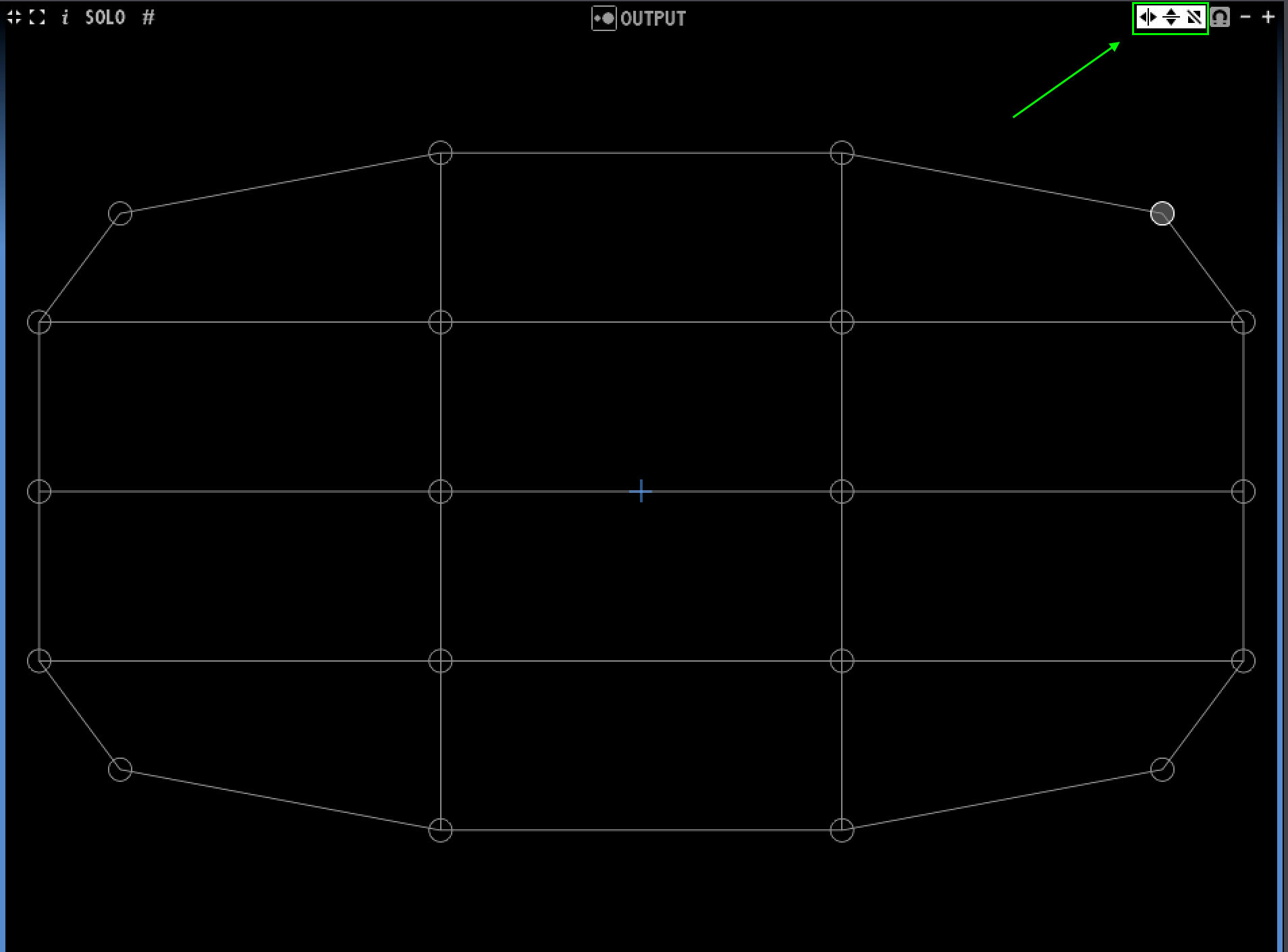
                      is there any way to grab and move one of the corners and all the other grid lines will warp proportionally

                       These little guys control the different types of mirroring (horizontal, vertical, and diagonal):
                      TroikaTronix Technical Support
                      New Support Ticket: https://support.troikatronix.com/support/tickets/new
                      Support Policy: https://support.troikatronix.com/support/solutions/articles/13000064762
                      Add-Ons: https://troikatronix.com/add-ons/ & https://troikatronix.com/add-ons/?u=woland
                      Professional Services: https://support.troikatronix.com/support/solutions/articles/13000109444

                      | Isadora Version: all of them | Mac Pro (Late 2013), macOS 10.14.6, 3.5GHz 6-core, 1TB SSD, 64GB RAM, Dual AMD FirePro D700s |

                      1 Reply Last reply Reply Quote 0
                      • DusX
                        DusX Tech Staff @JJHP3 last edited by

                        @jjhp3 said:

                        point by point process

                         Yes, only the selected points will move, and they all move the same amount. I 'stretch' type move would be a great feature request though. I will add this. 

                        Troikatronix Technical Support

                        • New Support Ticket Link: https://support.troikatronix.com/support/tickets/new
                        • My Add-ons: https://troikatronix.com/add-ons/?u=dusx
                        • Profession Services: https://support.troikatronix.com/support/solutions/articles/13000109444-professional-services

                        Running: Win 11 64bit, i7, M.2 PCIe SSD's, 32gb DDR4, nVidia GTX 4070 | located in Ontario Canada.

                        1 Reply Last reply Reply Quote 0
                        • First post
                          Last post