• Products
    • Isadora
    • Get It
    • ADD-ONS
    • IzzyCast
    • Get It
  • Forum
  • Help
  • Werkstatt
  • Newsletter
  • Impressum
  • Dsgvo
  • Press
  • Isadora
  • Get It
  • ADD-ONS
  • IzzyCast
  • Get It
  • Press
  • Dsgvo
  • Impressum

Navigation

    • Register
    • Login
    • Search
    • Categories
    • Recent
    • Popular
    • Tags

    [ANSWERED] Projector actor: publishing Input and Output parameters separately

    Feature Requests
    3
    4
    43
    Loading More Posts
    • Oldest to Newest
    • Newest to Oldest
    • Most Votes
    Reply
    • Reply as topic
    Log in to reply
    This topic has been deleted. Only users with topic management privileges can see it.
    • eight
      eight last edited by Woland

      I have a super wide movie frame, which I'd like to pan horizontally, to show just a portion of the frame at each point in time. I hoped to be able to do this by publishing an X offset of the input in the projector actor and then animating it using Envelope actor, however, it seems that this offset controls the projector's output, regardless of from where I am publishing it –– input or output control of the IzzyMap. Am I missing something, or this is a feature request?

      Thanks. 

      Analysis: http://post.scriptum.ru | Synthesis: http://onewaytheater.us
      Twitter: https://twitter.com/eight_io | Flickr: http://www.flickr.com/photos/eight_io/
      Github: https://github.com/eighteight | MulchCam: https//mulchcam.com
      MulchTune: https://itunes.apple.com/us/app/mulch-tune/id1070973465 | Augmented Theatre: https://augmentedtheatre.com

      Woland DusX 3 Replies Last reply Reply Quote 0
      • Woland
        Woland Tech Staff @eight last edited by

        @eight

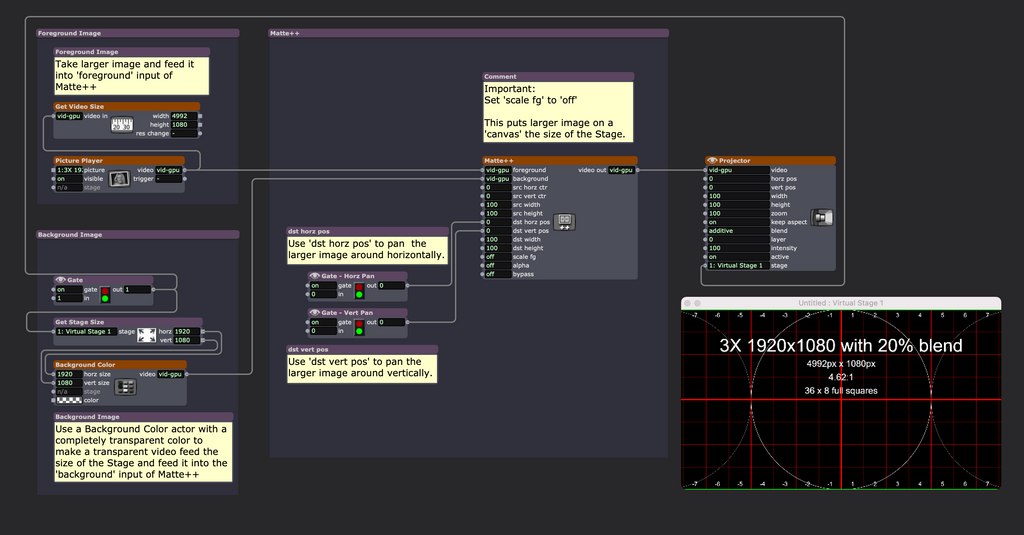
        Try this: patch-matte-panning-2026-04-16-4.1.3.zip

        TroikaTronix Technical Support
        New Support Ticket: https://support.troikatronix.com/support/tickets/new
        Support Policy: https://support.troikatronix.com/support/solutions/articles/13000064762
        Add-Ons: https://troikatronix.com/add-ons/ & https://troikatronix.com/add-ons/?u=woland
        Professional Services: https://support.troikatronix.com/support/solutions/articles/13000109444

        | Isadora Version: all of them | Mac Pro (Late 2013), macOS 10.14.6, 3.5GHz 6-core, 1TB SSD, 64GB RAM, Dual AMD FirePro D700s |

        1 Reply Last reply Reply Quote 1
        • Woland
          Woland Tech Staff @eight last edited by

          @eight said:

          Am I missing something

           You could also use a Composite rectangle IzzyMap Slice and publish the x offset of each corner of the input separately, but then you have to do math to keep the image centered.

          TroikaTronix Technical Support
          New Support Ticket: https://support.troikatronix.com/support/tickets/new
          Support Policy: https://support.troikatronix.com/support/solutions/articles/13000064762
          Add-Ons: https://troikatronix.com/add-ons/ & https://troikatronix.com/add-ons/?u=woland
          Professional Services: https://support.troikatronix.com/support/solutions/articles/13000109444

          | Isadora Version: all of them | Mac Pro (Late 2013), macOS 10.14.6, 3.5GHz 6-core, 1TB SSD, 64GB RAM, Dual AMD FirePro D700s |

          1 Reply Last reply Reply Quote 1
          • DusX
            DusX Tech Staff @eight last edited by DusX

            @eight said:

            publishing an X offset of the input in the projector actor

             I believe this is working in this configuration, unless I miss understand. 

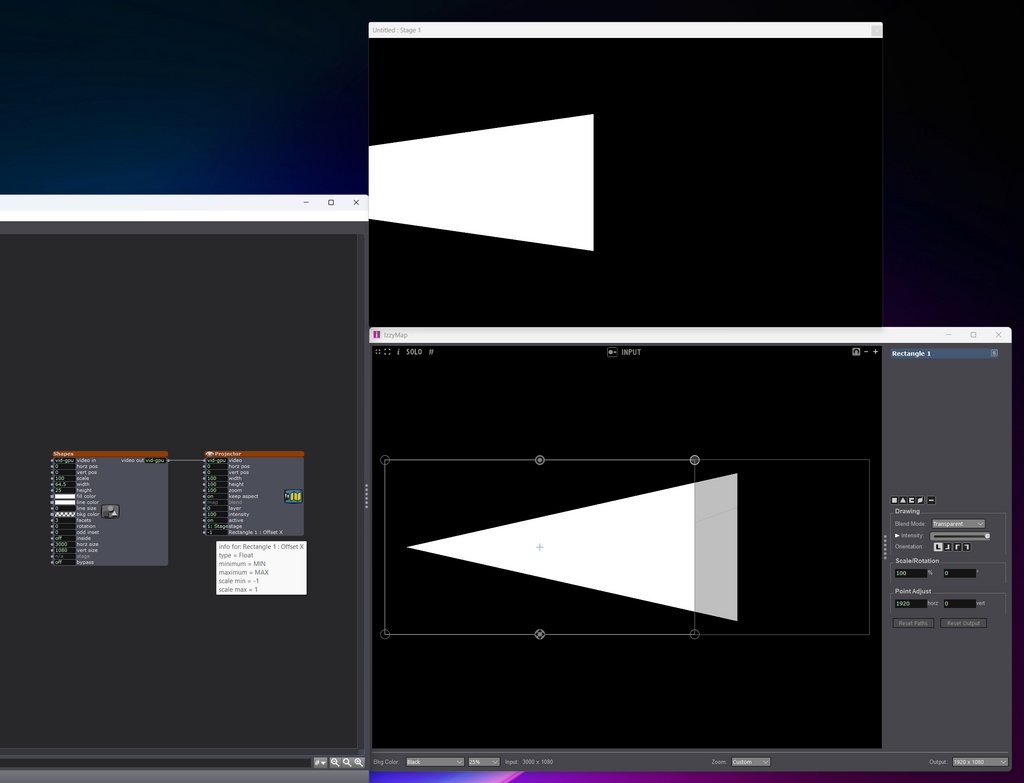
            My input is 3000px by 1080px In IzzyMap, 

            I move my rect to the far left and select each right side corner, and enter 1920 (this creates my 1920x1080 output selection) 

            I right click the Rect slice, and publish the Offset X 

            Then on the Projector, I can move my view from the left edge to the right edge. (-1 thru 1)
            Troikatronix Technical Support

            • New Support Ticket Link: https://support.troikatronix.com/support/tickets/new
            • My Add-ons: https://troikatronix.com/add-ons/?u=dusx
            • Profession Services: https://support.troikatronix.com/support/solutions/articles/13000109444-professional-services
            • Misc Projects [many work with Isadora]: https://github.com/rwebber

            Running: Win 11 64bit, i7, M.2 PCIe SSD's, 32gb DDR4, nVidia GTX 4070 | located in Ontario Canada.

            1 Reply Last reply Reply Quote 1
            • First post
              Last post