Timecode value entry with Streamdeck
-
Hi all
I am following up on a timer that I made for doing presenter countdowns.
The timer works fine and all is good.
I am now moving it to beingtriggered and set up via a streamdeck & companon
I have set up OSC and that aspect is fine.
My query is how I should populate the timecode parameters?
When I use the time code and trigger value it pushes the information automatically into the running time code. I am looking to create a button that has a specificed time/function that can set a specified value.
I have half the theory in my head but i cannot work out the patch here. I am looking (via OSC) to hit a button on the streamdeck that populates the timecode actor I have but only push this information when I press the button. At the moment, it is doing this automatically and I just cannot see what I should do here to fix it.
Hopefully I am being a bit clear...??
Thanks in advance.
eamon
1no. 14" MacBook Pro M1, 32GB RAM, Max Processor, 1GB SSD
Various Mac models from mac mini 2012 to Macbook Retina 15"
1no. imac 21.5 M2 model. -
So to be clear, you are sending OSC from the StreamDeck?
Isadora sees this incoming data? And you have it working with timecode actors? (meaning the text is converted to timeccode)
And you want the update in Isadora to be momentary? That's the problem? -
Hi
Yes. That is what I think I need!
Upon, re-reading my initial post, I think i might qualify for the clearest and most concise post of the year.....I am even confused.. Sorry about that.
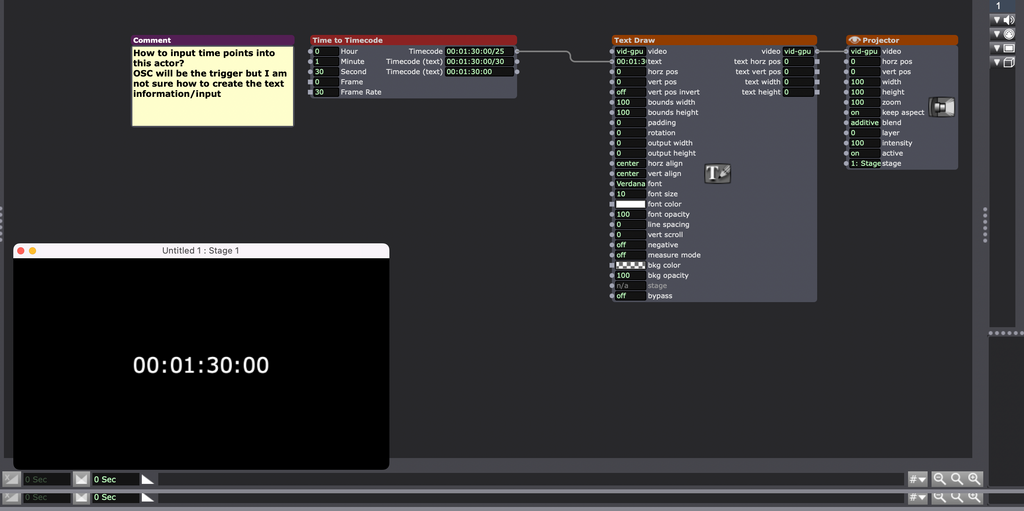
I am attaching a quick screen shot of what I am look to do.
I am probably over complicating a simple field input query.
Whilst the trigger will eventually come from the streamdeck/companion, the process of how to momentarily input the values into the time to timecode actor escapes me.
When I populate the text to timecode actor the information is automatically transferred to the text draw actor etc. I am looking for this to occur when I trigger the value via the streamdeck.
Hopefully I am being a bit clearer now.
eamon
1no. 14" MacBook Pro M1, 32GB RAM, Max Processor, 1GB SSD
Various Mac models from mac mini 2012 to Macbook Retina 15"
1no. imac 21.5 M2 model. -
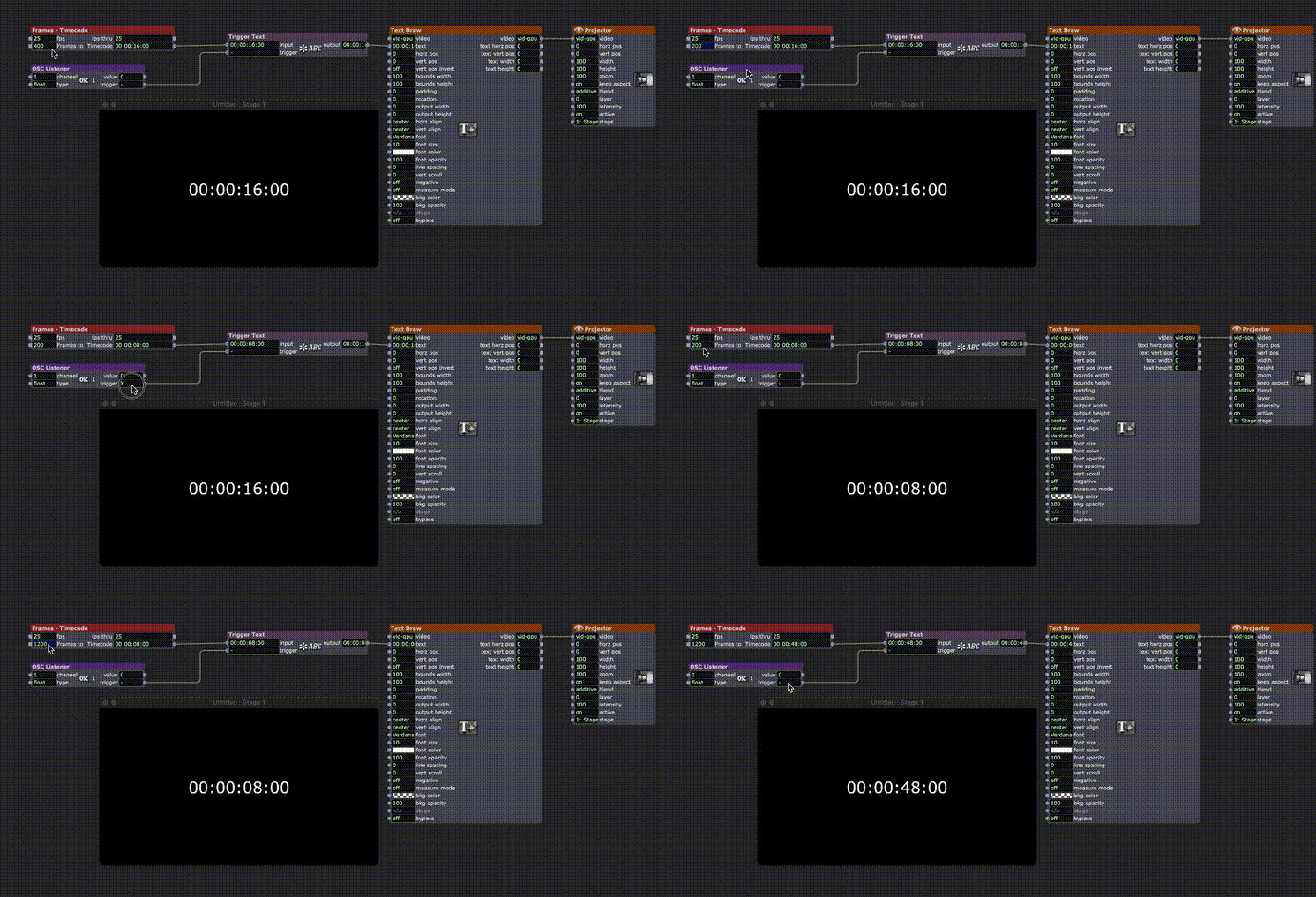
I don’t quite understand what you mean, because I don’t understand where the time value comes from. Does it come from Streamdeck, or do you enter it yourself? What form does this input take? Frames, time or timecode?
I don’t have a Time to Timecode Actor as in your image. I’ve replaced it with a Frame to Timecode Actor for the GIF. When the frame number changes, it’s sent to the Trigger Text Actor and only forwarded to the Text Draw Actor when a trigger comes via OSC.Or with a live timecode feed as input.
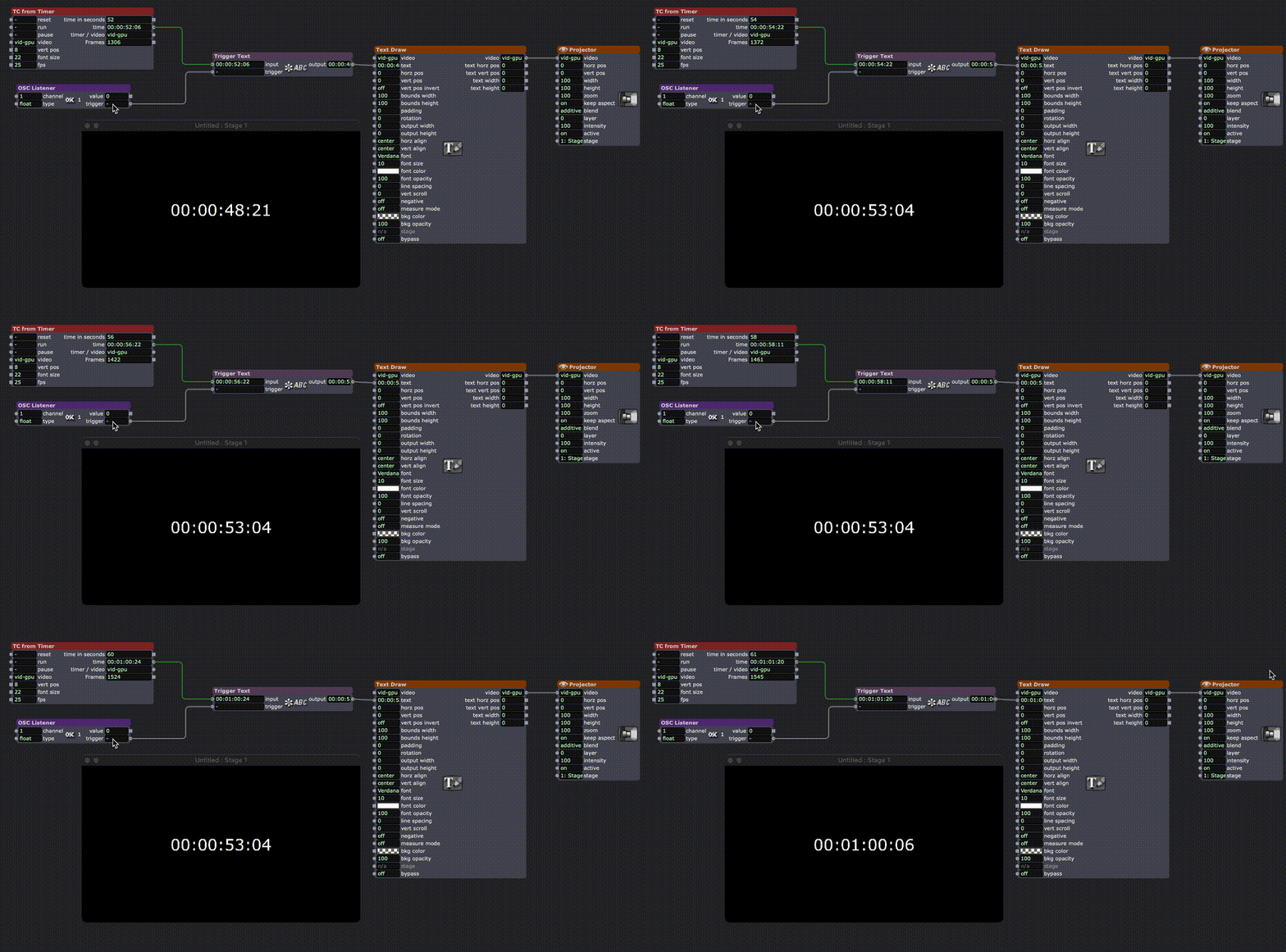
Is that what you’re looking for?• Izzy 4
- MacBook Pro M1 Max 16" 64GB RAM, Mac OS 15.3.2 Sequoia
- Mac Pro 5.1 middle 2012 (3,33 GHz 6-Core Intel Xeon, 32GB RAM, Radeon RX 580 8 GB ),
Mac OS 10.14.6 (Mojave)
- Mac mini Pro M4, Mac OS 15.3.2 Sequoia- A range of deployable older Macs
Located in Bremen, Germany
- A range of deployable older Macs
-
TroikaTronix Technical Support
New Support Ticket: https://support.troikatronix.com/support/tickets/new
Support Policy: https://support.troikatronix.com/support/solutions/articles/13000064762
Add-Ons: https://troikatronix.com/add-ons/ & https://troikatronix.com/add-ons/?u=woland
Professional Services: https://support.troikatronix.com/support/solutions/articles/13000109444| Isadora Version: all of them | Mac Pro (Late 2013), macOS 10.14.6, 3.5GHz 6-core, 1TB SSD, 64GB RAM, Dual AMD FirePro D700s |
-
???
-
• Izzy 4
- MacBook Pro M1 Max 16" 64GB RAM, Mac OS 15.3.2 Sequoia
- Mac Pro 5.1 middle 2012 (3,33 GHz 6-Core Intel Xeon, 32GB RAM, Radeon RX 580 8 GB ),
Mac OS 10.14.6 (Mojave)
- Mac mini Pro M4, Mac OS 15.3.2 Sequoia- A range of deployable older Macs
Located in Bremen, Germany
- A range of deployable older Macs
-