• Products
    • Isadora
    • Get It
    • ADD-ONS
    • IzzyCast
    • Get It
  • Forum
  • Help
  • Werkstatt
  • Newsletter
  • Impressum
  • Dsgvo
  • Press
  • Isadora
  • Get It
  • ADD-ONS
  • IzzyCast
  • Get It
  • Press
  • Dsgvo
  • Impressum

Navigation

    • Register
    • Login
    • Search
    • Categories
    • Recent
    • Popular
    • Tags

    [ANSWERED] Show/Hide Actor Names Isadora 3.2.6, macOS

    Troubleshooting and Bug Reports
    3
    8
    107
    Loading More Posts
    • Oldest to Newest
    • Newest to Oldest
    • Most Votes
    Reply
    • Reply as topic
    Log in to reply
    This topic has been deleted. Only users with topic management privileges can see it.
    • eight
      eight last edited by Woland

      As I was working on a patch in Isadora 3.2.6 on macbook pro m4, suddenly the titles of the actors disappeared.
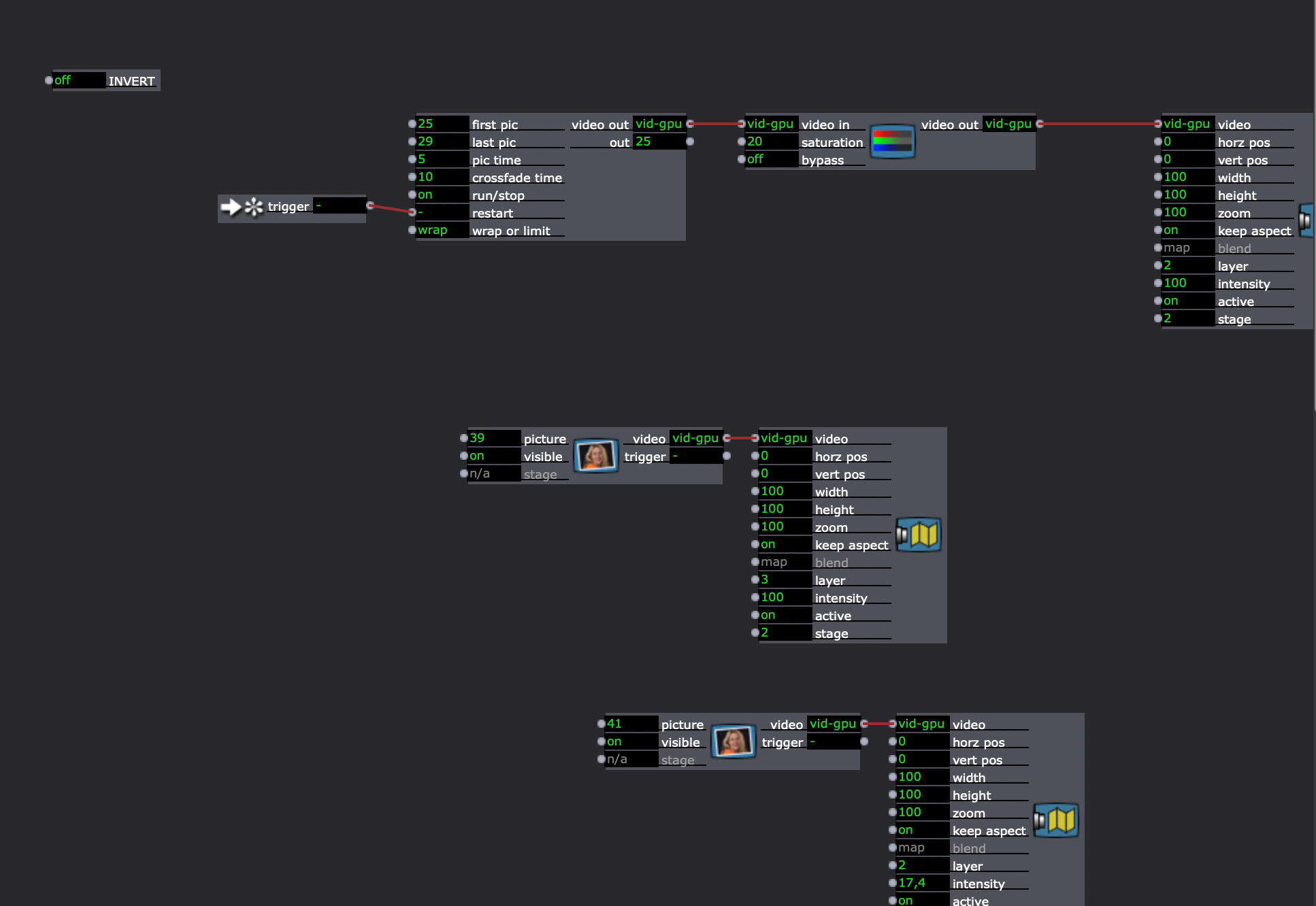

      Restarting Isadora and computer did not bring the titles back. A new patch, created in the same Isadora instance have the titles as usual.

      Copying a damaged scene into a new patch and adding new actors into it displays the new actors with the titles. Adding new scene in the damaged patch and adding an actor to it, instantiates the actors without titles. Any way to bring the titles back for the damaged actors?

      Thanks.

      Analysis: http://post.scriptum.ru | Synthesis: http://onewaytheater.us
      Twitter: https://twitter.com/eight_io | Flickr: http://www.flickr.com/photos/eight_io/
      Github: https://github.com/eighteight | MulchCam: https//mulchcam.com
      MulchTune: https://itunes.apple.com/us/app/mulch-tune/id1070973465 | Augmented Theatre: https://augmentedtheatre.com

      DusX Woland 2 Replies Last reply Reply Quote 0
      • DusX
        DusX Tech Staff @eight last edited by

        @eight

        Have you tried to select all the actors, then toggle the actors properties like, collapse/expand, hide property names/show property names?

        Troikatronix Technical Support

        • New Support Ticket Link: https://support.troikatronix.com/support/tickets/new
        • My Add-ons: https://troikatronix.com/add-ons/?u=dusx
        • Profession Services: https://support.troikatronix.com/support/solutions/articles/13000109444-professional-services
        • Misc Projects [many work with Isadora]: https://github.com/rwebber

        Running: Win 11 64bit, i7, M.2 PCIe SSD's, 32gb DDR4, nVidia GTX 4070 | located in Ontario Canada.

        eight 1 Reply Last reply Reply Quote 0
        • eight
          eight @DusX last edited by

          @dusx
          Yes, tried all of them –– no luck.

          Analysis: http://post.scriptum.ru | Synthesis: http://onewaytheater.us
          Twitter: https://twitter.com/eight_io | Flickr: http://www.flickr.com/photos/eight_io/
          Github: https://github.com/eighteight | MulchCam: https//mulchcam.com
          MulchTune: https://itunes.apple.com/us/app/mulch-tune/id1070973465 | Augmented Theatre: https://augmentedtheatre.com

          1 Reply Last reply Reply Quote 0
          • Woland
            Woland Tech Staff @eight last edited by

            @eight said:

            Isadora 3.2.6 on macbook pro m4

            This may be the problem. Isadora 3.2.6 was tested and is stable on Apple computers up to Ventura (released 2022), but Apple's M4 chips were released in 2024/2025, so it may be an issue we haven't seen before that occurs when running Isadora 3.2.6 on an unsupported OS/Apple computer.

            I'd also be curious to know if deleting Isadora Preferences helps, and if opening the same file in Isadora 4 still shows the same issue.

            eight 1 Reply Last reply Reply Quote 0
            • eight
              eight @Woland last edited by

              @woland

              I moved this patch to Intel Macbook pro 10.15.7

              Opened it with Isadora 4

              Deleted Preferences.

              Nothing helped.

              Analysis: http://post.scriptum.ru | Synthesis: http://onewaytheater.us
              Twitter: https://twitter.com/eight_io | Flickr: http://www.flickr.com/photos/eight_io/
              Github: https://github.com/eighteight | MulchCam: https//mulchcam.com
              MulchTune: https://itunes.apple.com/us/app/mulch-tune/id1070973465 | Augmented Theatre: https://augmentedtheatre.com

              Woland 2 Replies Last reply Reply Quote 0
              • Woland
                Woland Tech Staff @eight last edited by

                This post is deleted!
                1 Reply Last reply Reply Quote 0
                • Woland
                  Woland Tech Staff @eight last edited by

                  @eight

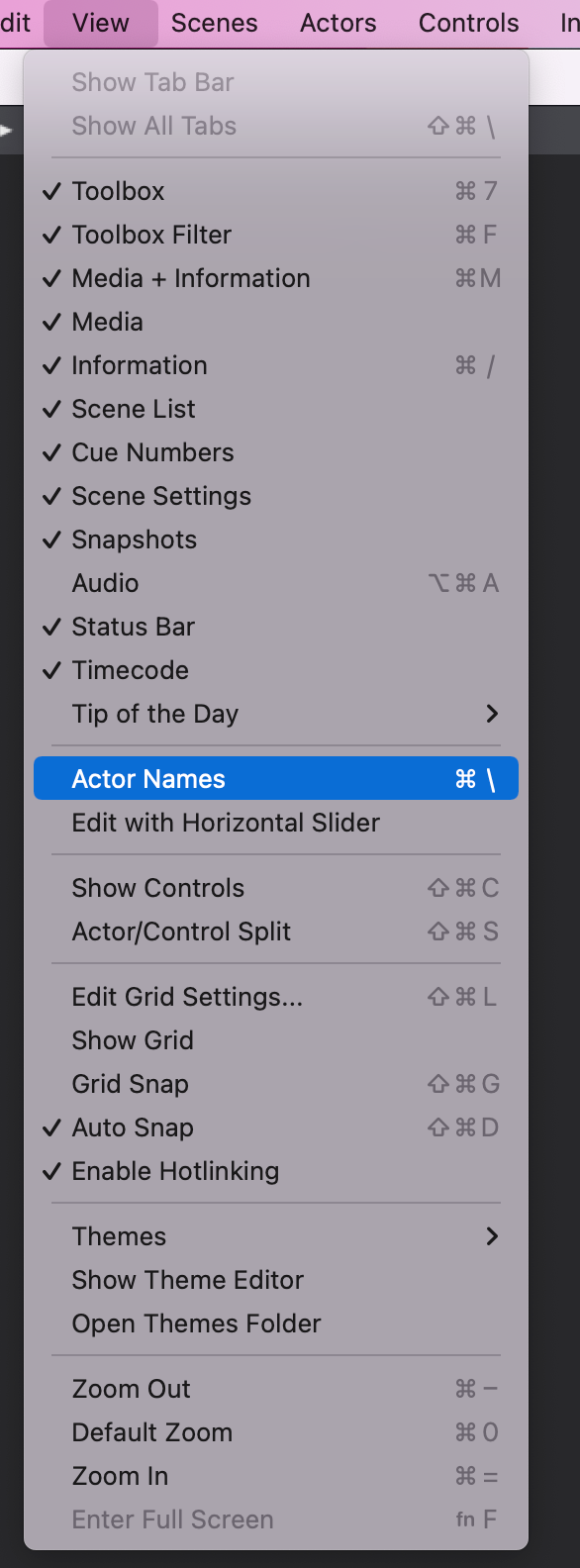
                  I'm silly. There's a menu option for it in the View Menu. I just never use this feature so I didn't remember it existed.
                  eight 1 Reply Last reply Reply Quote 1
                  • eight
                    eight @Woland last edited by

                    @woland

                    Ouch. Fat fingers!

                    Thanks a lot for figuring this out!

                    Analysis: http://post.scriptum.ru | Synthesis: http://onewaytheater.us
                    Twitter: https://twitter.com/eight_io | Flickr: http://www.flickr.com/photos/eight_io/
                    Github: https://github.com/eighteight | MulchCam: https//mulchcam.com
                    MulchTune: https://itunes.apple.com/us/app/mulch-tune/id1070973465 | Augmented Theatre: https://augmentedtheatre.com

                    1 Reply Last reply Reply Quote 0
                    • First post
                      Last post

