Smooth vertical scrolling numbers in a slot-machine / Apple timer style format
-
@dbini Hey John many thanks for your wise words. I will try out the Ease In/Out actors. If you have time to elaborate on your "conditional logic" comment that will be much appreciated.
Thanks again! 🙏
-
You could use Cheetah3D to make actual 3d wheels with numbers on them, then use the 3D Player actor to rotate them and the 3D Stage Orientation actor to position the "camera" in the right place.
TroikaTronix Technical Support
New Support Ticket: https://support.troikatronix.com/support/tickets/new
Support Policy: https://support.troikatronix.com/support/solutions/articles/13000064762
Add-Ons: https://troikatronix.com/add-ons/ & https://troikatronix.com/add-ons/?u=woland
Professional Services: https://support.troikatronix.com/support/solutions/articles/13000109444| Isadora Version: all of them | Mac Pro (Late 2013), macOS 10.14.6, 3.5GHz 6-core, 1TB SSD, 64GB RAM, Dual AMD FirePro D700s |
-
@woland Thank you L this is an alternative solution which I hadn't thought about. I'll check this out too. Many thanks!
Simon
-
@paz woland’s response is the same as I would advise. 3D is quite easy once you get the hang of it. You just need to make sure your anchor point is right in the middle of the object
Did each number slow down need to be triggered separately or should it all run consecutively and in time? So all spinning, first number slows and ends, a second passes, second number slows and ends, etc until all 4 are done? Or did you need each digit to be triggered manually from something? -
@skuven thanks for adding your support and advise on the 3D route initially suggested by @woland. The incorporation of 3D elements within Isadora is not an area I'm particularly confident in. Any support / advice from the community would be much appreciated.
I've continued to work on my original file which now looks like so: scroll-txt-test.izz
Simon Powell: Researching Emerging Technologies in Live Performance at University of the Arts London.
Running: Mac Studio M1 Max 32GB, 512GB SSD, macOS 26.3 | MacBook Pro M2 Pro 16GB, 512GB SSD, macOS 26.3 / Izzy v4.1.3 /// UK -
@paz said:
The incorporation of 3D elements within Isadora is not an area I'm particularly confident in. Any support / advice from the community would be much appreciated.
I'm not super familiar with 3D either and know nothing about using Cheetah 3D, but I managed to cobble something together that might be helpful as a starting point.
Try this: spinning-number-dial-2026-05-05-4.1.3.zip
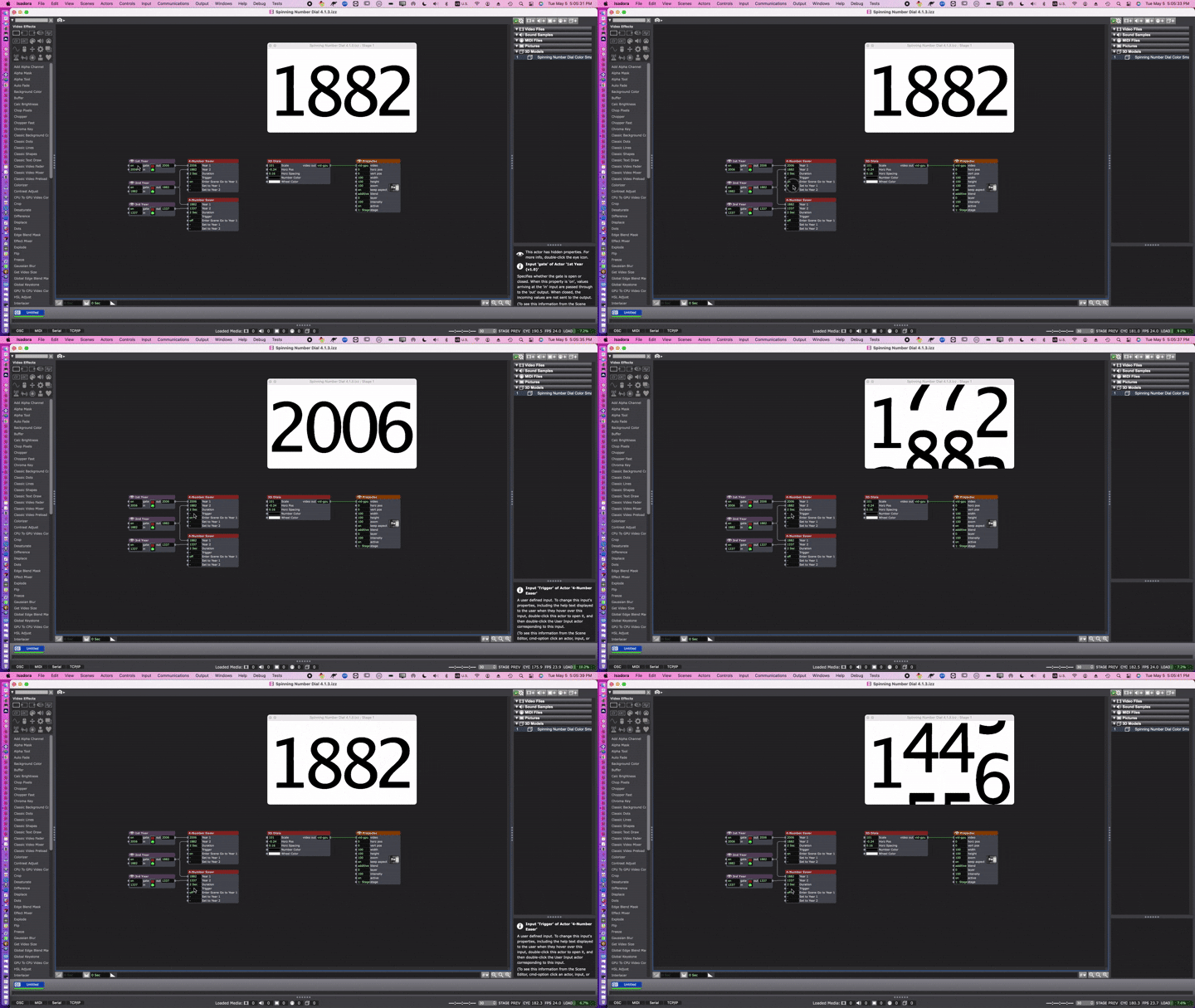
Important info (I think) is that if you have a cylinder with the numbers 0-9 on it, you have ten positions. A circle is 360 degrees, divided by the ten positions, you get 36 degrees, so adjacent positions are 36 degrees apart (rotating around the x-axis).
To get an incoming number from 0-9 and convert it to the correct rotation, I knew I'd have to use a Limit-Scale Value actor, and that makes sense to me. What doesn't make sense to me is why I needed a range of 0-10 for the incoming number and why I needed to invert the 'out min' and 'out max'. It works, but I don't know why. I guess positions 0 and 10 are the same (0 degrees and 360 degrees), so that explains why there are 11 positions, but I still don't understand why I needed to invert the outgoing range. We need someone smarter than me to explain that properly, I'm just good at guess and check. (I always describe my problem-solving approach as "bashing my head against a wall until the wall breaks".)
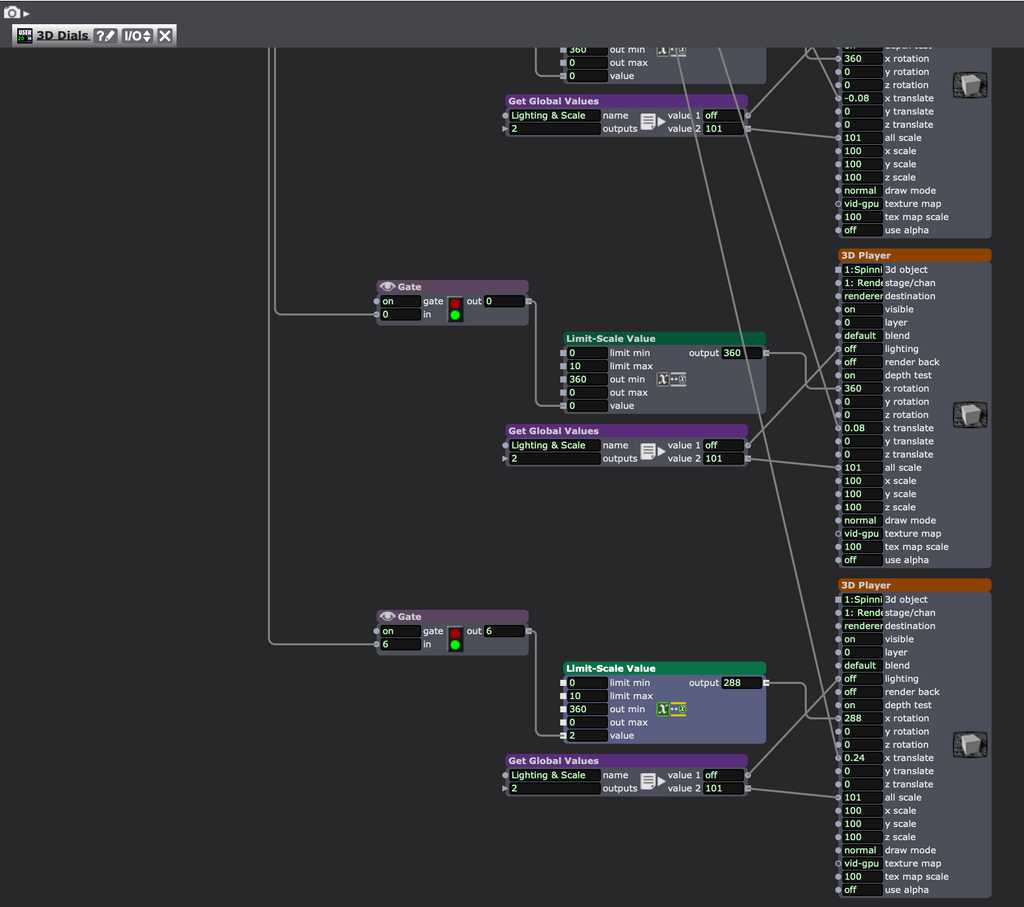
People smarter than me will have to work out the math to make sure all four numbers always spin in the same direction if that is what is desired. The smart way probably has something to do with modulo and could undoubtedly be done with Javascript. I would probably just brute force it by comparing the angle value of the current number to the angle value of the next number and using a Comparator to use one set of math if the angle value of the current number is less than or equal to the angle value of the next number, then use a different set of math if the angle value of the current number is greater than the angle value of the next number, switching between which math to use with a Selector actor.
TroikaTronix Technical Support
New Support Ticket: https://support.troikatronix.com/support/tickets/new
Support Policy: https://support.troikatronix.com/support/solutions/articles/13000064762
Add-Ons: https://troikatronix.com/add-ons/ & https://troikatronix.com/add-ons/?u=woland
Professional Services: https://support.troikatronix.com/support/solutions/articles/13000109444| Isadora Version: all of them | Mac Pro (Late 2013), macOS 10.14.6, 3.5GHz 6-core, 1TB SSD, 64GB RAM, Dual AMD FirePro D700s |
-
@paz said:
The incorporation of 3D elements within Isadora is not an area I'm particularly confident in. Any support / advice from the community would be much appreciated.
The best advice I can give is to watch Mark's Guru Session video on working with 3D in Isadora.
-
@paz said:
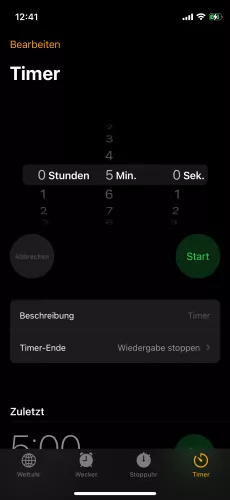
The closest example I can think of is Apple's iPhone timer.
I take it that you mean this:
-
@paz said:
In my mind the Isadora scene will fade up with each of the four numbers scrolling vertically, independently, with an element of inertia to replicate the Apple feel. I need it to be programmable so that each number comes to rest correctly in a sequence for the year in question.
@skuven said:
Did each number slow down need to be triggered separately or should it all run consecutively and in time? So all spinning, first number slows and ends, a second passes, second number slows and ends, etc until all 4 are done? Or did you need each digit to be triggered manually from something?
I have the same questions as skuven.
Also, does every number need to spin every time, or if we change from 1992 to 1883, does the 1 in the thousands place not spin because it's in the same location for both years?
TroikaTronix Technical Support
New Support Ticket: https://support.troikatronix.com/support/tickets/new
Support Policy: https://support.troikatronix.com/support/solutions/articles/13000064762
Add-Ons: https://troikatronix.com/add-ons/ & https://troikatronix.com/add-ons/?u=woland
Professional Services: https://support.troikatronix.com/support/solutions/articles/13000109444| Isadora Version: all of them | Mac Pro (Late 2013), macOS 10.14.6, 3.5GHz 6-core, 1TB SSD, 64GB RAM, Dual AMD FirePro D700s |
-
@woland Massive thanks as always L it's much appreciated. I'll dig into your example file and explanation 🙏
-
@woland Yes I'm looking for each number to spin every time in a style similar to Apple's iPhone timer - just like the iPhone screenshot you've provided.