Combining ambisonics and Isadora
-
TroikaTronix Technical Support
New Support Ticket: https://support.troikatronix.com/support/tickets/new
Support Policy: https://support.troikatronix.com/support/solutions/articles/13000064762
Add-Ons: https://troikatronix.com/add-ons/ & https://troikatronix.com/add-ons/?u=woland
Professional Services: https://support.troikatronix.com/support/solutions/articles/13000109444| Isadora Version: all of them | Mac Pro (Late 2013), macOS 10.14.6, 3.5GHz 6-core, 1TB SSD, 64GB RAM, Dual AMD FirePro D700s |
-
I haven't tried ambisonics in Izzy yet, but had a discussion with a colleague and we decided that it is properly possible. We took part in a residency project in a 19-speaker dome studio in Latvia last year. Dirty Deal Audio organised the project, and it's likely that they will be running more residencies: https://www.dda.lv/
Getting experience in a studio that is designed for ambisonics would be a huge help on your journey. The DDA website also has various resources, including tutorials using Sonobus, which should be applicable to the VSTs running in Isadora.John Collingswood
taikabox.com
2021 M1PRO 32GB OSX 26.5.2 & 2019 MBPT 2.6GHZ i7 OSX15.7.4 16GB
plus an old iMac and assorted Mac Minis for installations -
@dbini Thank you! This is encouraging. I'll take a look at the Dirty Deal Audio website and their resources.
Best wishes
Simon
-
Good idea to do this live in IZZY ... i transfer this into max/msp with spat5 for movment.
in the case you are running all input driver in the scarlet on 100% on the same level, then you will have the A-Format. I am recording with the Zoom F6 in A Format
So i my eye you need only one vst plugin to convert in a B-Format ... i going to test this with the F6 ... and output in an Motu ...
OSX 14.7 / MBP 16 2.3 GHz i9 32GB / Radeon 5500 8GB
OSX 15.7.4 / MBP 16 M4 Max 64GB
Motu Ultralite MKIII & M4 / BM UltraStudio Recorder 3G
located in Munich/Germany -
@sommerdi Thank you for your advice. I've set each of the four preamp channels on the Focusrite so that they match.
Frustratingly I'm getting some weird delay effect - even though the audio interface is set to "direct monitoring" and I've set Isadora's audio buffer to 128.
Do you mean the signal flow should be like this:
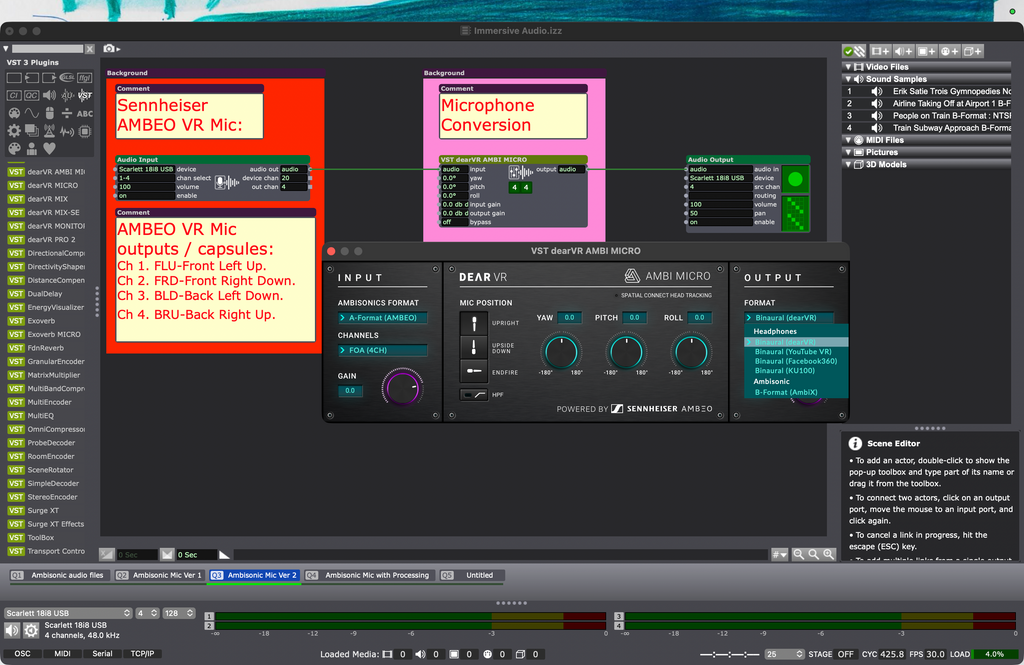
Thanks again!
-
yes the last patch , as i would do .... but put the plugin vst dearVR Pro2 behind ....
maybe the vst plugin has a high latency .... this real pain ...
-
there is an other interisting free VST3 plugin suit for ambisonic ...
OSX 14.7 / MBP 16 2.3 GHz i9 32GB / Radeon 5500 8GB
OSX 15.7.4 / MBP 16 M4 Max 64GB
Motu Ultralite MKIII & M4 / BM UltraStudio Recorder 3G
located in Munich/Germany -
@sommerdi Hi! Thank you for your feedback - really useful! I have the IEM plugins, I will experiment.
With my Focusrite Soundcard set to 96KHz and Isadora set to 96KHz with a 128-sample audio buffer I get the least delay - it's very slight, but annoying.
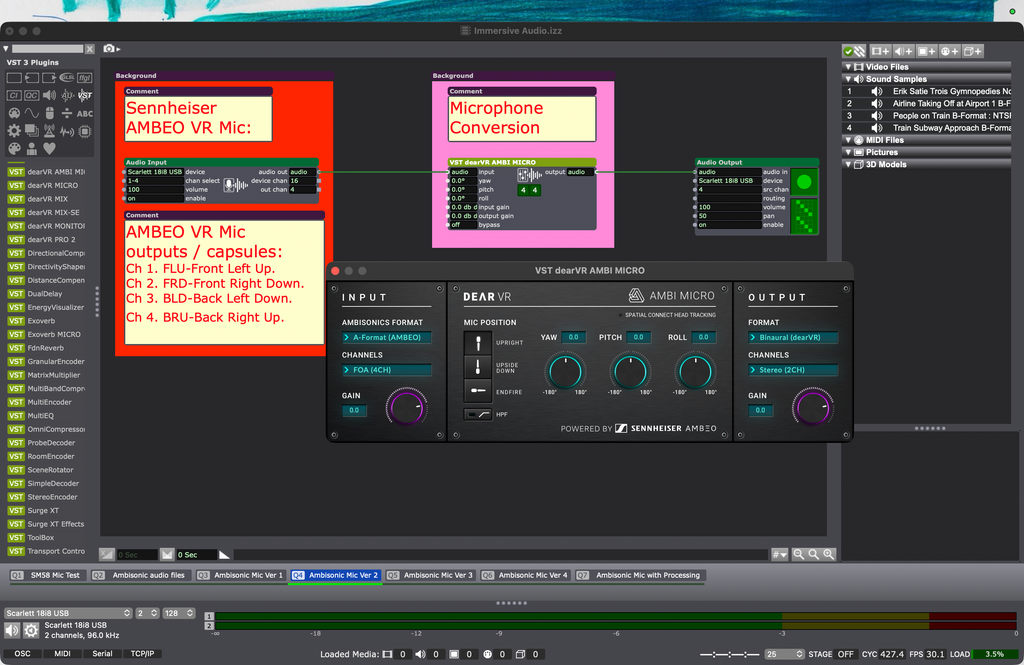
However, when I try this in Reaper with the same audio settings and audio interface the sound is crystal:
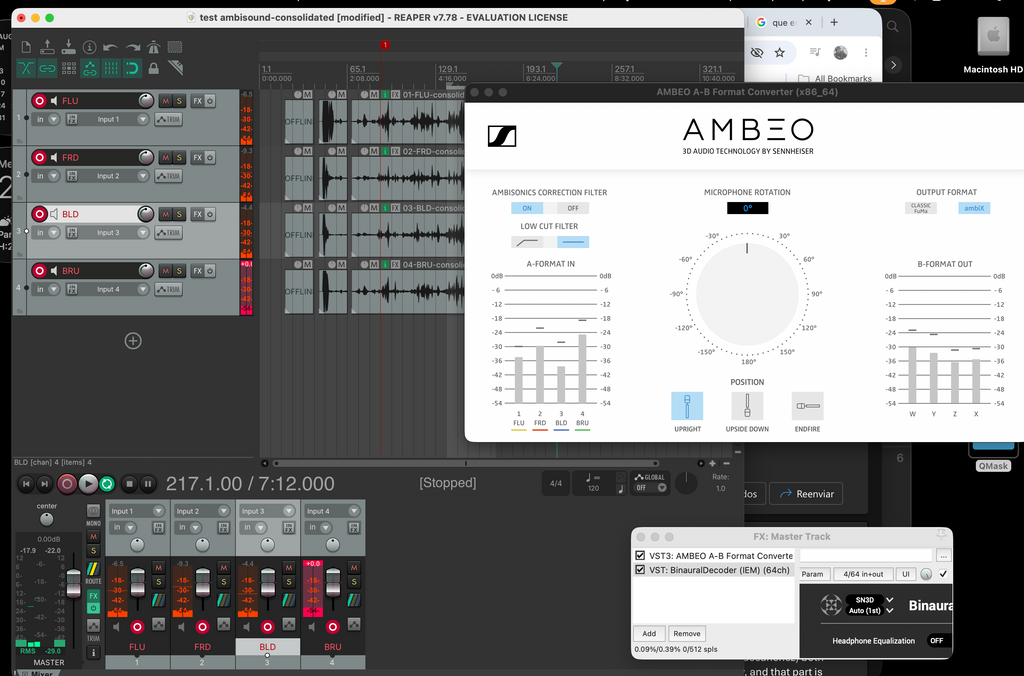
Hopefully I'll report back with a solution - possibly the IEM plugin suite.
P.S. The Sennheiser AMBEO plugin seen above is discontinued (Isadora doesn't recognise it) and has been superseded I believe with the dearVR plugin that I'm using in Isadora.
Best Simon
-
@woland Hello all. I am sorry I am ut of the forum at the moment. But Here is my take for the ambisonics in Isadora. I'll report much much more in the future because I believe this is one of the future of sound in real time applications, recorded sound and xr projects creations in Isadora.
In order to solve Simon problem we have to think in 4 stages
1) Recorded versus live
So, first of all, I have no experience in real time use of microphones in Isadora. I was able to conect a Zylia SM1 and a Zylia SM1S, third order ambisonics microphone in Isadora but for the moment I don't see a use case for it. It worked, but I'll dive into live later. My work is done solely on recorded sound at this moment, but I answer here for recorded sound. I hope it can help and I think it might.
A little bit of theory
You all probably know the rule of thumb to understant High Order Ambisonics (HOA). The higher the order the higher the number of micrphone capsules inside an ambisonic microphone and the higher is the spatial precision and lower signal to noise ratio.
The rule is the following : order +1 suqared
First order : (order 1) + 1 =2, squared = 4 : First oder (like Ambeo) is 4 capsules
Second order (order 2) +1 = 3, squared = 9 (minimum)
Thiurs order (order 3) +1 = 4, sqared = 16 (minimum)
etc.
2) A format versus B format
Now, the second thing to know (and maybe this is a part of the problem that Simon is having), is that the raw recording, called A format, is useless per se. A format is just used to transcode into B format in order to get to he spatial harmonics that can be really used to rotate pitch yaw and roll the rource and spatialize it.
Normally a microphone outputs just the A format. A daw, through a plugin -vst or otherwise- can transform it into B format and then only rotations and translations can happen. It CAN do it in real time, but if you work like me with recorded sound... there is no need to ask isadora to do something that you can render as a file to free cpu for other stuff.
So I only work with files transcoded into B format.
3) Virtual microphones (or not)
Once you have the b format the new amazing sound possibilities in Isadora allow the Audio FIe player to play HOA files, only then you can use rotators like my favourite IEM Scene Rotator you could place virtually infinite virtual microphones in the chain and move the microphones towards or far away from the sources in ordeer to navigate into the sound in real time in 6 DoF (six degrees of freedom : translation on x, y, z axis and rotation on x y and z axis). But just rotating inven without placinv virtual microphones is already astonishing because scene rotation is very different from traditional panorami potentiomenters in daw and mixers. PanPot (Panoramic potentiometers so called in the audio world just lower the volume of one ear (like isadora Audio Output "pan" input property). In ambisonic workd this is meaningless because through a rotato you really feel that the source is moving WITHOUT lowering the volume of one of the ears. The source is "REALLY" moving into space. So, unless you want 6DOF (for VR applications for instance) you don't need virtual microphones creation and translation in space : rotation is enough. Ambisonic rotation is more subtle, but so much more realistic. I'll never be able to go back, personally
4) Rendering
Thaat is where lies another complexity but essential stage for playing the sound. Ambisonic files fo either throug a multispeaker setup or a headphone. in my experience a 2 speaker set is not enough to perceive at the same time the sublte source shifts. It works better starting from 4 speakers. But it can work very well in a headphone. In the case of 2 speakers or headphones you need a binauralizer that renders whatever order into 2 channels. This is called binauralization.
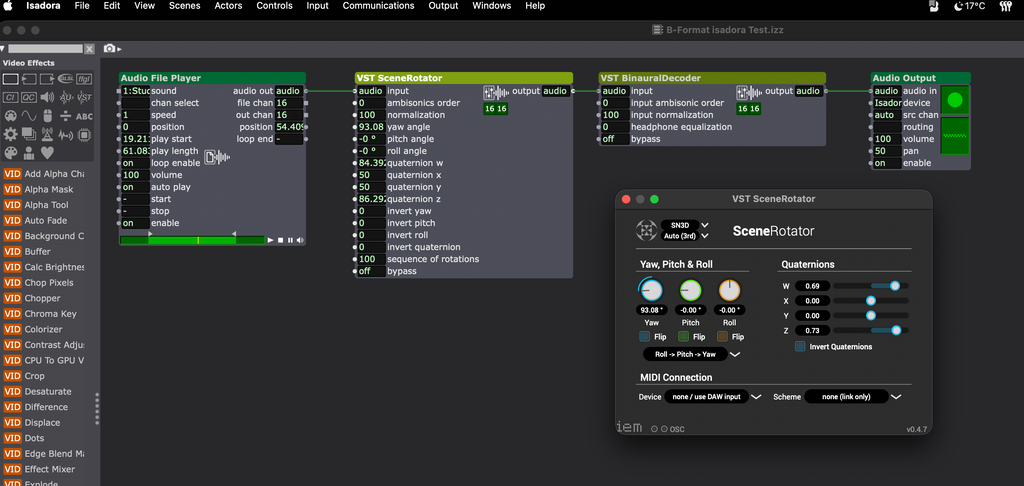
So please remember that isadora is ONLY compatible with VST 3 (so, forget the Sparta Ambisonic plugins for the moment because they are VST 2) Download IEM plugin suite and try this patch directly with b format. It works for me b-format-isadora-test.izz douible click the scene rotator and move the yaw from -90 to +90 you'll hear (better with a headphone first) the miracle of ambisonics screenshot-2026-08-26-at-02.37.56-resized.png
Please keep me posted
Armando Menicacci
www.studiosit.ca
MacBook Pro 16-inch, 2021 Apple M1 Max, RAM 64 GB, 4TB SSD, Mac OS Sonoma 14.4.1 (23E224) -
@armando Hello Armando, thank you so much for your detailed reply. I am away on summer vacation but as soon as I’m back with Isadora and my ambisonic mic I’ll be pouring over your advice and I’ll let you know how things are progressing. Best wishes Simon