[ANSWERED] Re-Validating VST plugins in Isadora 4.5.1 (Arm)
-
During first launch of 4.5.1 on macbook pro m4, I got a dialog asking to validate the vst plugins. A set of VST plugins required a separate login. While I was resetting my password for VST manager, Isadora went ahead and decided that these specific plugins are not compatible.
Q: Now, that I have my VST plugin credentials, how do I tell Isadora to reevaluate these plugins?
Thanks!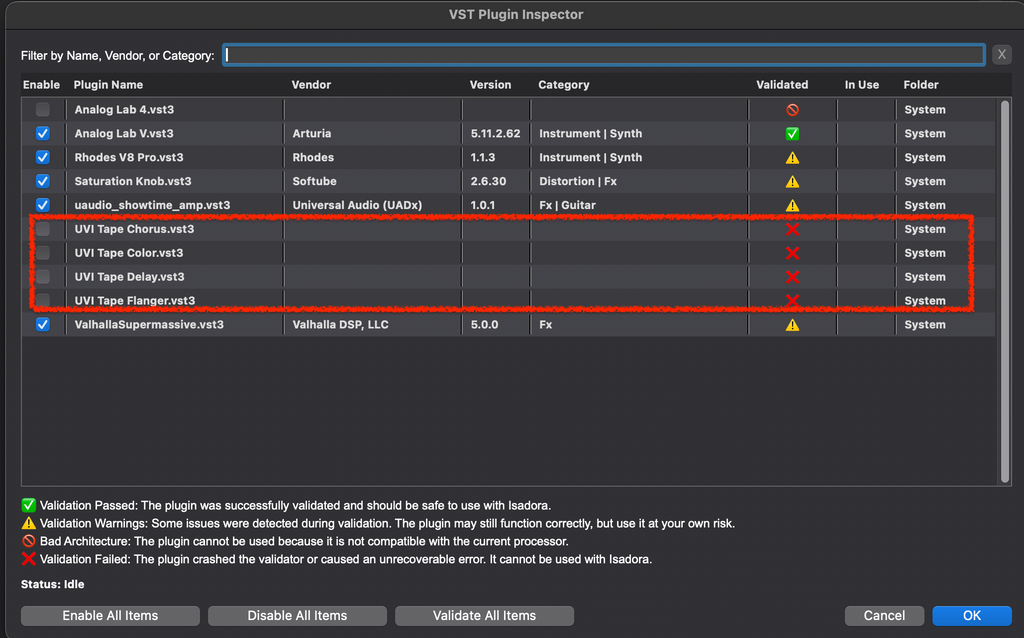
Analysis: http://post.scriptum.ru | Flickr: http://www.flickr.com/photos/eight_io/
Github: https://github.com/eighteight | MulchCam: https://mulchcam.web.app
MulchTune: https://itunes.apple.com/us/app/mulch-tune/id1070973465 | Augmented Theatre: https://augmented-theatre.web.app | What About Phase? https://whataboutphase.web.app -
@eight
You will need to open your preferences folder, and delete "com.troikatronix.isadora.vst3-plugins.json"
That file holds the list of plugins. Isadora should scan for all VSTs again, and revalidate them. This can be a slow process for users with hundreds of VSTs.🎛️ TroikaTronix Professional Services
https://troikatronix.com/professional-services🎫 Support Tickets
https://support.troikatronix.com/support/tickets/new💻 Add-ons
https://troikatronix.com/add-ons/?u=dusx🧪 GitHub Projects
https://github.com/rwebber🖥️ Win11 | i7 | RTX 4070 | 32GB RAM | Ontario, Canada
-
@dusx Thanks for clearing this out. It would be nice though to have a fourth "Reset" button in the screen above.
-
@dusx said:
You will need to open your preferences folder, and delete "com.troikatronix.isadora.vst3-plugins.json"
Just for folks who run across this post in the future, it's worth noting that you need to go to Mac HD/Users/[YOUR USERNAME]/Library/Preferences
Apple, in their infinite wisdom, has both of the following and they're completely different:
 Mac HD/Users/[YOUR USERNAME]/Library/Preferences
  Mac HD/Library/Preferences


