• Products
    • Isadora
    • Get It
    • ADD-ONS
    • IzzyCast
    • Get It
  • Forum
  • Help
  • Werkstatt
  • Newsletter
  • Impressum
  • Dsgvo
  • Press
  • Isadora
  • Get It
  • ADD-ONS
  • IzzyCast
  • Get It
  • Press
  • Dsgvo
  • Impressum

Navigation

    • Register
    • Login
    • Search
    • Categories
    • Recent
    • Popular
    • Tags

    Capture stage shows distorted image

    Troubleshooting and Bug Reports
    4
    12
    153
    Loading More Posts
    • Oldest to Newest
    • Newest to Oldest
    • Most Votes
    Reply
    • Reply as topic
    Log in to reply
    This topic has been deleted. Only users with topic management privileges can see it.
    • jfg
      jfg @Eva last edited by

      @Eva

      Have you tried to make a screenshot with Syphon Recorder? Do you get then the same result?

      https://syphon.info/recorder.html

      Best regards

      Jean-François 

      • Izzy 4
      - MacBook Pro M1 Max 16" 64GB RAM, Mac OS 15.3.2 Sequoia
      - Mac Pro 5.1 middle 2012 (3,33 GHz 6-Core Intel Xeon, 32GB RAM, Radeon RX 580 8 GB ),
      Mac OS 10.14.6 (Mojave)
      - Mac mini Pro M4, Mac OS 15.3.2 Sequoia

      • A range of deployable older Macs
        Located in Bremen, Germany
      1 Reply Last reply Reply Quote 0
      • E
        Eva last edited by

        I will have to try tomorrow, but why is this impossible in Isadora? I have quite some trouble with output and it is a strong computer.

        Eva Esmann Behrens
        Labtop: Macbook pro (Retina) 2015, 2,7 GHz,8 GB, MacOS Mojave
        Mac Studio

        jfg 1 Reply Last reply Reply Quote 0
        • jfg
          jfg @Eva last edited by jfg

          @Eva

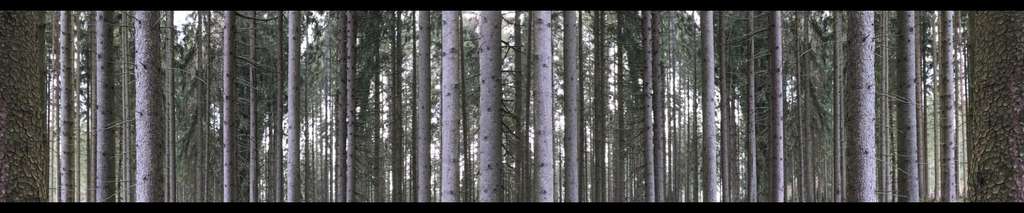
          I don't know why it is not working for you. I got following results without artefacts using Capture Stage to picture (here small size for web)


          • Izzy 4
          - MacBook Pro M1 Max 16" 64GB RAM, Mac OS 15.3.2 Sequoia
          - Mac Pro 5.1 middle 2012 (3,33 GHz 6-Core Intel Xeon, 32GB RAM, Radeon RX 580 8 GB ),
          Mac OS 10.14.6 (Mojave)
          - Mac mini Pro M4, Mac OS 15.3.2 Sequoia

          • A range of deployable older Macs
            Located in Bremen, Germany
          DusX 1 Reply Last reply Reply Quote 0
          • Woland
            Woland Tech Staff @Eva last edited by

            @eva

            What is the resolution of your Stage?

            TroikaTronix Technical Support
            New Support Ticket: https://support.troikatronix.com/support/tickets/new
            Support Policy: https://support.troikatronix.com/support/solutions/articles/13000064762
            Add-Ons: https://troikatronix.com/add-ons/ & https://troikatronix.com/add-ons/?u=woland
            Professional Services: https://support.troikatronix.com/support/solutions/articles/13000109444

            | Isadora Version: all of them | Mac Pro (Late 2013), macOS 10.14.6, 3.5GHz 6-core, 1TB SSD, 64GB RAM, Dual AMD FirePro D700s |

            E 1 Reply Last reply Reply Quote 0
            • E
              Eva last edited by

              Here is a syphon snapshot, its totally off... there is usually a black background.

              isadora-stage-6-2026-10-24-at-20.29.31-resized.png

              Eva Esmann Behrens
              Labtop: Macbook pro (Retina) 2015, 2,7 GHz,8 GB, MacOS Mojave
              Mac Studio

              1 Reply Last reply Reply Quote 0
              • E
                Eva @Woland last edited by

                @woland its 4880x1200

                Eva Esmann Behrens
                Labtop: Macbook pro (Retina) 2015, 2,7 GHz,8 GB, MacOS Mojave
                Mac Studio

                1 Reply Last reply Reply Quote 0
                • DusX
                  DusX Izzy Guru @jfg last edited by

                  @jfg said:

                  I got following results without artefacts using Capture Stage to picture

                   Can you do a test at the same resolution Eva is using (4880x1200)?
                  I have recently discovered some formats don't record for video (vertical for example), so perhaps there are image limitations as well?

                  🎛️ TroikaTronix Professional Services
                  https://troikatronix.com/professional-services

                  🎫 Support Tickets
                  https://support.troikatronix.com/support/tickets/new

                  💻 Add-ons
                  https://troikatronix.com/add-ons/?u=dusx

                  🧪 GitHub Projects
                  https://github.com/rwebber

                  🖥️ Win11 | i7 | RTX 4070 | 32GB RAM | Ontario, Canada

                  jfg 1 Reply Last reply Reply Quote 0
                  • jfg
                    jfg @DusX last edited by jfg

                    @dusx @eva

                    the captured picture have 5760x1080 pixels. I made a try with 5760x1200 with no problem.

                    5760x1080

                    5760x1200

                    • Izzy 4
                    - MacBook Pro M1 Max 16" 64GB RAM, Mac OS 15.3.2 Sequoia
                    - Mac Pro 5.1 middle 2012 (3,33 GHz 6-Core Intel Xeon, 32GB RAM, Radeon RX 580 8 GB ),
                    Mac OS 10.14.6 (Mojave)
                    - Mac mini Pro M4, Mac OS 15.3.2 Sequoia

                    • A range of deployable older Macs
                      Located in Bremen, Germany
                    1 Reply Last reply Reply Quote 0
                    • jfg
                      jfg last edited by jfg

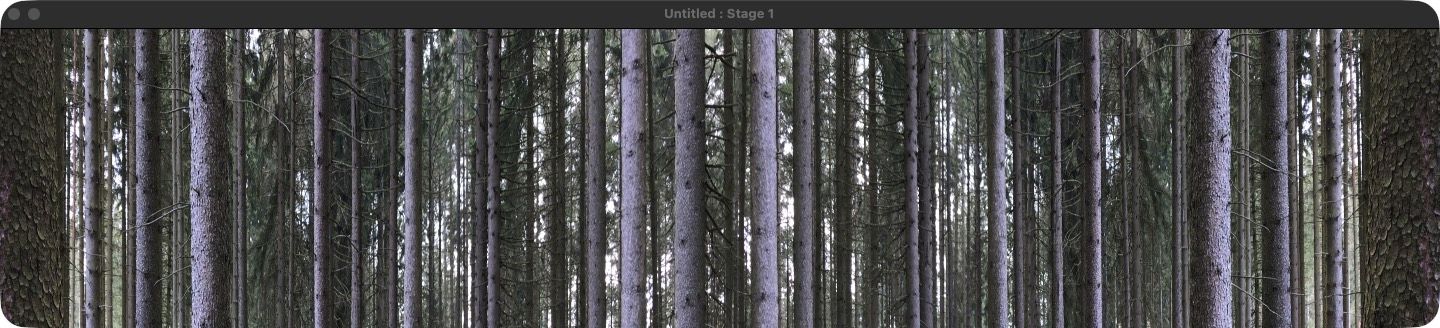
                      The only problem is that the image captured (Stage 1200px, original video 1080px) from Isadora has black bars at the top and bottom, whilst the output from Isadora fills the screen
                      • Izzy 4
                      - MacBook Pro M1 Max 16" 64GB RAM, Mac OS 15.3.2 Sequoia
                      - Mac Pro 5.1 middle 2012 (3,33 GHz 6-Core Intel Xeon, 32GB RAM, Radeon RX 580 8 GB ),
                      Mac OS 10.14.6 (Mojave)
                      - Mac mini Pro M4, Mac OS 15.3.2 Sequoia

                      • A range of deployable older Macs
                        Located in Bremen, Germany
                      1 Reply Last reply Reply Quote 0
                      • E
                        Eva last edited by

                        I have managed to get snapshots through OBS, but its a bit of an extra piece of work, and not super handy.


                        Eva Esmann Behrens
                        Labtop: Macbook pro (Retina) 2015, 2,7 GHz,8 GB, MacOS Mojave
                        Mac Studio

                        1 Reply Last reply Reply Quote 0
                        • First post
                          Last post