• Products
    • Isadora
    • Get It
    • ADD-ONS
    • IzzyCast
    • Get It
  • Forum
  • Help
  • Werkstatt
  • Newsletter
  • Impressum
  • Dsgvo
  • Press
  • Isadora
  • Get It
  • ADD-ONS
  • IzzyCast
  • Get It
  • Press
  • Dsgvo
  • Impressum

Navigation

    • Register
    • Login
    • Search
    • Categories
    • Recent
    • Popular
    • Tags

    Offsetting incoming timecode?

    How To... ?
    2
    2
    28
    Loading More Posts
    • Oldest to Newest
    • Newest to Oldest
    • Most Votes
    Reply
    • Reply as topic
    Log in to reply
    This topic has been deleted. Only users with topic management privileges can see it.
    • G
      gpeddino last edited by

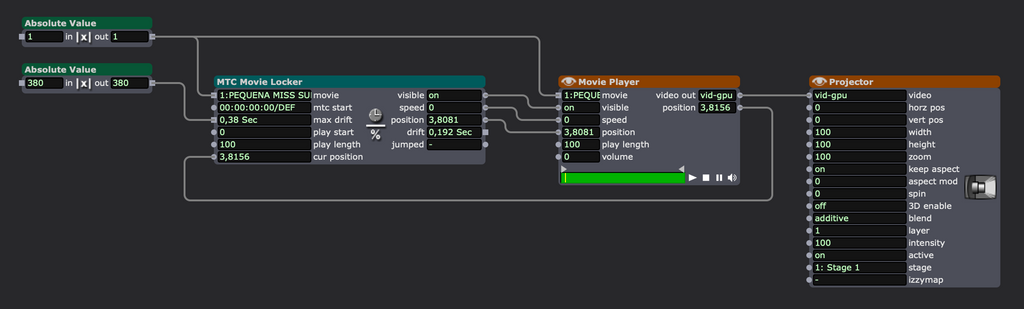
      I've been working with the MTC actors and I noticed that MTC Movie Locker receives timecode automatically, with no need of an input from MTC Reader. But the thing is, I find myself having to offset slightly the incoming TC so it will match the sync between two different systems (Ableton sending MTC, Isadora receiving it and keeping a video file in sync).

      I do the offset by moving the TC file in Ableton, but it seems far from ideal. Is there a way of offsetting the incoming value within Isadora? Am i doing something wrong here?
      1 Reply Last reply Reply Quote 0
      • E
        eamon last edited by

        Hi 

        There may be other ways to do this more elegantly and no doubt greater minds will arrive in.

         I have done similar but only within Isadora but the principle should be the same.

        I have used the TC Caclulator to offset the incoming TC by subtracting/adding by the requisite value and then send that updated TC value to your next step.

        I did this internally to offset a constantly changing start point for a timecode video....!!!

        Hope this helps!?

        eamon

        1no. 14" MacBook Pro M1, 32GB RAM, Max Processor, 1GB SSD
        Various Mac models from mac mini 2012 to Macbook Retina 15"
        1no. imac 21.5 M2 model.

        1 Reply Last reply Reply Quote 0
        • First post
          Last post