Offsetting incoming timecode?
-
I've been working with the MTC actors and I noticed that MTC Movie Locker receives timecode automatically, with no need of an input from MTC Reader. But the thing is, I find myself having to offset slightly the incoming TC so it will match the sync between two different systems (Ableton sending MTC, Isadora receiving it and keeping a video file in sync).
I do the offset by moving the TC file in Ableton, but it seems far from ideal. Is there a way of offsetting the incoming value within Isadora? Am i doing something wrong here?
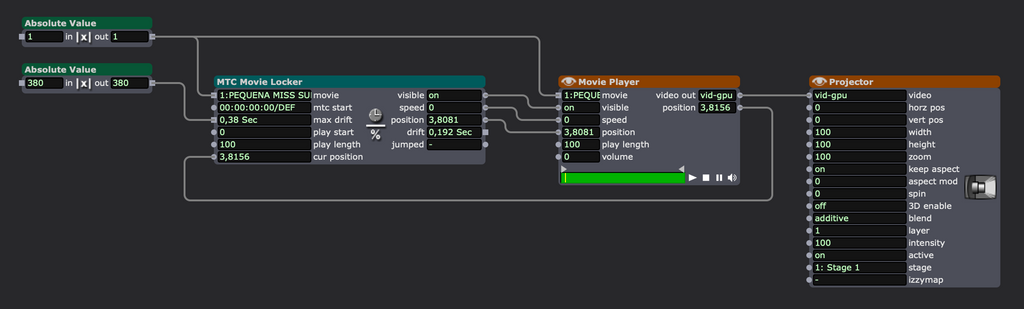
-
Hi
There may be other ways to do this more elegantly and no doubt greater minds will arrive in.
I have done similar but only within Isadora but the principle should be the same.
I have used the TC Caclulator to offset the incoming TC by subtracting/adding by the requisite value and then send that updated TC value to your next step.
I did this internally to offset a constantly changing start point for a timecode video....!!!
Hope this helps!?
eamon
-
@gpeddino said:
offset by moving the TC file in Ableton
This seems a valid way of doing this to me. If you were to add/subtract from the code in Isadora you would change your endpoints by the offset, So perhaps never play the beginning frames? By moving the TC file you preserve both ends exactly.
Of course you could add/subtract from the position output of the MTC Movie Locker to have the same effect as offsetting the timecode itself.
-
Maybe:
- Ditch the MTC Movie Locker actor
- Place a fresh Movie Player actor (or unhide the hidden inputs on the one you've got from the screenshot)
- Right-click the Movie Player actor
- Select "Use Timecode" from the contextual menu
- The Movie Player's position inputs and outputs will switch to Timecode
- Use a Timecode Calculator actor connected to the relevant input on the Movie Player to add or subtract as needed to deal with your offset