• Products
    • Isadora
    • Get It
    • ADD-ONS
    • IzzyCast
    • Get It
  • Forum
  • Help
  • Werkstatt
  • Newsletter
  • Impressum
  • Dsgvo
  • Press
  • Isadora
  • Get It
  • ADD-ONS
  • IzzyCast
  • Get It
  • Press
  • Dsgvo
  • Impressum

Navigation

    • Register
    • Login
    • Search
    • Categories
    • Recent
    • Popular
    • Tags

    Feature request: picture from video grabber

    Feature Requests
    10
    26
    16101
    Loading More Posts
    • Oldest to Newest
    • Newest to Oldest
    • Most Votes
    Reply
    • Reply as topic
    Log in to reply
    This topic has been deleted. Only users with topic management privileges can see it.
    • barneybroomer
      barneybroomer Beta Gold last edited by

      I'm having a workaround now, not the easiest way. Nikon HDMI to Black magic input - out to projector

      Shoot a picture with a Nikon and Sofortbild , picture ends up in user bin. Picture player is already set to picture number (aargh, have to shoot the right picture...), then I switch off live view and enable picture player. 
      The problem is I have to do this with 20 projectors on 2 stages...
       I know in the past Isadora and DSLR input was in the works, but I think that stopped (could only find something back in the old forum)

      Mac Studio Ultra M2 / OSX 26.6
      Mac Mini M4 / OSX 15.5
      Imac M1 / OSX 15.5

      and a Motorola DynaTAC 8000X ;)

      1 Reply Last reply Reply Quote 0
      • camilozk
        camilozk last edited by

        still no go for picture grabber?

        :)

        i5 M520 @ 2.40GHz / 4Gb Ram / Win 7 - izzy 2.2.2
        i7 7700HQ @ 2.8GHz / 16Gb Ram / Win 10 - izzy 2.6.1 / GeForce GTX 1060
        AMD Ryzen 7 5800H / 16Gb Ram / Windows 11 / Radeon Graphics 3.20 GHz

        1 Reply Last reply Reply Quote 0
        • DusX
          DusX Izzy Guru last edited by

          I am currently pulling together all feature requests, and grouping related requests.

          You can be sure that this is in the mix, and that we will be prioritizing these ASAP.

          🎛️ TroikaTronix Professional Services
          https://troikatronix.com/professional-services

          🎫 Support Tickets
          https://support.troikatronix.com/support/tickets/new

          💻 Add-ons
          https://troikatronix.com/add-ons/?u=dusx

          🧪 GitHub Projects
          https://github.com/rwebber

          🖥️ Win11 | i7 | RTX 4070 | 32GB RAM | Ontario, Canada

          1 Reply Last reply Reply Quote 0
          • camilozk
            camilozk last edited by

            :)

            thanks and thanks for so many satisfactions with isadora 2.0.5!

            i5 M520 @ 2.40GHz / 4Gb Ram / Win 7 - izzy 2.2.2
            i7 7700HQ @ 2.8GHz / 16Gb Ram / Win 10 - izzy 2.6.1 / GeForce GTX 1060
            AMD Ryzen 7 5800H / 16Gb Ram / Windows 11 / Radeon Graphics 3.20 GHz

            1 Reply Last reply Reply Quote 0
            • N
              nick last edited by

              I grab a short movie and then load it into a movie player with speed set to 0 to get round this

              MacBook Pro 11.5.2

              1 Reply Last reply Reply Quote 0
              • Skulpture
                Skulpture Izzy Guru last edited by

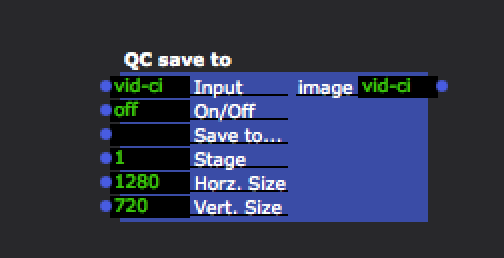
                Drop this in:

                ~/Library/compositions
                Send a video into it and you can use an off/on toggle.

                4b1d30-screen-shot-2015-03-09-at-12.14.17.png 5e3388-save-to.zip

                Graham Thorne | www.grahamthorne.co.uk
                RIG 1: Custom-built PC: Windows 11. Ryzen 7 7700X, RTX3080, 32G DDR5 RAM. 2 x m.2.
                RIG 2: Laptop MSI Vector 16 HX AI: Windows 11, Intel Ultra 9. RTX5070ti, 32G RAM (DDR5 6000htz), NVME M.2 SSD.
                RIG 3: Apple Laptop: rMBP i7, 8gig RAM 256 SSD, HD, OS X 10.12.12

                1 Reply Last reply Reply Quote 0
                • crystalhorizon
                  crystalhorizon Beta Platinum last edited by

                  took the save to qc from your zip. but my save to qc looks different

                  when opening with qc it says:
                  https://www.dropbox.com/s/4gkjzxh0ytgnjee/Screenshot%202015-03-09%2022.02.02.png?dl=0
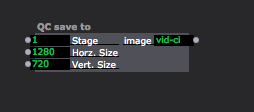
                  66d86f-screenshot-2015-03-09-21.57.56.png

                  Alexander Nantschev | http://www.crystalhorizon.at | located in Vienna Austria

                  1 Reply Last reply Reply Quote 0
                  • crystalhorizon
                    crystalhorizon Beta Platinum last edited by

                    strange cannot put the screenshot, uploading, but when i click post comment, it doesnt show up

                    here the dropboxlink
                    https://www.dropbox.com/s/lqq9lg87ilv1ta1/Screenshot%202015-03-09%2021.57.56.png?dl=0
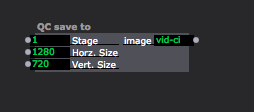
                    52261c-screenshot-2015-03-09-21.57.56.png

                    Alexander Nantschev | http://www.crystalhorizon.at | located in Vienna Austria

                    1 Reply Last reply Reply Quote 0
                    • vanakaru
                      vanakaru last edited by

                      Something is missing or screwed up.

                      MBP 4.1 & MBP (Retina, Mid 2012) MBP Retina 2017

                      1 Reply Last reply Reply Quote 0
                      • Fred
                        Fred last edited by

                        I think this will answer it

                        http://kineme.net/forum/Discussion/DevelopingCompositions/HowexportimageQCfile

                        http://www.fredrodrigues.net/
                        https://github.com/fred-dev
                        OSX 13.6.4 (22G513) MBP 2019 16" 2.3 GHz 8-Core i9, Radeon Pro 5500M 8 GB, 32g RAM
                        Windows 10 7700K, GTX 1080ti, 32g RAM, 2tb raided SSD

                        1 Reply Last reply Reply Quote 0
                        • Fred
                          Fred last edited by

                          Here is a compiled version 443252-imageexporter.plugin.zip

                          http://www.fredrodrigues.net/
                          https://github.com/fred-dev
                          OSX 13.6.4 (22G513) MBP 2019 16" 2.3 GHz 8-Core i9, Radeon Pro 5500M 8 GB, 32g RAM
                          Windows 10 7700K, GTX 1080ti, 32g RAM, 2tb raided SSD

                          1 Reply Last reply Reply Quote 0
                          • Skulpture
                            Skulpture Izzy Guru last edited by

                            Sorry people!

                            I just dragged it out of my folder; presumed it would work for you all.
                            Thanks @Fred 

                            Graham Thorne | www.grahamthorne.co.uk
                            RIG 1: Custom-built PC: Windows 11. Ryzen 7 7700X, RTX3080, 32G DDR5 RAM. 2 x m.2.
                            RIG 2: Laptop MSI Vector 16 HX AI: Windows 11, Intel Ultra 9. RTX5070ti, 32G RAM (DDR5 6000htz), NVME M.2 SSD.
                            RIG 3: Apple Laptop: rMBP i7, 8gig RAM 256 SSD, HD, OS X 10.12.12

                            1 Reply Last reply Reply Quote 0
                            • crystalhorizon
                              crystalhorizon Beta Platinum last edited by

                              @fred where do I put your plugin?

                              Alexander Nantschev | http://www.crystalhorizon.at | located in Vienna Austria

                              1 Reply Last reply Reply Quote 0
                              • crystalhorizon
                                crystalhorizon Beta Platinum last edited by

                                @fred got it, into the qc path, now it looks like on grahams screenshot. Thank you

                                Alexander Nantschev | http://www.crystalhorizon.at | located in Vienna Austria

                                1 Reply Last reply Reply Quote 0
                                • Woland
                                  Woland Tech Staff @Fred last edited by

                                  @Fred

                                  Any chance you still have that Applescript kicking around? I'd love to get my hands on it, provided that you're willing to share.

                                  TroikaTronix Technical Support
                                  New Support Ticket: https://support.troikatronix.com/support/tickets/new
                                  Support Policy: https://support.troikatronix.com/support/solutions/articles/13000064762
                                  Add-Ons: https://troikatronix.com/add-ons/ & https://troikatronix.com/add-ons/?u=woland
                                  Professional Services: https://support.troikatronix.com/support/solutions/articles/13000109444

                                  | Isadora Version: all of them | Mac Pro (Late 2013), macOS 10.14.6, 3.5GHz 6-core, 1TB SSD, 64GB RAM, Dual AMD FirePro D700s |

                                  Fred 1 Reply Last reply Reply Quote 0
                                  • Fred
                                    Fred @Woland last edited by

                                    @Woland long gone, but something like this:

                                    on run
                                    set filePath to POSIX path of "/Users/folder_path"
                                    set theCurrentDate to current date
                                    set shellCommand to "/usr/sbin/screencapture \"" & filePath & "Screen Shot" & theCurrentDate & ".png\""
                                    do shell script shellCommand
                                    end run

                                    And you can attach this to a folder to watch it and import the files into Izzy

                                    on adding folder items to this_folder after receiving these_items

                                    try
                                    tell application "Isadora"
                                    import media into document 1 from these_items
                                    end tell

                                    on error msg
                                    display dialog "Error importing file into Isadora: " & msg
                                    end try

                                    end adding folder items to

                                    And to refine it to a specific stage here is a good thread

                                    http://apple.stackexchange.com...

                                    http://www.fredrodrigues.net/
                                    https://github.com/fred-dev
                                    OSX 13.6.4 (22G513) MBP 2019 16" 2.3 GHz 8-Core i9, Radeon Pro 5500M 8 GB, 32g RAM
                                    Windows 10 7700K, GTX 1080ti, 32g RAM, 2tb raided SSD

                                    Woland 1 Reply Last reply Reply Quote 0
                                    • Woland
                                      Woland Tech Staff @Fred last edited by

                                      @Fred Thanks!

                                      TroikaTronix Technical Support
                                      New Support Ticket: https://support.troikatronix.com/support/tickets/new
                                      Support Policy: https://support.troikatronix.com/support/solutions/articles/13000064762
                                      Add-Ons: https://troikatronix.com/add-ons/ & https://troikatronix.com/add-ons/?u=woland
                                      Professional Services: https://support.troikatronix.com/support/solutions/articles/13000109444

                                      | Isadora Version: all of them | Mac Pro (Late 2013), macOS 10.14.6, 3.5GHz 6-core, 1TB SSD, 64GB RAM, Dual AMD FirePro D700s |

                                      1 Reply Last reply Reply Quote 0
                                      • barneybroomer
                                        barneybroomer Beta Gold last edited by

                                        Still I think it needs a good actor for this. There is already an movie to disk actor, I need to capture only 1 frame....Still working with Syphon capture and import it into Izzy

                                        Mac Studio Ultra M2 / OSX 26.6
                                        Mac Mini M4 / OSX 15.5
                                        Imac M1 / OSX 15.5

                                        and a Motorola DynaTAC 8000X ;)

                                        1 Reply Last reply Reply Quote 0
                                        • First post
                                          Last post