• Products
    • Isadora
    • Get It
    • ADD-ONS
    • IzzyCast
    • Get It
  • Forum
  • Help
  • Werkstatt
  • Newsletter
  • Impressum
  • Dsgvo
  • Press
  • Isadora
  • Get It
  • ADD-ONS
  • IzzyCast
  • Get It
  • Press
  • Dsgvo
  • Impressum

Navigation

    • Register
    • Login
    • Search
    • Categories
    • Recent
    • Popular
    • Tags

    Output position parameter not resetting

    How To... ?
    4
    12
    3689
    Loading More Posts
    • Oldest to Newest
    • Newest to Oldest
    • Most Votes
    Reply
    • Reply as topic
    Log in to reply
    This topic has been deleted. Only users with topic management privileges can see it.
    • J
      jamienesbitt last edited by

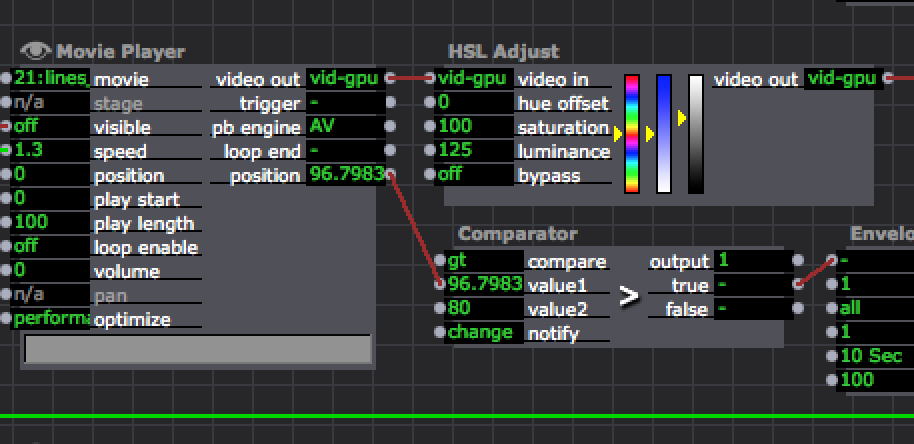
      Thanks for the reply! If you look at the movie player output position of 96.7983. I need that to be zero when i click into the scene.  36ceb3-screen-shot-2017-01-10-at-4.47.54-pm.png
      1 Reply Last reply Reply Quote 0
      • crystalhorizon
        crystalhorizon Beta Platinum last edited by

        So that means, it doesnt go to zero when jumping into the scene? Which version of Isadora are you running? Which OS?

        Alexander Nantschev | http://www.crystalhorizon.at | located in Vienna Austria

        1 Reply Last reply Reply Quote 0
        • Skulpture
          Skulpture Izzy Guru last edited by

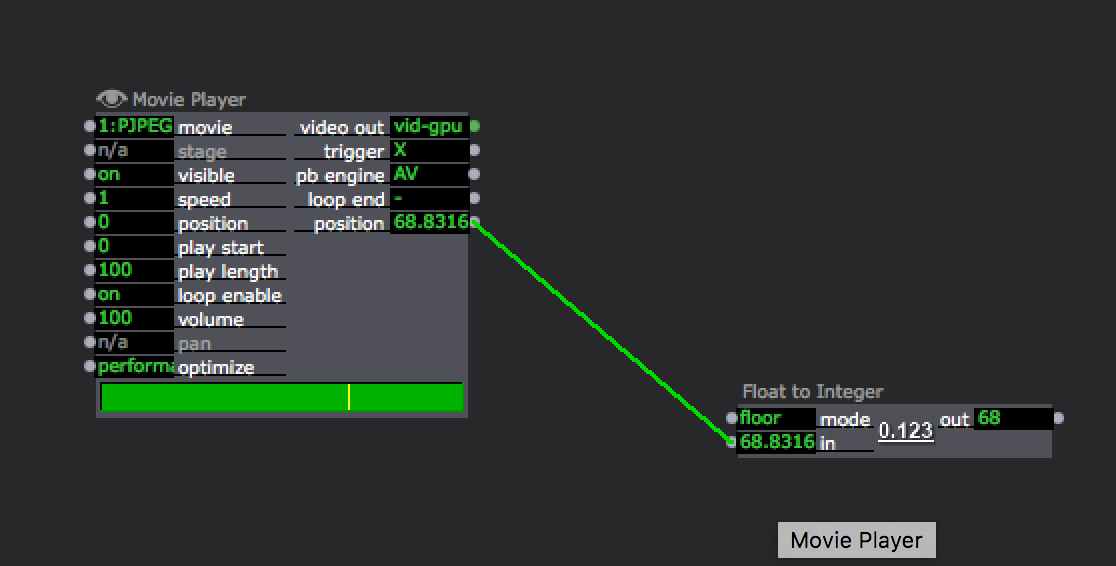
          I think you will need to add an actor called Float to Integer. See attached.

          Basically the movie position has many decimal places... and the actor is looking for EXACTLY 80 and the movie player would have to hit exactly 80.0000, does that make sense?
          Let us know how you get on.
          Cheers,
          Graham 

          dc13fa-screen-shot-2017-01-11-at-09.53.59.png

          Graham Thorne | www.grahamthorne.co.uk
          RIG 1: Custom-built PC: Windows 11. Ryzen 7 7700X, RTX3080, 32G DDR5 RAM. 2 x m.2.
          RIG 2: Laptop MSI Vector 16 HX AI: Windows 11, Intel Ultra 9. RTX5070ti, 32G RAM (DDR5 6000htz), NVME M.2 SSD.
          RIG 3: Apple Laptop: rMBP i7, 8gig RAM 256 SSD, HD, OS X 10.12.12

          1 Reply Last reply Reply Quote 0
          • DusX
            DusX Izzy Guru last edited by

            Try initializing to 0.001 rather than 0. It may be that a non zero value may push the position output.

            🎛️ TroikaTronix Professional Services
            https://troikatronix.com/professional-services

            🎫 Support Tickets
            https://support.troikatronix.com/support/tickets/new

            💻 Add-ons
            https://troikatronix.com/add-ons/?u=dusx

            🧪 GitHub Projects
            https://github.com/rwebber

            🖥️ Win11 | i7 | RTX 4070 | 32GB RAM | Ontario, Canada

            1 Reply Last reply Reply Quote 0
            • J
              jamienesbitt last edited by

              Isn't the 'comparator' actor looking for a number greater than the Value marked in Value 2? I don't see how adding Float to Integer helps that?

              Thanks for the help,
              Jamie
              1 Reply Last reply Reply Quote 0
              • Skulpture
                Skulpture Izzy Guru last edited by

                I have re-read your comment and misunderstood your question. Apologies.

                Graham Thorne | www.grahamthorne.co.uk
                RIG 1: Custom-built PC: Windows 11. Ryzen 7 7700X, RTX3080, 32G DDR5 RAM. 2 x m.2.
                RIG 2: Laptop MSI Vector 16 HX AI: Windows 11, Intel Ultra 9. RTX5070ti, 32G RAM (DDR5 6000htz), NVME M.2 SSD.
                RIG 3: Apple Laptop: rMBP i7, 8gig RAM 256 SSD, HD, OS X 10.12.12

                1 Reply Last reply Reply Quote 0
                • J
                  jamienesbitt last edited by

                  No problem.

                  1 Reply Last reply Reply Quote 0
                  • crystalhorizon
                    crystalhorizon Beta Platinum last edited by

                    There is a problem with the comparator actor: it fires a trigger the first time it is used (selecting it or going into the scene). After the first trigger it works normally. 2968b8-comparator.izz

                    Alexander Nantschev | http://www.crystalhorizon.at | located in Vienna Austria

                    1 Reply Last reply Reply Quote 0
                    • DusX
                      DusX Izzy Guru last edited by

                      @crystalhorizon

                      Please submit a bugreport with the attached file.
                      Thanks

                      🎛️ TroikaTronix Professional Services
                      https://troikatronix.com/professional-services

                      🎫 Support Tickets
                      https://support.troikatronix.com/support/tickets/new

                      💻 Add-ons
                      https://troikatronix.com/add-ons/?u=dusx

                      🧪 GitHub Projects
                      https://github.com/rwebber

                      🖥️ Win11 | i7 | RTX 4070 | 32GB RAM | Ontario, Canada

                      1 Reply Last reply Reply Quote 0
                      • crystalhorizon
                        crystalhorizon Beta Platinum last edited by

                        done

                        Alexander Nantschev | http://www.crystalhorizon.at | located in Vienna Austria

                        1 Reply Last reply Reply Quote 0
                        • First post
                          Last post