[ANSWERED] 4 projector output in 2026???
-
The Apple M2 Max and M3 Max chips can also support four external displays, but the new M4 Max chip offers even higher resolutions and refresh rates for these displays.
-
Hi,
Another option is through NDI. BirdDog Play is reasonably priced, and with a single cable and a switch, you can send the streams to all four outputs. I've only worked with one output through BirdDog Play, and the results were good. Perhaps the most problematic aspect is assigning NDI streams when you start the setup. BirdDog support may be able to help with this.
That's an idea.Best
-
Hello,
I am currently using M4 Mac Mini’s for multiple video output from Isadora. They represent a Mac solution with a lower price point but great performance and flexibility. I recently set up an eight projector blend (8 x 1080p Benq short throw- shown in image) using just Mac Mini’s. The current M4 Mac Mini allows 3 video outputs - so your set up could include 2 linked Mac Mini with capacity for a control monitor.
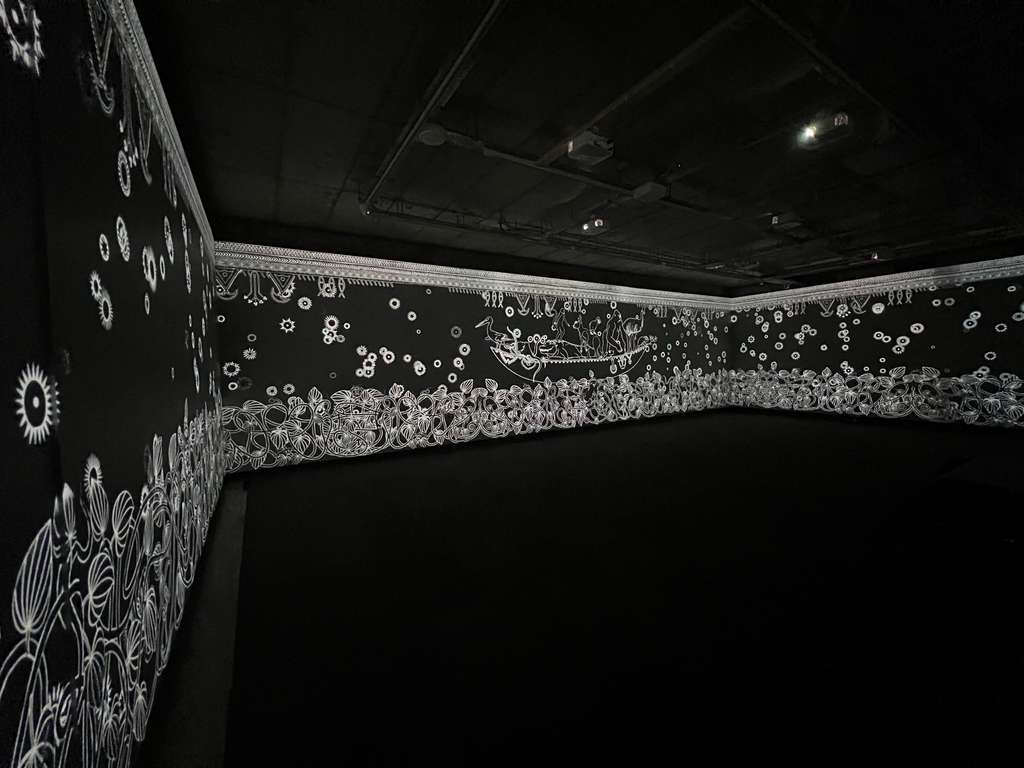
I also use a Mac Studio M2 Max Ultra it has capacity of 8 video outputs.
Best wishes
Russell
http://bonemap.com | Australia
Izzy STD 4.5.1 | USB 4.5.1 | + Beta
MBP 14” 2022 M2 16GB | 26.6.2 Tahoe
Mac Studio 2023 M2 Ultra 128GB | 26.6.2 Tahoe
Mac Mini 2025 M4 Pro 64GB | 26.6.2 Tahoe
MBP 16” 2026 M5 Max 128GB | 26.6.2 TahoeA range of deployable older Macs
-
@dbni is Full hd enough or you need all outputs to be 4k ?
Armando Menicacci
www.studiosit.ca
MacBook Pro 16-inch, 2021 Apple M1 Max, RAM 64 GB, 4TB SSD, Mac OS Sonoma 14.4.1 (23E224) -
@armando - FHD x 4 is fine. I probably can't get hold of 4 x 4K ST projectors within my budget.
-
@bonemap
Hi Russell - that looks amazing! I will look around and see if there's anywhere to hire Mac Minis. It's another option. :) -
Ive been using an M2 Mac Studio. The one I have supports 5 displays. 1 for my monitor and 4 outputs to. projectors. The higher spec'd one can run 8 displays. But that was way over my budget. Its been great. Ive been running around 30 x 1080p movie files simultaneously, (albeit with large areas of alpha) and it hasn't missed a beat. It also seems a lot less vulnerable than a laptop, especially out doors or at messy gigs.
-
I'm using also M2 Ultra with 4 HDMI out and local one for monitoring. I just received a made in china video wall controller 1 in 4 out to see how that is performing. Have to test it first.
-
bumping this thread with an update and a question.
So I ordered 4x Optoma Laser ST projectors (new ones aime at the golf sim market)
I have access to a Seada 4K pro video wall controller to split the image into 4. It doesn't handle edge blending, but has facility to overlap screens, so I will make a blended edge in my output video.
BUT. I just discovered an old MacPro 2012 for sale. running High Sierra. Specs say it can output 6 video streams. So I could potentially do all the mapping and edge blending in Isadora. Do you think it could handle splitting a 4K 30fps video into 4x HD?John Collingswood
taikabox.com
2021 M1PRO 32GB OSX 26.5.2 & 2019 MBPT 2.6GHZ i7 OSX15.7.4 16GB
plus an old iMac and assorted Mac Minis for installations -
-
Hello how are you?
I am currently setting up for a 4 x projector show in a building site. 3 x projectors illuminate an hexagonal structure 1 x projector is stand alone. I will be blending the hexagonal with a Stage blend in Isadora with a second Stage for the single projector.
I also have a 2012 trashcan Mac Pro - but I will not be using it. Instead, I will use a MacBook Pro M5 Max which has the capacity for the 4 x video output leaving the built in screen for live control.
For my setup there is a fair amount of cable run and I spent some time figuring out what cabling to use that can deliver over long distances. Recently, in a theatre, we deployed Decimator branded video converters to send video from hdmi through SDI cable lengths to 3x Epson Pro laser projectors in the grid. This worked great with only minor issues with latency being uneven across the three sends. Well, the theatre owned the stash of Decimator devices and SDI cable runs, it worked because my Epson Pro projectors have SDI inputs reducing the need for the signal to be converted back to hdmi at the projector end.
This time I don’t have access to the Decimator/SDI solution. And costing it out for 4x Decimator devices and 4x long SDI cable runs went well above what I can spend currently. So I have invested in 4 x Active Optical hdmi cables and compatible thunderbolt/display port dongles. The cables are still expensive but have the converter electronics housed in the cable ends resulting in a solution that is considerable cheaper than converting to SDI. However, the cables are said to be more fragile and perhaps less robust ‘on the road’. This will be the first time using them. If anyone has experience using the AOC hdmi cables would be interested to hear.
The thing with the 2012 trashcan is compatible dongles (thunderbolt 2?) and the cable lengths required to distribute to your ST laser projectors.
Best wishes
Russell
http://bonemap.com | Australia
Izzy STD 4.5.1 | USB 4.5.1 | + Beta
MBP 14” 2022 M2 16GB | 26.6.2 Tahoe
Mac Studio 2023 M2 Ultra 128GB | 26.6.2 Tahoe
Mac Mini 2025 M4 Pro 64GB | 26.6.2 Tahoe
MBP 16” 2026 M5 Max 128GB | 26.6.2 TahoeA range of deployable older Macs
-
Hi Russell, I'm good, thanks. super busy with Oulu being European Capital of Culture this year, but surviving.
Thanks for loads of useful information. I've been using optical HDMI on the road for a few years and its great. More sturdy than I expected. The lighter weight seems to help to keep stress off the plugs.
I decided not to go for the 2012 MacPro - with that particular graphics card there's no hardware sync lock between the outputs, so no guarantee that all 4 quadrants would be running accurately. No budget for a M5 Max, so I've ordered a used M2 Mac Mini for the playback into the Saeda. Cable runs are short, so no worries there - all HDMI cables can be the same length.The projectors arrived yesterday and, at first test, the image is super sharp. and they don't get hot. The only obvious design flaw is that the mounting points underneath look a bit flimsy, and are strangely distributed - I will probably build some mounting brackets out of ply and leave them bolted to the projectors.
So it looks like this is the first video installation project I've made in the last 18 years that doesn't use Isadora at all!