• Products
    • Isadora
    • Get It
    • ADD-ONS
    • IzzyCast
    • Get It
  • Forum
  • Help
  • Werkstatt
  • Newsletter
  • Impressum
  • Dsgvo
  • Press
  • Isadora
  • Get It
  • ADD-ONS
  • IzzyCast
  • Get It
  • Press
  • Dsgvo
  • Impressum

Navigation

    • Register
    • Login
    • Search
    • Categories
    • Recent
    • Popular
    • Tags

    What's wrong between isadora and windows ? Help needed

    Troubleshooting and Bug Reports
    6
    13
    4668
    Loading More Posts
    • Oldest to Newest
    • Newest to Oldest
    • Most Votes
    Reply
    • Reply as topic
    Log in to reply
    This topic has been deleted. Only users with topic management privileges can see it.
    • DusX
      DusX Izzy Guru last edited by

      @loulight

      Have you entered a support request?   http://troikatronix.com/support/isadora/
      That is the easiest way for one of the team to work with you to find where the conflict exists.

      🎛️ TroikaTronix Professional Services
      https://troikatronix.com/professional-services

      🎫 Support Tickets
      https://support.troikatronix.com/support/tickets/new

      💻 Add-ons
      https://troikatronix.com/add-ons/?u=dusx

      🧪 GitHub Projects
      https://github.com/rwebber

      🖥️ Win11 | i7 | RTX 4070 | 32GB RAM | Ontario, Canada

      1 Reply Last reply Reply Quote 0
      • DusX
        DusX Izzy Guru last edited by

        @blackgotan ,

        from your support ticket I understand that you were able to correct the issue with your system by going into the nVidia 3D settings and setting Isadora to use the GPU instead of the Integrated processor. 
        This is related to the Optimus technology included with many nVidia cards, where the system is allowed to use a secondary integrated video card (usually an intel card). These options are primarily for power savings, and it is recommended that the settings be changed in the fashion that you have.

        🎛️ TroikaTronix Professional Services
        https://troikatronix.com/professional-services

        🎫 Support Tickets
        https://support.troikatronix.com/support/tickets/new

        💻 Add-ons
        https://troikatronix.com/add-ons/?u=dusx

        🧪 GitHub Projects
        https://github.com/rwebber

        🖥️ Win11 | i7 | RTX 4070 | 32GB RAM | Ontario, Canada

        1 Reply Last reply Reply Quote 0
        • Skulpture
          Skulpture Izzy Guru last edited by

          Good to know @DusX

          I have an nVidia in my Gaming PC - I will have to go and investigate this! 

          Graham Thorne | www.grahamthorne.co.uk
          RIG 1: Custom-built PC: Windows 11. Ryzen 7 7700X, RTX3080, 32G DDR5 RAM. 2 x m.2.
          RIG 2: Laptop MSI Vector 16 HX AI: Windows 11, Intel Ultra 9. RTX5070ti, 32G RAM (DDR5 6000htz), NVME M.2 SSD.
          RIG 3: Apple Laptop: rMBP i7, 8gig RAM 256 SSD, HD, OS X 10.12.12

          1 Reply Last reply Reply Quote 0
          • mark_m
            mark_m last edited by

            Just want to chip in:

            I have  a Dell Precision m3800 laptop running Windows 10x64, which has the integrated Intel Graphics as well as the Quadro K1000.

            I could not get Isadora to output to a secondary display until I went into the NVidia Control Panel and specified that Isadora should use the Quadro, not the integrated Intel Graphics.

            EDIT:
            Sorry, have to backtrack. I got it working with this method once. but it has not stayed working. More investigation needed.

            Intel NUC8i7HVK Hades Canyon VR Gaming NUC, i7-8809G w/ Radeon RX Vega M GH 4GB Graphics, 32GB RAM, 2 x NVMe SSD
            Gigabyte Aero 15 OLED XD. Intel Core i7-11800H, NVidia RTX3070, 32GB RAM 2 x NVMe SSD
            PC Specialist Desktop: i9-14900K, RTX5080, 64GB RAM, Win11Pro
            www.natalieinsideout.com

            1 Reply Last reply Reply Quote 0
            • DusX
              DusX Izzy Guru last edited by

              Try changing your vertical sync string in isadora (be sure isadora is using the dedicated card as outlined above ). I have had a user that needed to make this change to his laptop to get multi screen output.

              🎛️ TroikaTronix Professional Services
              https://troikatronix.com/professional-services

              🎫 Support Tickets
              https://support.troikatronix.com/support/tickets/new

              💻 Add-ons
              https://troikatronix.com/add-ons/?u=dusx

              🧪 GitHub Projects
              https://github.com/rwebber

              🖥️ Win11 | i7 | RTX 4070 | 32GB RAM | Ontario, Canada

              1 Reply Last reply Reply Quote 0
              • mark_m
                mark_m last edited by

                Hi Ryan,

                Do you mean this setting?

                https://www.dropbox.com/s/3g9qbvukwjgoyhi/vertical_retrace.PNG?dl=0

                If so, yes, thanks very much, that fixes the problem for a simple project with just one video actor, but not with another projects where the assets are all PNGs. Am going to try making the images as other still types. Very odd...

                If that's not the setting you meant, please tell me what you did mean!

                Many thanks

                Mark
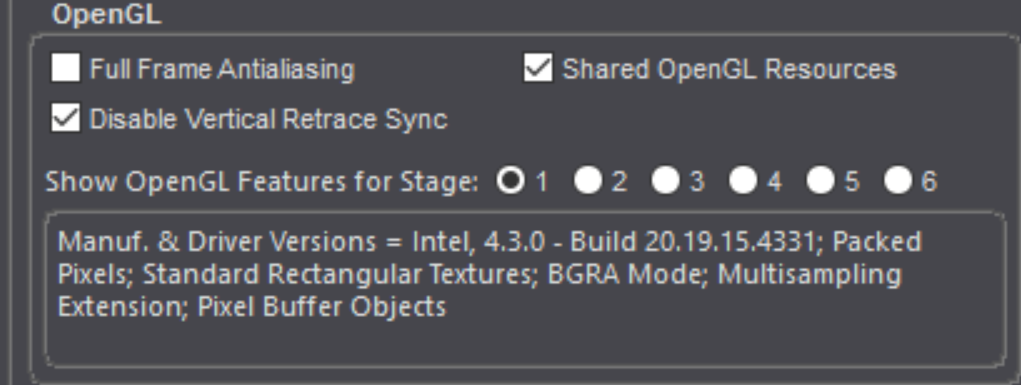
                82e259-vertical_retrace.png

                Intel NUC8i7HVK Hades Canyon VR Gaming NUC, i7-8809G w/ Radeon RX Vega M GH 4GB Graphics, 32GB RAM, 2 x NVMe SSD
                Gigabyte Aero 15 OLED XD. Intel Core i7-11800H, NVidia RTX3070, 32GB RAM 2 x NVMe SSD
                PC Specialist Desktop: i9-14900K, RTX5080, 64GB RAM, Win11Pro
                www.natalieinsideout.com

                1 Reply Last reply Reply Quote 0
                • mark_m
                  mark_m last edited by

                  No, as soon as I put an asset into a project that is not a video file, it stops working properly.
                  I cannot get any still image files to output to secondary monitor with this Dell m3800. Even if I start a project where scene 1 is a video file - which outputs to secondary display just fine - and scene 2 is a still image, scene 2 will not output to secondary display....

                  Ideas? Even better, cures?

                  I've a dress rehearsal on Saturday for a show that's supposed to open on Sunday... if I can't get it to work on this PC, will the same .izz file play fine on a Mac that's just got Isadora running in demo mode? So I can at least run the show on that?

                  Intel NUC8i7HVK Hades Canyon VR Gaming NUC, i7-8809G w/ Radeon RX Vega M GH 4GB Graphics, 32GB RAM, 2 x NVMe SSD
                  Gigabyte Aero 15 OLED XD. Intel Core i7-11800H, NVidia RTX3070, 32GB RAM 2 x NVMe SSD
                  PC Specialist Desktop: i9-14900K, RTX5080, 64GB RAM, Win11Pro
                  www.natalieinsideout.com

                  1 Reply Last reply Reply Quote 0
                  • DusX
                    DusX Izzy Guru last edited by

                    Can you submit a support request? http://troikatronix.com/support/isadora/ I will be able to communicate more efficiently thru the sup port system.

                    🎛️ TroikaTronix Professional Services
                    https://troikatronix.com/professional-services

                    🎫 Support Tickets
                    https://support.troikatronix.com/support/tickets/new

                    💻 Add-ons
                    https://troikatronix.com/add-ons/?u=dusx

                    🧪 GitHub Projects
                    https://github.com/rwebber

                    🖥️ Win11 | i7 | RTX 4070 | 32GB RAM | Ontario, Canada

                    1 Reply Last reply Reply Quote 0
                    • mark_m
                      mark_m last edited by

                      Hi, yes, I submitted a bug report on this topic about 22 hours ago, 0200 British Summer Time. Not had response yet. Thanks.

                      Intel NUC8i7HVK Hades Canyon VR Gaming NUC, i7-8809G w/ Radeon RX Vega M GH 4GB Graphics, 32GB RAM, 2 x NVMe SSD
                      Gigabyte Aero 15 OLED XD. Intel Core i7-11800H, NVidia RTX3070, 32GB RAM 2 x NVMe SSD
                      PC Specialist Desktop: i9-14900K, RTX5080, 64GB RAM, Win11Pro
                      www.natalieinsideout.com

                      1 Reply Last reply Reply Quote 0
                      • mark
                        mark last edited by

                        Dear @mark_m,

                        DusX will be in touch via the ticket system. We may need some of your PNGs to try to sort out the problem.
                        Best Wishes,
                        Mark

                        Media Artist & Creator of Isadora
                        Macintosh SE-30, 32 Mb RAM, MacOS 7.6, Dual Floppy Drives

                        1 Reply Last reply Reply Quote 0
                        • First post
                          Last post