• Products
    • Isadora
    • Get It
    • ADD-ONS
    • IzzyCast
    • Get It
  • Forum
  • Help
  • Werkstatt
  • Newsletter
  • Impressum
  • Dsgvo
  • Press
  • Isadora
  • Get It
  • ADD-ONS
  • IzzyCast
  • Get It
  • Press
  • Dsgvo
  • Impressum

Navigation

    • Register
    • Login
    • Search
    • Categories
    • Recent
    • Popular
    • Tags

    Enttec pro mk2 "offline"

    Hardware
    4
    8
    3174
    Loading More Posts
    • Oldest to Newest
    • Newest to Oldest
    • Most Votes
    Reply
    • Reply as topic
    Log in to reply
    This topic has been deleted. Only users with topic management privileges can see it.
    • tim_f
      tim_f last edited by

      Hi,

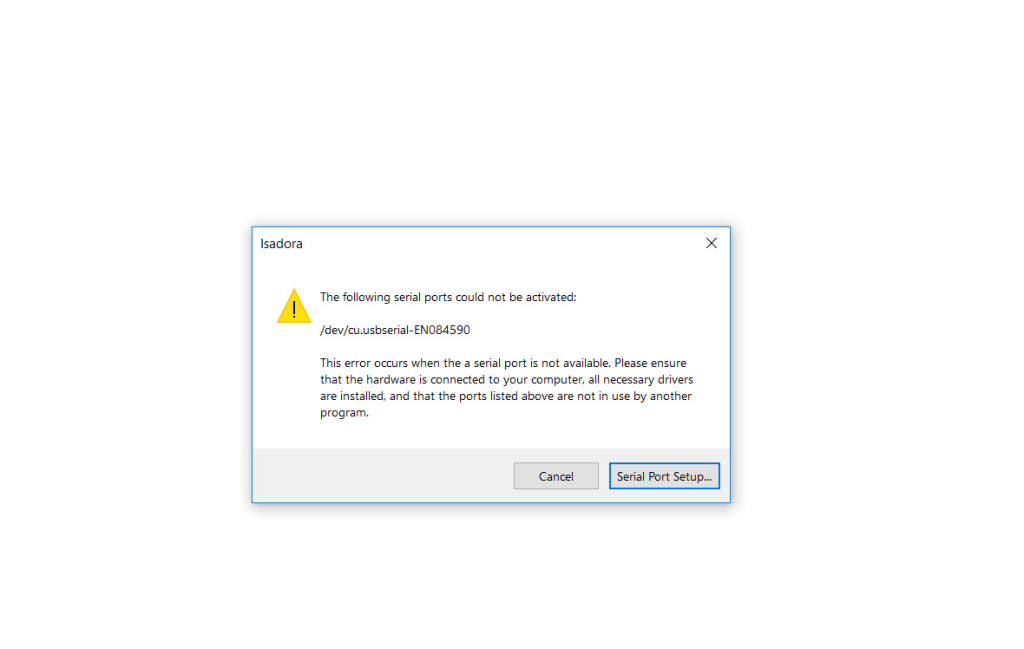
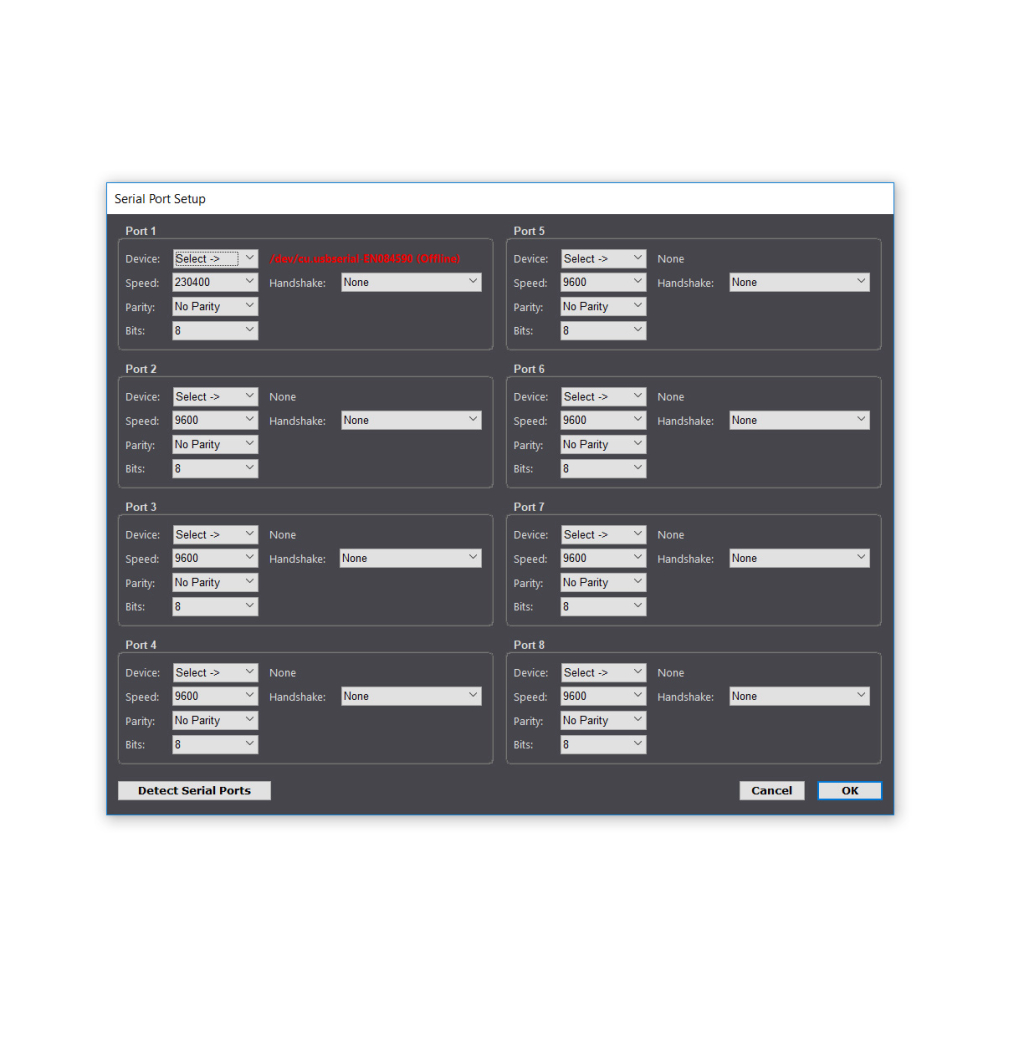
      I am trying to get isadora to communicate with an enttec pro mk2. The enttec is recognised by the dmx pro manager and I can control lights through that app. I downloaded this patch to try and get izzy to talk to the enttec (attached). All I get when I open it is a dialogue box that tells me there is a problem activating the enttec and then when I open the serial port set up that it is offline. It obviously 'sees' the enttec but is not communicating for whatever reason. - have attached screenshots of my error messages.

      I have scoured the forum for clues but think I need some generous soul to walk me through it.

      I am on windows desktop running Isadora v2.6.1

      thanks in advance

      tim

      1 Reply Last reply Reply Quote 0
      • DusX
        DusX Izzy Guru last edited by

        @tim_f the screenshots and Isadora file are missing.

        Can you try testing my Enttec user actor? http://dusxproductions.com/blo...

        🎛️ TroikaTronix Professional Services
        https://troikatronix.com/professional-services

        🎫 Support Tickets
        https://support.troikatronix.com/support/tickets/new

        💻 Add-ons
        https://troikatronix.com/add-ons/?u=dusx

        🧪 GitHub Projects
        https://github.com/rwebber

        🖥️ Win11 | i7 | RTX 4070 | 32GB RAM | Ontario, Canada

        tim_f 1 Reply Last reply Reply Quote 0
        • mark_m
          mark_m last edited by

          Have you closed the DMXPro Manager before opening Isadora? 

          Intel NUC8i7HVK Hades Canyon VR Gaming NUC, i7-8809G w/ Radeon RX Vega M GH 4GB Graphics, 32GB RAM, 2 x NVMe SSD
          Gigabyte Aero 15 OLED XD. Intel Core i7-11800H, NVidia RTX3070, 32GB RAM 2 x NVMe SSD
          PC Specialist Desktop: i9-14900K, RTX5080, 64GB RAM, Win11Pro
          www.natalieinsideout.com

          1 Reply Last reply Reply Quote 0
          • tim_f
            tim_f @DusX last edited by

            @dusx I don't get an error message when I set up your patch but I also don't get any communication with the enttec. I have made sure that the manager pro is turned off first. 

            Underneath are the images that got missed from the last post and here is the file I was using that got the errors. Enttec Lanbox MATRIX.izz

            ...confused
            1 Reply Last reply Reply Quote 0
            • Juriaan
              Juriaan Tech Staff last edited by

              isnt that speed to high ? I never had issues with Enttec dmx usb pro and Izzy. Are you sure your drivers are up to date and that you are using ftdi ?

              Are other programs working with the enttec ?

              Isadora 4.x, Windows 11 Dell XPS 17 5010 or my MacBook Pro M3 Max (Tahoe)
              Interactive Performance Designer, Freelance Artist, Scenographer, Lighting Designer, TroikaTronix Community moderator
              Always in for chatting about interaction in space / performance design. Drop me an email at hello@juriaan.me

              1 Reply Last reply Reply Quote 0
              • DusX
                DusX Izzy Guru last edited by

                Yes.  It seems the problem is with connecting to the device. As suggested a lower connection speed may be required (I would try 56k).

                🎛️ TroikaTronix Professional Services
                https://troikatronix.com/professional-services

                🎫 Support Tickets
                https://support.troikatronix.com/support/tickets/new

                💻 Add-ons
                https://troikatronix.com/add-ons/?u=dusx

                🧪 GitHub Projects
                https://github.com/rwebber

                🖥️ Win11 | i7 | RTX 4070 | 32GB RAM | Ontario, Canada

                1 Reply Last reply Reply Quote 0
                • tim_f
                  tim_f last edited by

                  Alright got it up and working. Indeed it was a speed problem.

                  Thanks for helping out, I am a complete novice at using DMX with izzy but am very much looking forward to our next show and controlling everything from one place!cheers

                  tim

                  1 Reply Last reply Reply Quote 0
                  • DusX
                    DusX Izzy Guru last edited by

                    one tip. Throttle back the transfer speed. Sending the dmx too fast can negatively affect patch performance.


                    🎛️ TroikaTronix Professional Services
                    https://troikatronix.com/professional-services

                    🎫 Support Tickets
                    https://support.troikatronix.com/support/tickets/new

                    💻 Add-ons
                    https://troikatronix.com/add-ons/?u=dusx

                    🧪 GitHub Projects
                    https://github.com/rwebber

                    🖥️ Win11 | i7 | RTX 4070 | 32GB RAM | Ontario, Canada

                    1 Reply Last reply Reply Quote 0
                    • First post
                      Last post