• Isadora
  • Get it
  • Forum
  • Help
  • ADD-ONS
  • Newsletter
  • Impressum
  • Dsgvo
  • Impressum
Forum

Navigation

    • Register
    • Login
    • Search
    • Categories
    • Recent
    • Popular
    • Tags

    Feature request: picture from video grabber

    Feature Requests
    10
    26
    6607
    Loading More Posts
    • Oldest to Newest
    • Newest to Oldest
    • Most Votes
    Reply
    • Reply as topic
    Log in to reply
    This topic has been deleted. Only users with topic management privileges can see it.
    • Skulpture
      Skulpture Izzy Guru last edited by

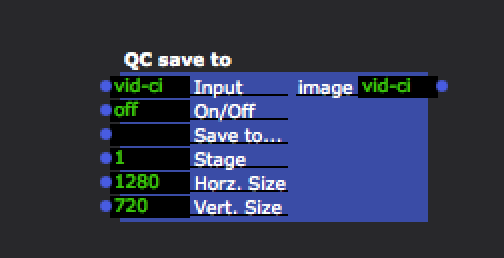
      Drop this in:

      ~/Library/compositions
      Send a video into it and you can use an off/on toggle.

      4b1d30-screen-shot-2015-03-09-at-12.14.17.png 5e3388-save-to.zip

      Graham Thorne | www.grahamthorne.co.uk
      RIG 1: Windows 11, AMD 7 Ryzen, RTX3070, 16gig RAM. 2 x M.2 SSD. HD. Lenovo Legion 5 gaming laptop.
      RIG 2: Windows 11, Intel i19 12th Gen. RTX3070ti, 16gig RAM (ddr5), 1x M.2 SSD. UHD DELL G15 Gaming laptop.
      RIG 3: Apple rMBP i7, 8gig RAM 256 SSD, HD, OS X 10.12.12

      1 Reply Last reply Reply Quote 0
      • crystalhorizon
        crystalhorizon Beta Platinum last edited by

        took the save to qc from your zip. but my save to qc looks different

        when opening with qc it says:
        https://www.dropbox.com/s/4gkjzxh0ytgnjee/Screenshot%202015-03-09%2022.02.02.png?dl=0
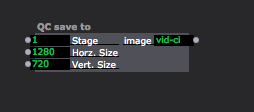
        66d86f-screenshot-2015-03-09-21.57.56.png

        Alexander Nantschev | http://www.crystalhorizon.at | located in Vienna Austria

        1 Reply Last reply Reply Quote 0
        • crystalhorizon
          crystalhorizon Beta Platinum last edited by

          strange cannot put the screenshot, uploading, but when i click post comment, it doesnt show up

          here the dropboxlink
          https://www.dropbox.com/s/lqq9lg87ilv1ta1/Screenshot%202015-03-09%2021.57.56.png?dl=0
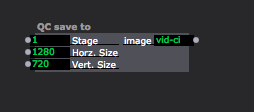
          52261c-screenshot-2015-03-09-21.57.56.png

          Alexander Nantschev | http://www.crystalhorizon.at | located in Vienna Austria

          1 Reply Last reply Reply Quote 0
          • vanakaru
            vanakaru last edited by

            Something is missing or screwed up.

            MBP 4.1 & MBP (Retina, Mid 2012) MBP Retina 2017

            1 Reply Last reply Reply Quote 0
            • Fred
              Fred last edited by

              I think this will answer it

              http://kineme.net/forum/Discussion/DevelopingCompositions/HowexportimageQCfile

              http://www.fredrodrigues.net/
              https://github.com/fred-dev
              OSX 10.15.15 MBP 2019 16" 2.3 GHz 8-Core i9, Radeon Pro 5500M 8 GB, 32g RAM
              Windows 10 7700K, GTX 1080ti, 32g RAM, 2tb raided SSD
              Windows 10 Threadripper 3960x 64g ram, 1tb NVME, rtx 2080ti + rtx2070 super

              1 Reply Last reply Reply Quote 0
              • Fred
                Fred last edited by

                Here is a compiled version 443252-imageexporter.plugin.zip

                http://www.fredrodrigues.net/
                https://github.com/fred-dev
                OSX 10.15.15 MBP 2019 16" 2.3 GHz 8-Core i9, Radeon Pro 5500M 8 GB, 32g RAM
                Windows 10 7700K, GTX 1080ti, 32g RAM, 2tb raided SSD
                Windows 10 Threadripper 3960x 64g ram, 1tb NVME, rtx 2080ti + rtx2070 super

                1 Reply Last reply Reply Quote 0
                • Skulpture
                  Skulpture Izzy Guru last edited by

                  Sorry people!

                  I just dragged it out of my folder; presumed it would work for you all.
                  Thanks @Fred 

                  Graham Thorne | www.grahamthorne.co.uk
                  RIG 1: Windows 11, AMD 7 Ryzen, RTX3070, 16gig RAM. 2 x M.2 SSD. HD. Lenovo Legion 5 gaming laptop.
                  RIG 2: Windows 11, Intel i19 12th Gen. RTX3070ti, 16gig RAM (ddr5), 1x M.2 SSD. UHD DELL G15 Gaming laptop.
                  RIG 3: Apple rMBP i7, 8gig RAM 256 SSD, HD, OS X 10.12.12

                  1 Reply Last reply Reply Quote 0
                  • crystalhorizon
                    crystalhorizon Beta Platinum last edited by

                    @fred where do I put your plugin?

                    Alexander Nantschev | http://www.crystalhorizon.at | located in Vienna Austria

                    1 Reply Last reply Reply Quote 0
                    • crystalhorizon
                      crystalhorizon Beta Platinum last edited by

                      @fred got it, into the qc path, now it looks like on grahams screenshot. Thank you

                      Alexander Nantschev | http://www.crystalhorizon.at | located in Vienna Austria

                      1 Reply Last reply Reply Quote 0
                      • Woland
                        Woland Tech Staff @Fred last edited by

                        @Fred

                        Any chance you still have that Applescript kicking around? I'd love to get my hands on it, provided that you're willing to share.

                        TroikaTronix Technical Support
                        New Support Ticket Link: https://support.troikatronix.com/support/tickets/new
                        TroikaTronix Support Policy: https://support.troikatronix.com/support/solutions/articles/13000064762
                        TroikaTronix Add-Ons Page: https://troikatronix.com/add-ons/

                        | Isadora 2.6.1 + 3 | Mac Pro (Late 2013), macOS 10.14.6, 3.5GHz 6-core, 1TB SSD, 64GB RAM, Dual AMD FirePro D700s | Macbook Pro (Retina, 15", Mid 2015), macOS 10.11.4, 2.8GHz Intel Core i7, 16GB RAM, Intel Iris Pro 1536 MB |

                        Fred 1 Reply Last reply Reply Quote 0
                        • Fred
                          Fred @Woland last edited by

                          @Woland long gone, but something like this:

                          on run
                          set filePath to POSIX path of "/Users/folder_path"
                          set theCurrentDate to current date
                          set shellCommand to "/usr/sbin/screencapture \"" & filePath & "Screen Shot" & theCurrentDate & ".png\""
                          do shell script shellCommand
                          end run

                          And you can attach this to a folder to watch it and import the files into Izzy

                          on adding folder items to this_folder after receiving these_items

                          try
                          tell application "Isadora"
                          import media into document 1 from these_items
                          end tell

                          on error msg
                          display dialog "Error importing file into Isadora: " & msg
                          end try

                          end adding folder items to

                          And to refine it to a specific stage here is a good thread

                          http://apple.stackexchange.com...

                          http://www.fredrodrigues.net/
                          https://github.com/fred-dev
                          OSX 10.15.15 MBP 2019 16" 2.3 GHz 8-Core i9, Radeon Pro 5500M 8 GB, 32g RAM
                          Windows 10 7700K, GTX 1080ti, 32g RAM, 2tb raided SSD
                          Windows 10 Threadripper 3960x 64g ram, 1tb NVME, rtx 2080ti + rtx2070 super

                          Woland 1 Reply Last reply Reply Quote 0
                          • Woland
                            Woland Tech Staff @Fred last edited by

                            @Fred Thanks!

                            TroikaTronix Technical Support
                            New Support Ticket Link: https://support.troikatronix.com/support/tickets/new
                            TroikaTronix Support Policy: https://support.troikatronix.com/support/solutions/articles/13000064762
                            TroikaTronix Add-Ons Page: https://troikatronix.com/add-ons/

                            | Isadora 2.6.1 + 3 | Mac Pro (Late 2013), macOS 10.14.6, 3.5GHz 6-core, 1TB SSD, 64GB RAM, Dual AMD FirePro D700s | Macbook Pro (Retina, 15", Mid 2015), macOS 10.11.4, 2.8GHz Intel Core i7, 16GB RAM, Intel Iris Pro 1536 MB |

                            1 Reply Last reply Reply Quote 0
                            • barneybroomer
                              barneybroomer Beta Gold last edited by

                              Still I think it needs a good actor for this. There is already an movie to disk actor, I need to capture only 1 frame....Still working with Syphon capture and import it into Izzy
                              Mac Mini M1 2020 / OSX 11.7
                              MacBook Pro 2,3 Ghz Intel 8 core I9 / OSX 10.15.7
                              MacBook Pro 2,2 Ghz Intel 8 core I7 / OSX 10.15.7

                              and a Motorola DynaTAC 8000X ;)

                              1 Reply Last reply Reply Quote 0
                              • First post
                                Last post