• Products
    • Isadora
    • Get It
    • ADD-ONS
    • IzzyCast
    • Get It
  • Forum
  • Help
  • Werkstatt
  • Newsletter
  • Impressum
  • Dsgvo
  • Press
  • Isadora
  • Get It
  • ADD-ONS
  • IzzyCast
  • Get It
  • Press
  • Dsgvo
  • Impressum

Navigation

    • Register
    • Login
    • Search
    • Categories
    • Recent
    • Popular
    • Tags

    ISF PLUGIN

    How To... ?
    4
    14
    3102
    Loading More Posts
    • Oldest to Newest
    • Newest to Oldest
    • Most Votes
    Reply
    • Reply as topic
    Log in to reply
    This topic has been deleted. Only users with topic management privileges can see it.
    • D
      Dako Ark Beta Silver @Dako Ark last edited by

      @dako-ark

      @mark 

      gentleman mark, i suppose that one time upon you give me the helper to access at terminal_ now i don't remember the perfectly sudo_code, that you pass me, it' s past a lot of time, if please you can refresh my —instant—_—;

      please you know that me is very dear or TROIKA — Pavlov teach me —

      bye giampis

      DusX 1 Reply Last reply Reply Quote 0
      • DusX
        DusX Izzy Guru @Dako Ark last edited by

        @dako-ark

        Mark has updated the script for converting ISF for use in Isadora. You can grab the new Mac/PC scripts here: https://community.troikatronix...

        I have successfully converted these script myself, most work very well, but not all have the inputs and outputs defined correctly.

        🎛️ TroikaTronix Professional Services
        https://troikatronix.com/professional-services

        🎫 Support Tickets
        https://support.troikatronix.com/support/tickets/new

        💻 Add-ons
        https://troikatronix.com/add-ons/?u=dusx

        🧪 GitHub Projects
        https://github.com/rwebber

        🖥️ Win11 | i7 | RTX 4070 | 32GB RAM | Ontario, Canada

        1 Reply Last reply Reply Quote 1
        • D
          Dako Ark Beta Silver last edited by

          Ok... Nothing !!

          I tried and retried, but nothing to do.

          i do no, what can i do??

          please help me

          DusX 1 Reply Last reply Reply Quote 0
          • DusX
            DusX Izzy Guru @Dako Ark last edited by

            @dako-ark

            I am running the script on Windows, so I don't know what you might be getting stuck on. 

            On Windows, the script assumes your downloads folder is in the default location (mine isn't) and that when unzipped the package isn't added to an additional folder (mine was).
            So it's possible the file paths in the script are not working for you.

            In any case, I am attaching the latest conversion of these files. I have not tested these, so a number will not work. You will need to go through them one at a time to determine which ones work.

            vidvox-isf-files-fresh-converted.zip

            🎛️ TroikaTronix Professional Services
            https://troikatronix.com/professional-services

            🎫 Support Tickets
            https://support.troikatronix.com/support/tickets/new

            💻 Add-ons
            https://troikatronix.com/add-ons/?u=dusx

            🧪 GitHub Projects
            https://github.com/rwebber

            🖥️ Win11 | i7 | RTX 4070 | 32GB RAM | Ontario, Canada

            D 1 Reply Last reply Reply Quote 0
            • D
              Dako Ark Beta Silver @DusX last edited by

              @dusx

              Sorry, i' m working on mac osx mojave. Probably there was some different with windows.

              in any case i need all steps for running the script, because i have try with all command instructions files, but no determinate any access at the library.

              give me more information, please!!

              see you..

              DusX 1 Reply Last reply Reply Quote 0
              • DusX
                DusX Izzy Guru @Dako Ark last edited by

                @dako-ark

                The zip file I linked in my previous message contains all the ISF files converted with the script. You don't need to run it locally.

                🎛️ TroikaTronix Professional Services
                https://troikatronix.com/professional-services

                🎫 Support Tickets
                https://support.troikatronix.com/support/tickets/new

                💻 Add-ons
                https://troikatronix.com/add-ons/?u=dusx

                🧪 GitHub Projects
                https://github.com/rwebber

                🖥️ Win11 | i7 | RTX 4070 | 32GB RAM | Ontario, Canada

                1 Reply Last reply Reply Quote 0
                • A
                  antc last edited by

                  &, does Isadora 3.x still have the limitation to process a shader (.fs file) that has a companion vertex shader (.vs file)?

                  That will bee great to improve and open more possibilities for using shaders in Isadora...

                  Isadora 3.2.6 | MacBook Pro (Late 2013) | 8GB | Mac OS 13.5

                  DusX 1 Reply Last reply Reply Quote 0
                  • DusX
                    DusX Izzy Guru @antc last edited by

                    @antcaramelo

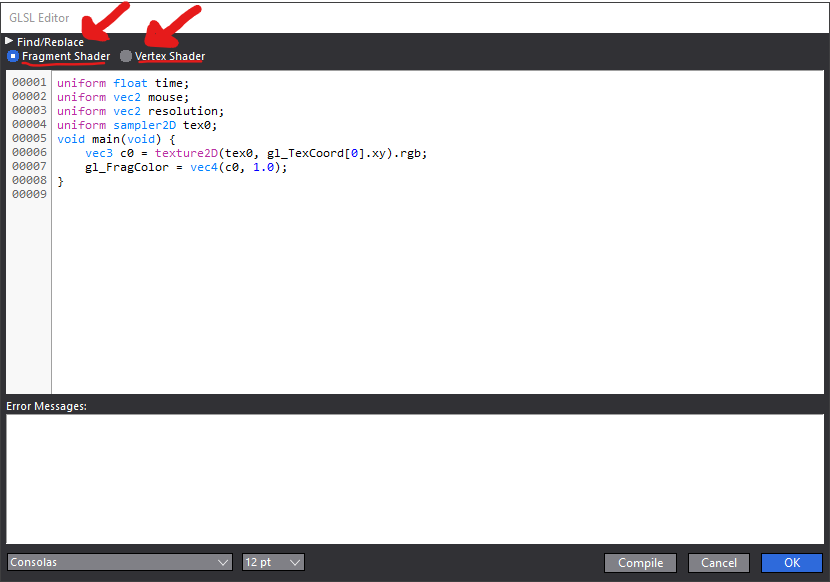
                    Isadora allows you to enter a Fragment and Vertex shader. The GLSL editor opens to the Fragment Shader coded by default since this is the most commonly used.
                    You can change the coded view by selecting the Shader typed via the Radio select buttons. See the image below.
                    🎛️ TroikaTronix Professional Services
                    https://troikatronix.com/professional-services

                    🎫 Support Tickets
                    https://support.troikatronix.com/support/tickets/new

                    💻 Add-ons
                    https://troikatronix.com/add-ons/?u=dusx

                    🧪 GitHub Projects
                    https://github.com/rwebber

                    🖥️ Win11 | i7 | RTX 4070 | 32GB RAM | Ontario, Canada

                    A 1 Reply Last reply Reply Quote 0
                    • A
                      antc @DusX last edited by

                      @dusx

                      yes of course! :)

                      Sorry, I meant different Buffers, not vertex shaders!


                      Isadora 3.2.6 | MacBook Pro (Late 2013) | 8GB | Mac OS 13.5

                      DusX 1 Reply Last reply Reply Quote 0
                      • DusX
                        DusX Izzy Guru @antc last edited by

                        @antcaramelo said:

                        different Buffers

                          At this time, the only way to do this is to use multiple GLSL actors, one for each buffer. @mark has made an example of this somewhere in the forum here. It works very well.

                        🎛️ TroikaTronix Professional Services
                        https://troikatronix.com/professional-services

                        🎫 Support Tickets
                        https://support.troikatronix.com/support/tickets/new

                        💻 Add-ons
                        https://troikatronix.com/add-ons/?u=dusx

                        🧪 GitHub Projects
                        https://github.com/rwebber

                        🖥️ Win11 | i7 | RTX 4070 | 32GB RAM | Ontario, Canada

                        A eattreebark 2 Replies Last reply Reply Quote 1
                        • A
                          antc @DusX last edited by

                          @dusx said:

                          use multiple GLSL actors, one for each buffer. @mark has made an example of this somewhere in the forum

                          Thanks  @dusx, 

                          this is good to know. I never thought on that path way, multiples & individual shader buffers..

                          So, its time to search  that @mark example. Thank you for the feedback!

                          Isadora 3.2.6 | MacBook Pro (Late 2013) | 8GB | Mac OS 13.5

                          1 Reply Last reply Reply Quote 0
                          • eattreebark
                            eattreebark @DusX last edited by

                            @dusx Hi is there a way to convert the old Pete warden free frames into shader code using some of these new tools I'm reading about?
                            http://petewarden.github.io/pe...

                            DusX 1 Reply Last reply Reply Quote 0
                            • DusX
                              DusX Izzy Guru @eattreebark last edited by

                              @eattreebark said:

                              a way to convert the old Pete warden free frames into shader code

                               unfortunately no, most of these plugins use CPU based processing, and simply won't convert to GLSL.


                              🎛️ TroikaTronix Professional Services
                              https://troikatronix.com/professional-services

                              🎫 Support Tickets
                              https://support.troikatronix.com/support/tickets/new

                              💻 Add-ons
                              https://troikatronix.com/add-ons/?u=dusx

                              🧪 GitHub Projects
                              https://github.com/rwebber

                              🖥️ Win11 | i7 | RTX 4070 | 32GB RAM | Ontario, Canada

                              1 Reply Last reply Reply Quote 0
                              • First post
                                Last post