• Products
    • Isadora
    • Get It
    • ADD-ONS
    • IzzyCast
    • Get It
  • Forum
  • Help
  • Werkstatt
  • Newsletter
  • Impressum
  • Dsgvo
  • Press
  • Isadora
  • Get It
  • ADD-ONS
  • IzzyCast
  • Get It
  • Press
  • Dsgvo
  • Impressum

Navigation

    • Register
    • Login
    • Search
    • Categories
    • Recent
    • Popular
    • Tags

    Rokoko Studio Beta - Isadora Data Streaming

    Interfacing
    rokoko motion capture motion tracking osc add-ons
    8
    21
    4530
    Loading More Posts
    • Oldest to Newest
    • Newest to Oldest
    • Most Votes
    Reply
    • Reply as topic
    Log in to reply
    This topic has been deleted. Only users with topic management privileges can see it.
    • Woland
      Woland Tech Staff @wedkim last edited by

      @wedkim

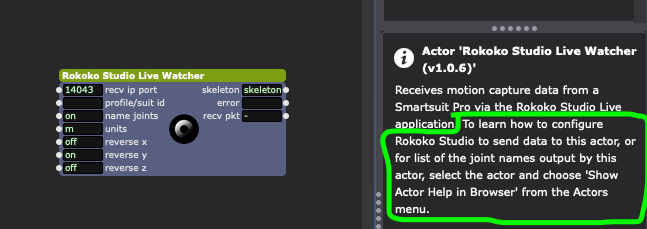
      As I wrote in your ticket (just re-writing it here for the benefit of others) the instructions for this can be found by right-clicking the Rokoko Studio Live Watcher actor and selecting the top menu option "Show Actor Help in Browser". The actor's help text also says this (though it tells you to use the top menu, which is not my preferred method).
      TroikaTronix Technical Support
      New Support Ticket: https://support.troikatronix.com/support/tickets/new
      Support Policy: https://support.troikatronix.com/support/solutions/articles/13000064762
      Add-Ons: https://troikatronix.com/add-ons/ & https://troikatronix.com/add-ons/?u=woland
      Professional Services: https://support.troikatronix.com/support/solutions/articles/13000109444

      | Isadora Version: all of them | Mac Pro (Late 2013), macOS 10.14.6, 3.5GHz 6-core, 1TB SSD, 64GB RAM, Dual AMD FirePro D700s |

      1 Reply Last reply Reply Quote 0
      • First post
        Last post
