Collect Your Media With Ease!
-
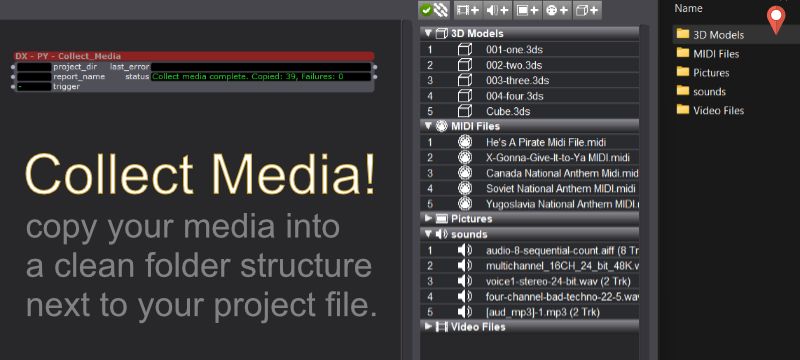
@Woland and I had a chat, where they suggested the use of the Media Report to power a media collection script.
After a little back and forth this little Utility User Actor runs on Mac and Windows using the standard library included with Pythoner, so that nothing extra needs to be installed.
You simply need to allow Pythoner to run for your project, save a Media Report file, click 'trigger' and you will have a media bin filled with all the media in your media BINs. (Save your file as 'old media links' so you have that as a reference). When you close and re-open your file, it will relink to the local media, and is ready to be moved to another machine or archived etc..
GET: COLLECT MEDIA🎛️ TroikaTronix Professional Services
https://troikatronix.com/professional-services🎫 Support Tickets
https://support.troikatronix.com/support/tickets/new💻 Add-ons
https://troikatronix.com/add-ons/?u=dusx🧪 GitHub Projects
https://github.com/rwebber🖥️ Win11 | i7 | RTX 4070 | 32GB RAM | Ontario, Canada
-
-
@dusx said:
@Woland and I had a chat, where they suggested the use of the Media Report to power a media collection script.
Sometimes I have good ideas

TroikaTronix Technical Support
New Support Ticket: https://support.troikatronix.com/support/tickets/new
Support Policy: https://support.troikatronix.com/support/solutions/articles/13000064762
Add-Ons: https://troikatronix.com/add-ons/ & https://troikatronix.com/add-ons/?u=woland
Professional Services: https://support.troikatronix.com/support/solutions/articles/13000109444| Isadora Version: all of them | Mac Pro (Late 2013), macOS 10.14.6, 3.5GHz 6-core, 1TB SSD, 64GB RAM, Dual AMD FirePro D700s |
-
@bonemap
I would be curious to here from you if you have a chance to use this one some 3D heavy projects. The 3D files can have associated texture files, and collecting these was the only special case that had to be handled to get this working. I had cases where my textures didn't have file extensions, so I made sure that case was covered. Let me know if you have any feedback. Thanks🎛️ TroikaTronix Professional Services
https://troikatronix.com/professional-services🎫 Support Tickets
https://support.troikatronix.com/support/tickets/new💻 Add-ons
https://troikatronix.com/add-ons/?u=dusx🧪 GitHub Projects
https://github.com/rwebber🖥️ Win11 | i7 | RTX 4070 | 32GB RAM | Ontario, Canada
-
Thanks for the prompt, will give it a try soon. Your Pythoner Add-On example also nudged me to think about how to manage the Media Bins more broadly as I move towards assimilating larger libraries of - say - Midi files, like these open source examples: free-midi-chords
A programmable option to import and remove path items from the media bins is what I am thinking right now - but early days in creating interactive experiences with such large suites of media options. It may be more about opening and closing Isadora files with segmented regions based on - for example - musical major and minor keys.
Best Wishes,
Russell
http://bonemap.com | Australia
Izzy STD 4.5.1 | USB 4.5.1 | + Beta
MBP 14” 2022 M2 16GB | 26.6.2 Tahoe
Mac Studio 2023 M2 Ultra 128GB | 26.6.2 Tahoe
Mac Mini 2025 M4 Pro 64GB | 26.6.2 Tahoe
MBP 16” 2026 M5 Max 128GB | 26.6.2 TahoeA range of deployable older Macs
-
@bonemap said:
opening and closing Isadora files
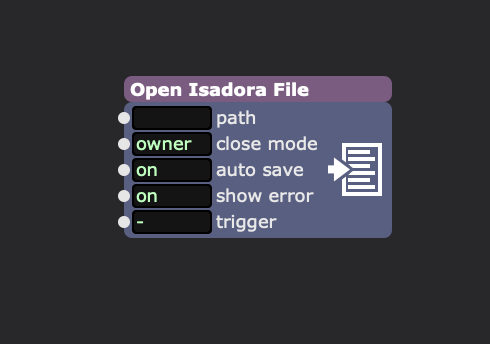
I keep meaning to do something neat with this little guy. Some day, some day...
-
Hi Ryan,
Apologies for the slow response. I did try your 'Collect Media Files' Pythoner on a couple of projects and it collected files from cloud storage and locally compiled a folder as described - great stuff! I did note that the pathnames to the assets did not change in the newly saved version. I think you indicate that the assets might be reassigned in the created archive? I haven't had a chance to try to port a 'collected' project to a different network computer yet.
Isadora also allows several files to be associated with a scene through various actors, like Data Array etc. and even .oni skeleton files so these get left out of the 'collect all process' or do yiu think there is another way to scrape a project for associated files?
Your offer will definitely help to clean up archives etc.
Best Wishes,
Russell
http://bonemap.com | Australia
Izzy STD 4.5.1 | USB 4.5.1 | + Beta
MBP 14” 2022 M2 16GB | 26.6.2 Tahoe
Mac Studio 2023 M2 Ultra 128GB | 26.6.2 Tahoe
Mac Mini 2025 M4 Pro 64GB | 26.6.2 Tahoe
MBP 16” 2026 M5 Max 128GB | 26.6.2 TahoeA range of deployable older Macs
-
@bonemap said:
sadora also allows several files to be associated with a scene through various actors, like Data Array etc. and even .oni skeleton files so these get left out of the 'collect all process' or do yiu think there is another way to scrape a project for associated files?
I might have a solution to this.. I am working on something.
-
@bonemap said:
I did note that the pathnames to the assets did not change in the newly saved version
No, The project file and Isadora need to be re-opened, facilitating the Media Search. After this search (it should find the local files) it will save the new paths when saved. I was just suggesting, making a backup of the file before re-opening the project with Isadora, since it would be easy to save and lose the remote filepaths. I'm working on another process right now for filepaths embedded in the project file. It won't be possible to get everything, especially for advanced Pythoner projects (shouldn't need to, if they follow best practices). Right now I can find, DataArray files, Top Level Python linked files, Files linked in Javascript via read() and include(), and I am able to expand this still. I will add .oni next and try to get a complete scan. I think I will have this script output a report, that is human readable, and can be edited by hand. Specifically, per found file, an 'Include' setting, so that specific files can be excluded from the next step of collecting, which will be handled by another script.
-
Hi there,
I would prefere a solution like Reaper: when you save the first time Isadora should create a folder, and inside a media folder (Or two for folms and picture), the Isadora show, an undo file or folder and a backup folder. In the prefs you could allow to move, or copy the files.
All this should be easy to put into Isadora, and I wonder why it is not yet implemented?!?
many greetings Matth
many greetings
Matthias
-
The main reason is that you cannot cover all circumstances. If your goal is to collect only the media that is actually used — and not everything stored in the media bin — Isadora can be used differently compared to other software. See this post:
https://community.troikatronix.com/topic/8601/moving-media/10?_=1767347158370Best Michel
Michel Weber | www.filmprojekt.ch | MBP (2023) M2 Pro, 16gig, OS X 26.6 | located in Winterthur Switzerland.
-
you can collect all media first, and when the project is finished you can maybe delete all unused media items.
many greetings
Matthias
-
I will have a tool to share shortly that parses your IZZ files and returns a report of all the filepaths found.
It is VERY experimental but provides very useful information already.
It is broken into three parts:
-1 Collect data from IZZ file (find all linked files)
-2 Make Local copies of all link files.
-3 Update a copy of your IZZ binary with new local filepaths
The JSON report from step 1 is for all Scenes in your project, and includes things like read/include() calls inside any javascript you have.
The report provides a few settings you can adjust before running step two.
    {
      "source_path": "C:\\pyFile2.py",
      "target_name": "pyFile2.py",
      "action": "localize",
      "localized_relpath": "pyFile2.py",
      "occurrences": 2,
      "exists": false,
      "scenes_found": [
        "scene1",
        "scene3"
      ]
    },
"notes": {
"summary": "Structural scene detection + Deterministic Value Header extraction (Index 0).",
"action_codes": {
"localize": "Standard project dependency. Should be moved/collected for portability.",
"ignore": "eg: Internal Isadora/Pythoner resource. Should remain in place.",
"[custom-path]": "User-defined destination path (e.g. '/data'). Localizes the file into this subfolder relative to the project root."    },
"exists_codes": {
"true": "Absolute path found on this system.",
"false": "Absolute path NOT found on this system.",
"null": "Relative path. Existence depends on project root location."    }  }
The above JSON outlines what is collected for each filepath. In this case, the filepath was found in two scenes, and so both are listed for reference. The filepath entry is unique so it is listed once.
The Notes provide details on what options are available. Mostly the action_code is what you might change. This can allow you to create a custom path. Custom Paths MUST be equal or shorter than the source_path if you want to use step three.
Part 1 and 2 will be available for testing soon.
Part 3 is more delicate, and will need more testing before I can release anything.
🎛️ TroikaTronix Professional Services
https://troikatronix.com/professional-services🎫 Support Tickets
https://support.troikatronix.com/support/tickets/new💻 Add-ons
https://troikatronix.com/add-ons/?u=dusx🧪 GitHub Projects
https://github.com/rwebber🖥️ Win11 | i7 | RTX 4070 | 32GB RAM | Ontario, Canada
-
The above linked User Actor provides part one and two of a three part project.
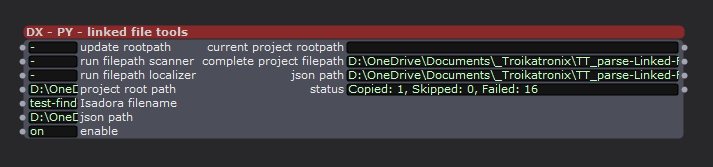
parts:
- Scanner - Identifies all file dependencies in an
.izzfile - Localizer - Copies identified files to a local project folder
- NOT AVAILABLE YET
Remapper- Updates the.izzfile to point to localized files
🚀 Quick Start
(assuming we are going to work on the current file)- add the User actor to your scene, & save
- Click 'update rootpath) to get the project root path from the output of the actor.
- Enter this project root path in the like named input
- Enter the isadora filename (must be exact. EG: test-find-txt-path_v4b.izz)
- Click the run filepath scanner' input
if the filepath is wrong you will get details in the output status.
Otherwise you should see the 'json path' output is now populated and 'status' is success - *** You now have a JSON file (at the 'json path') that outlines all linked files that are found and default settings for localizing.
The end of the JSON files provides some details about possible settings, and advanced user can make changes in the JSON if needed.
Generally the defaults are a good starting point, and it is safe to re-run these processes. - Enter the 'json path' from the output to the 'json path' input.
- Click the 'run filepath localizer' input.
- *** The status output will now provide details about: Copied, Skipped, Failed
You also get a report (named, YourFileName_localization_report.txt)
Files that have be moved, will be located alongside your Isadora project file, unless you customized the JSON file before running localizer.
I am hoping to get feedback on these features, before asking a few brave souls to help me test Part 3 of this project (seems to work well, but needs more hands on board for testing).
🎛️ TroikaTronix Professional Services
https://troikatronix.com/professional-services🎫 Support Tickets
https://support.troikatronix.com/support/tickets/new💻 Add-ons
https://troikatronix.com/add-ons/?u=dusx🧪 GitHub Projects
https://github.com/rwebber🖥️ Win11 | i7 | RTX 4070 | 32GB RAM | Ontario, Canada
- Scanner - Identifies all file dependencies in an
-
I don't know what the result should look like. I have 35 video files, 20 audio files and 3 images in the project. I use 3 video files and 3 audio files in the scene. The result looks like this:

Why do you have to copy the addresses you have obtained back into the inbox? It would be no problem to forward them in the Actor.
Do you need the .json and .txt files?
Best regards,
Jean-François
• Izzy 4
- MacBook Pro M1 Max 16" 64GB RAM, Mac OS 15.3.2 Sequoia
- Mac Pro 5.1 middle 2012 (3,33 GHz 6-Core Intel Xeon, 32GB RAM, Radeon RX 580 8 GB ),
Mac OS 10.14.6 (Mojave)
- Mac mini Pro M4, Mac OS 15.3.2 Sequoia- A range of deployable older Macs
Located in Bremen, Germany
- A range of deployable older Macs
-
The goal of this set of actors it to help developers collect and package complex project files with a range of linked files.
So, this User actor doesn't collect your media. Nothing listed in the media bins will be collected, doing that can be done via: TROIKATRONIX : ISADORA - DX – PY – Collect_Media
This actor, searches the binary of your Isadora file to find linked files that are harder to see/find. For example the data file for the data array actor will be listed.
Current file types it will find: ".izz", ".txt", ".py", ".srt", ".oni", ".json", ".csv", ".xml", ".js" [I just fixed a bufg with .js files, so that isn't in the user actor yet.]
If you link other file types let me know. Right now this looks inside javascript for read() and include() calls, and will 'find' those files if they are not dynamically created [eg, this fails : read(basePath + "file.txt") ]. It does NOT attempt to find linked files within Pythoner code. The options Python offers here is far to broad.
Currently the JSON and Report, only provide the Scene name that each file is used/located in. I would like to extend this later with a breadcrumb path to help navigate into user actors if the file path is internal, as well as, adding the Q# alongside the Scene Name.
@jfg said:Why do you have to copy the addresses you have obtained back into the inbox?
This was simply to make it clear what is being done. I am happy to change this later. Really there are 2 primary actors inside. By making you copy the path, you have more control over running each on 1, another file (doesn't need to be the active Isadora file), 2 re-running either function independently.. but I am not married to the approach.