• Products
    • Isadora
    • Get It
    • ADD-ONS
    • IzzyCast
    • Get It
  • Forum
  • Help
  • Werkstatt
  • Newsletter
  • Impressum
  • Dsgvo
  • Press
  • Isadora
  • Get It
  • ADD-ONS
  • IzzyCast
  • Get It
  • Press
  • Dsgvo
  • Impressum

Navigation

    • Register
    • Login
    • Search
    • Categories
    • Recent
    • Popular
    • Tags

    Working with subtitle tracks and feature length screenings through Isadora

    How To... ?
    3
    3
    15
    Loading More Posts
    • Oldest to Newest
    • Newest to Oldest
    • Most Votes
    Reply
    • Reply as topic
    Log in to reply
    This topic has been deleted. Only users with topic management privileges can see it.
    • T
      thatmattrogers last edited by

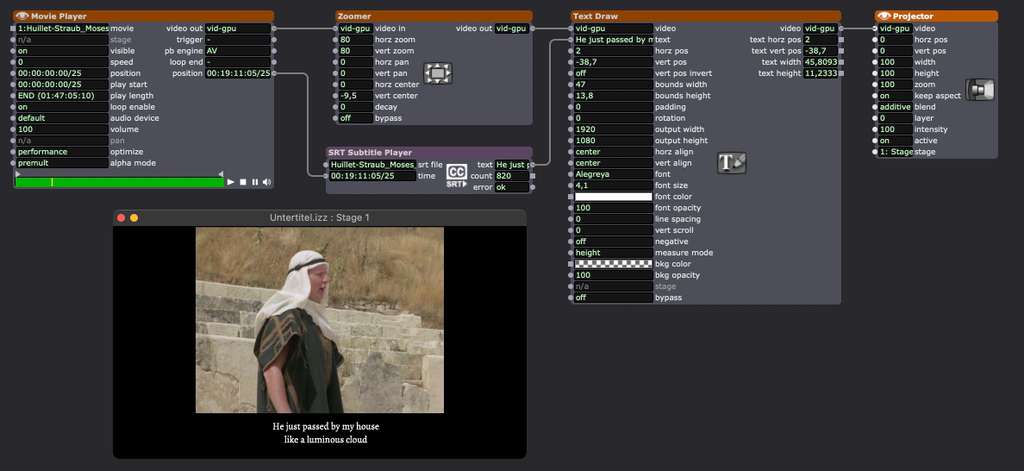
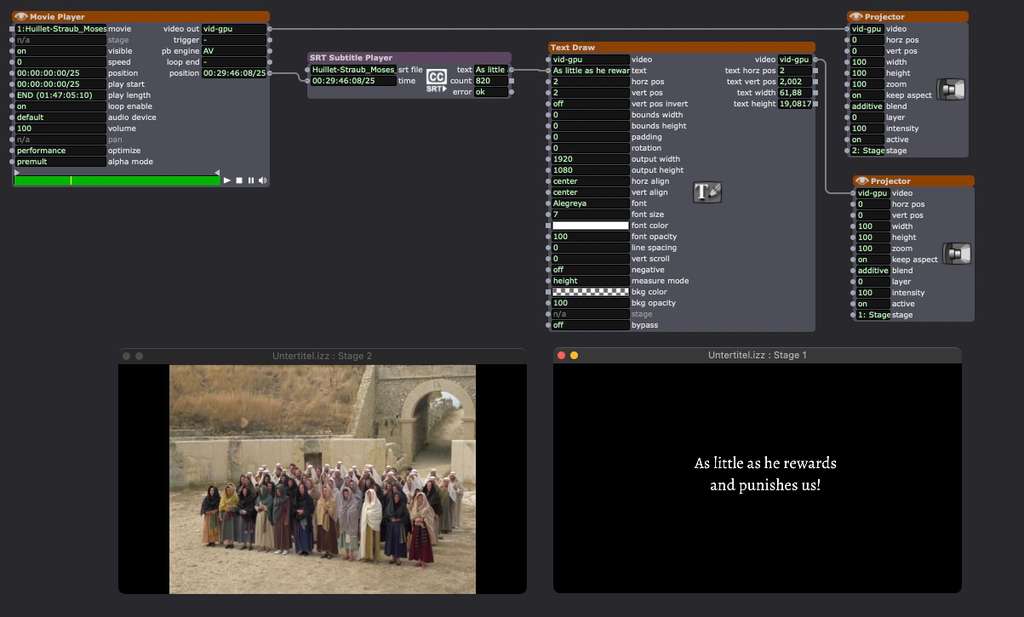
      I'm considering using Isadora for a small film screening, and I was wondering if it is possible to use the subtitle track in any interesting ways ie. have it function as a a discreet element separately from the video.

      Basically, I'd like to be able to experiment with placing the subtitles (based on an SRT file ideally) on their own screen or at least confine them to an area in the letterboxing to improve clarity and preserve the image. Is that something which is possible in Isadora and what should I take into consideration whilst doing it, based on everyone else's experiences?

      and secondarily - is there any reason that I shouldn't be running feature length films through isadora? 
      I know that Isadora was originally constructed with dance and theatre in mind, with more of a focus on shorter clips - is there any chance that it will start to behave unexpectedly with larger video files?


      I'm running Isadora 3 on Win10
      Machine 1- AMD 1700x 8 core CPU, 32GB RAM, and an AMD Radeon RX580 GPU
      Machine 2 -AMD 5900HX , 8 Core APU, 16GB Ram and an integrated GPU

      1 Reply Last reply Reply Quote 0
      • Woland
        Woland Tech Staff last edited by

        @Michel any thoughts?

        TroikaTronix Technical Support
        New Support Ticket: https://support.troikatronix.com/support/tickets/new
        Support Policy: https://support.troikatronix.com/support/solutions/articles/13000064762
        Add-Ons: https://troikatronix.com/add-ons/ & https://troikatronix.com/add-ons/?u=woland
        Professional Services: https://support.troikatronix.com/support/solutions/articles/13000109444

        | Isadora Version: all of them | Mac Pro (Late 2013), macOS 10.14.6, 3.5GHz 6-core, 1TB SSD, 64GB RAM, Dual AMD FirePro D700s |

        1 Reply Last reply Reply Quote 0
        • dbini
          dbini last edited by

          I regularly use Isadora for movie screenings in a tiny pop-up cinema in a shed. There's only room for 4 or 5 viewers, so I can chat to them beforehand and find out whether they want subtitles, and which language would work best for them.

          Isadora is perfect for having more control over the subtitles placement. Separate screen is no problem. Last year I staged a performance where the soundtrack was an hour-long 4-track audio file. I used Isadora to display a translation of the spoken text and tweaked it to show the subtitles in different ways throughout the performance.

          John Collingswood
          taikabox.com
          2021 M1PRO 32GB OSX 26.3.1 & 2019 MBPT 2.6GHZ i7 OSX15.7.4 16GB
          plus an old iMac and assorted Mac Minis for installations

          1 Reply Last reply Reply Quote 1
          • First post
            Last post