• Products
    • Isadora
    • Get It
    • ADD-ONS
    • IzzyCast
    • Get It
  • Forum
  • Help
  • Werkstatt
  • Newsletter
  • Impressum
  • Dsgvo
  • Press
  • Isadora
  • Get It
  • ADD-ONS
  • IzzyCast
  • Get It
  • Press
  • Dsgvo
  • Impressum

Navigation

    • Register
    • Login
    • Search
    • Categories
    • Recent
    • Popular
    • Tags

    Caps Lock Input for Text Draw actor

    Feature Requests
    text text draw string entry
    4
    7
    39
    Loading More Posts
    • Oldest to Newest
    • Newest to Oldest
    • Most Votes
    Reply
    • Reply as topic
    Log in to reply
    This topic has been deleted. Only users with topic management privileges can see it.
    • dbini
      dbini last edited by Woland

      Hello Isadoramongers, quick test of a feature request: Caps Lock input for the Text Draw actor. (I never needed it before, but now there's the Speech to Text actor to play around with, it would be lovely to be able to dynamically control whether the text generated is in lower case or capitals)

      1 Reply Last reply Reply Quote 0
      • dbini
        dbini last edited by

        This post is deleted!
        DusX 1 Reply Last reply Reply Quote 0
        • DusX
          DusX Izzy Guru @dbini last edited by

          @dbini said:

          dynamically control whether the text generated is in lower case or capitals

           This can easily be done via Javascript.

          // iz_input 1 "text input"
          // iz_input 2 "format mode"
          // iz_output 1 "text output" /*
          INPUT ORDER
          arguments[0] = incoming text
          arguments[1] = format mode (Integer) FORMAT MODES
          1 = unchanged
          2 = UPPERCASE
          3 = lowercase OUTPUT ORDER
          The single returned value is sent to output 1.
          */ function main()
          {
              var textInput = String(arguments[0]);
              var formatMode = Math.round(arguments[1]);     var outputText = textInput;     if (formatMode === 2)
              {
                  outputText = textInput.toUpperCase();
              }
              else if (formatMode === 3)
              {
                  outputText = textInput.toLowerCase();
              }     // View these messages using Windows > Show Monitor.
              print("Input: " + textInput + "\n");
              print("Mode: " + formatMode + "\n");
              print("Output: " + outputText + "\n");     return [outputText];
          }

          🎛️ TroikaTronix Professional Services
          https://troikatronix.com/professional-services

          🎫 Support Tickets
          https://support.troikatronix.com/support/tickets/new

          💻 Add-ons
          https://troikatronix.com/add-ons/?u=dusx

          🧪 GitHub Projects
          https://github.com/rwebber

          🖥️ Win11 | i7 | RTX 4070 | 32GB RAM | Ontario, Canada

          dbini 1 Reply Last reply Reply Quote 1
          • dbini
            dbini @DusX last edited by

            Thanks Ryan, I suspected there would be a codey way to format the text. Still, I think it would be a nice addition to the Text Draw.

            dbini 1 Reply Last reply Reply Quote 0
            • dbini
              dbini @dbini last edited by

              - although, after experimenting, the system works in a slightly different way, in that now the text builds up over time. if you go directly from Audio to Text into Text Draw, it resets at the end of each sentence. Im sure there's a way to add a reset trigger to the Javascript.

              Woland 1 Reply Last reply Reply Quote 0
              • Woland
                Woland Tech Staff @dbini last edited by Woland

                @dbini said:

                the text builds up over time. if you go directly from Audio to Text into Text Draw, it resets at the end of each sentence.

                Not sure if this helps at all
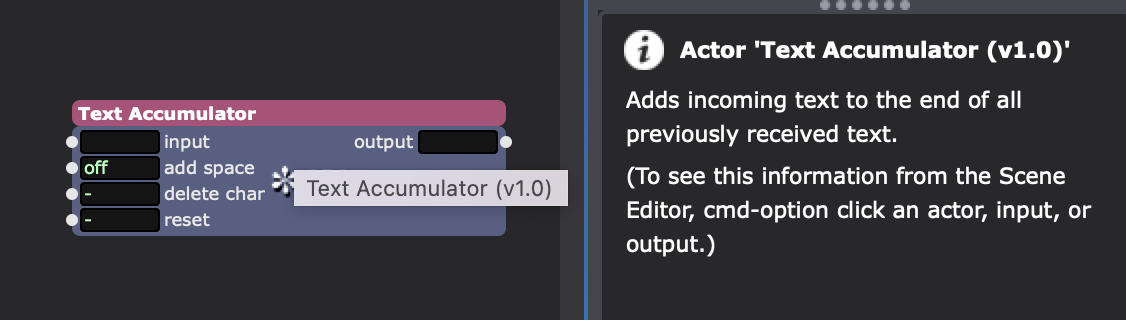

                Also just gunna throw these in here for good measure. Maybe I made something before that you might find useful: js-text-user-actors.zip

                TroikaTronix Technical Support
                New Support Ticket: https://support.troikatronix.com/support/tickets/new
                Support Policy: https://support.troikatronix.com/support/solutions/articles/13000064762
                Add-Ons: https://troikatronix.com/add-ons/ & https://troikatronix.com/add-ons/?u=woland
                Professional Services: https://support.troikatronix.com/support/solutions/articles/13000109444

                | Isadora Version: all of them | Mac Pro (Late 2013), macOS 10.14.6, 3.5GHz 6-core, 1TB SSD, 64GB RAM, Dual AMD FirePro D700s |

                1 Reply Last reply Reply Quote 0
                • jfg
                  jfg last edited by jfg

                  a workaround is to use a font with a capital version like Bodoni 72 and Bodoni 72 small caps and to switch between both.
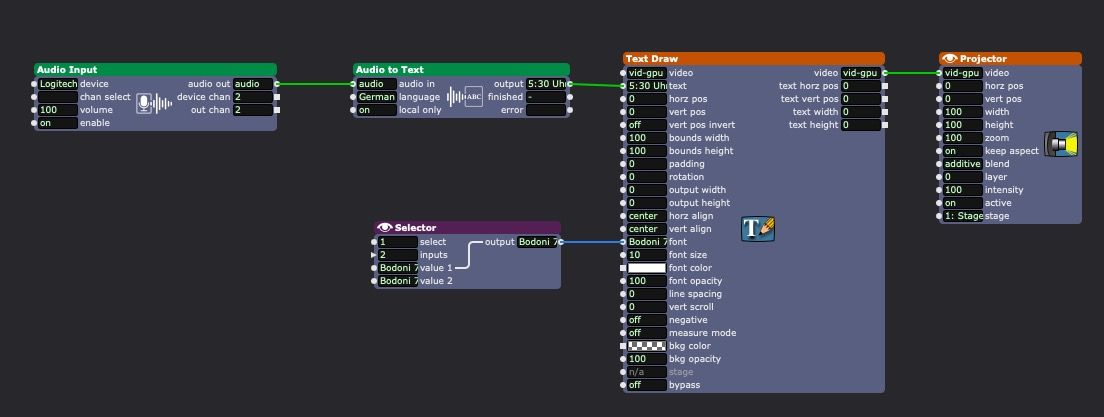
                  Best regards

                  Jean-François

                  • Izzy 4
                  - MacBook Pro M1 Max 16" 64GB RAM, Mac OS 15.3.2 Sequoia
                  - Mac Pro 5.1 middle 2012 (3,33 GHz 6-Core Intel Xeon, 32GB RAM, Radeon RX 580 8 GB ),
                  Mac OS 10.14.6 (Mojave)
                  - Mac mini Pro M4, Mac OS 15.3.2 Sequoia

                  • A range of deployable older Macs
                    Located in Bremen, Germany
                  1 Reply Last reply Reply Quote 1
                  • First post
                    Last post