• Products
    • Isadora
    • Get It
    • ADD-ONS
    • IzzyCast
    • Get It
  • Forum
  • Help
  • Werkstatt
  • Newsletter
  • Impressum
  • Dsgvo
  • Press
  • Isadora
  • Get It
  • ADD-ONS
  • IzzyCast
  • Get It
  • Press
  • Dsgvo
  • Impressum

Navigation

    • Register
    • Login
    • Search
    • Categories
    • Recent
    • Popular
    • Tags

    Multiple screen one over the other one with Tripple Head

    Hardware
    4
    15
    5430
    Loading More Posts
    • Oldest to Newest
    • Newest to Oldest
    • Most Votes
    Reply
    • Reply as topic
    Log in to reply
    This topic has been deleted. Only users with topic management privileges can see it.
    • monsieurmeus
      monsieurmeus last edited by

      Hi again, yes it's working ! You're the best ! I never used this actor, now I understand what it is… It's a new era for me, I'm always amazed by the solution there is to any problem, cool ! now I can go back to work.
      thanks and have a great day ! all the best
      Samuel

      Samuel, working on Macbook i7 10.10.3

      1 Reply Last reply Reply Quote 0
      • Skulpture
        Skulpture Izzy Guru last edited by

        You are most welcome. It's what we are here for.

        Graham Thorne | www.grahamthorne.co.uk
        RIG 1: Custom-built PC: Windows 11. Ryzen 7 7700X, RTX3080, 32G DDR5 RAM. 2 x m.2.
        RIG 2: Laptop MSI Vector 16 HX AI: Windows 11, Intel Ultra 9. RTX5070ti, 32G RAM (DDR5 6000htz), NVME M.2 SSD.
        RIG 3: Apple Laptop: rMBP i7, 8gig RAM 256 SSD, HD, OS X 10.12.12

        1 Reply Last reply Reply Quote 0
        • monsieurmeus
          monsieurmeus last edited by

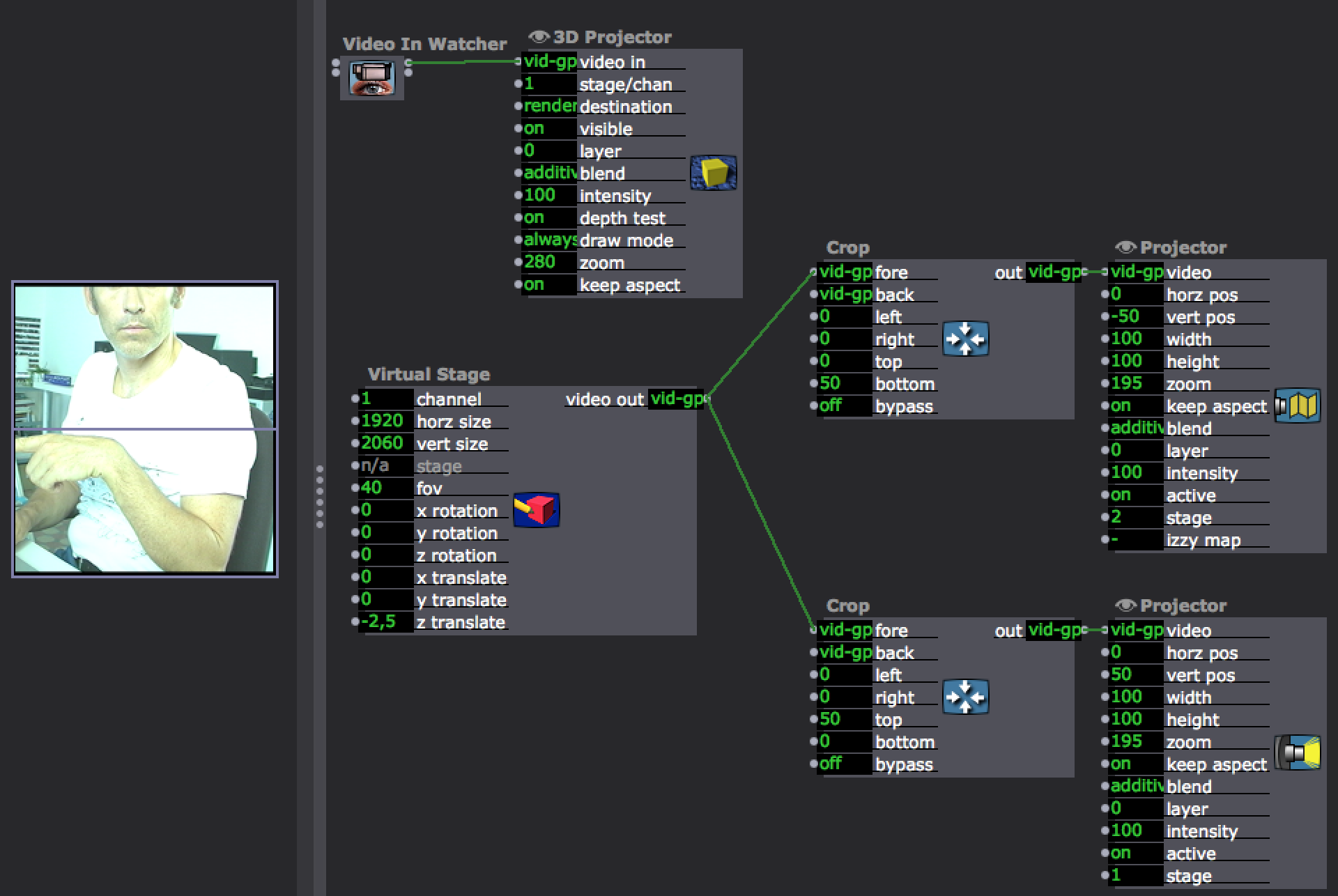
          Hi again, sorry to write again about the same thing but I feel something could be done better.

          This is how I did it (image attached) but it looks a bit complicated and I'm zooming in the image at the end and I'm affraid I'm losing resolution. What do you think ?
          all the best
          Samuel

          b7d0a2-multiple-projector.png

          Samuel, working on Macbook i7 10.10.3

          1 Reply Last reply Reply Quote 0
          • Skulpture
            Skulpture Izzy Guru last edited by

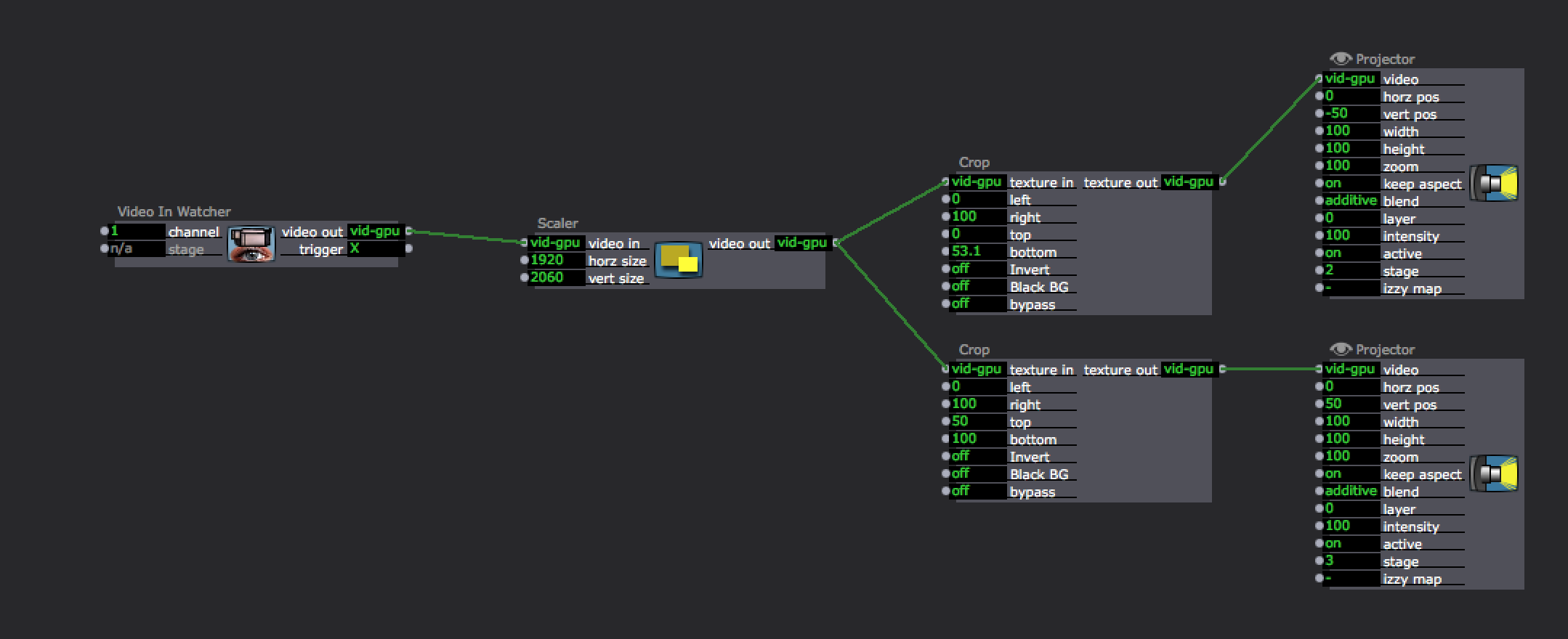
            Would this work?

            Unless your webcam has a very high resolution I think you will always lose quality/resolution as you are upscaling the video to fit a 1920*2060 size.
            67f20f-screen-shot-2016-09-07-at-14.56.20.png

            Graham Thorne | www.grahamthorne.co.uk
            RIG 1: Custom-built PC: Windows 11. Ryzen 7 7700X, RTX3080, 32G DDR5 RAM. 2 x m.2.
            RIG 2: Laptop MSI Vector 16 HX AI: Windows 11, Intel Ultra 9. RTX5070ti, 32G RAM (DDR5 6000htz), NVME M.2 SSD.
            RIG 3: Apple Laptop: rMBP i7, 8gig RAM 256 SSD, HD, OS X 10.12.12

            1 Reply Last reply Reply Quote 0
            • monsieurmeus
              monsieurmeus last edited by

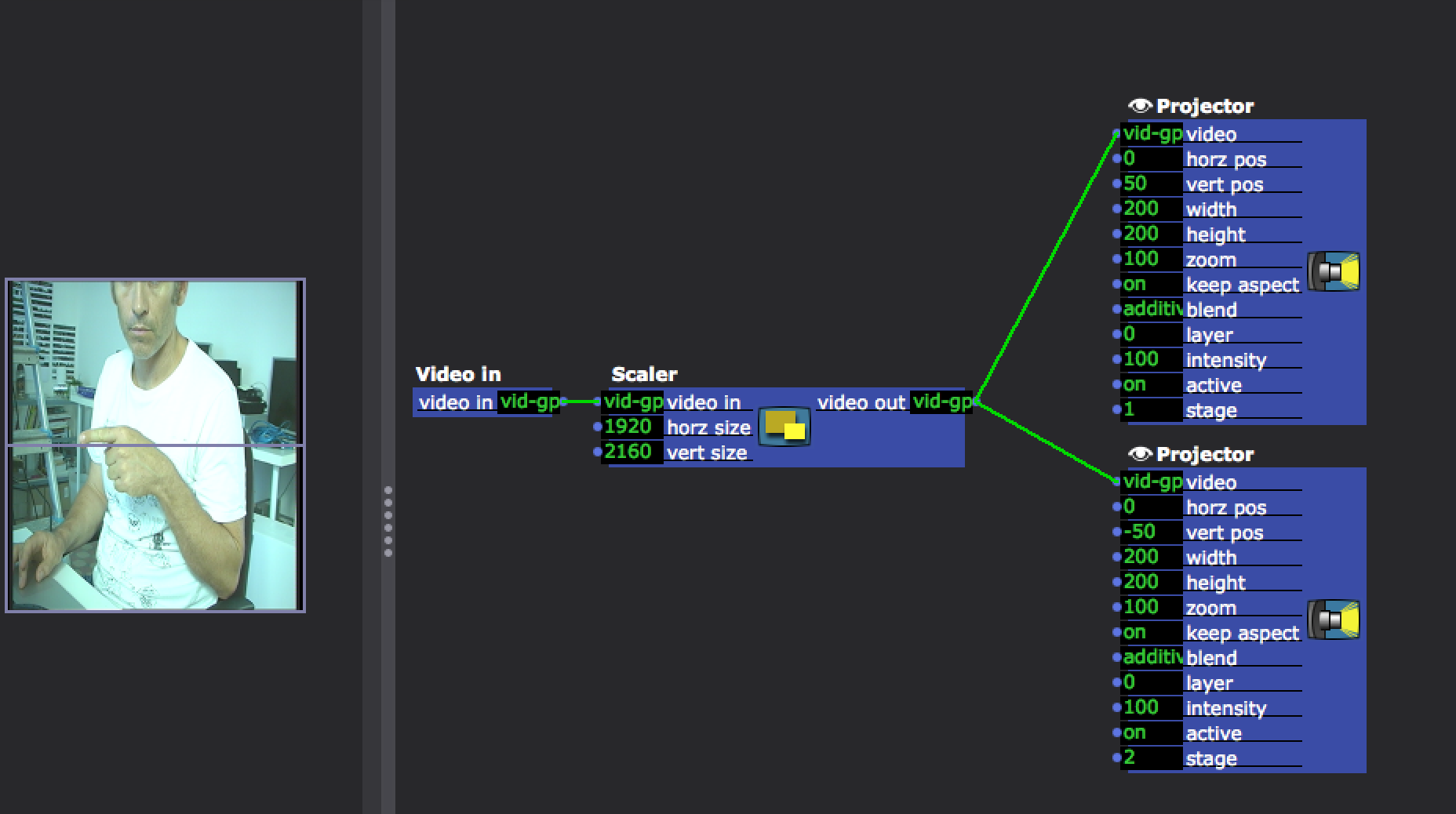
              in fact, it could be done very simpler (in a macro) but I'l still oversizing the image… is there a better way ? Am I losing definition ? f69766-multiple-projector-simple.png
              Samuel, working on Macbook i7 10.10.3

              1 Reply Last reply Reply Quote 0
              • Michel
                Michel Izzy Guru last edited by

                @monsieurmeus

                Sure you are loosing resolution, you are scaling an image to the double size of its source.
                Best Michel

                Michel Weber | www.filmprojekt.ch | rMBP (2019) i9, 16gig, AMD 5500M 8 GB, OS X 10.15 | located in Winterthur Switzerland.

                1 Reply Last reply Reply Quote 0
                • DusX
                  DusX Izzy Guru last edited by

                  You might also take a look at the 'chopper' actor.

                  Also, assuming your using 1920*1080 your vertical size of 2060 seems wrong.
                  If you want to not loose image quality, your source video should be  1920*2160, then cut into the 2 halves and run to the projectors.. 
                  That would allow zero scaling, and would give you the best image quality (I suggest the chopper actor for the cutting of the image)

                  🎛️ TroikaTronix Professional Services
                  https://troikatronix.com/professional-services

                  🎫 Support Tickets
                  https://support.troikatronix.com/support/tickets/new

                  💻 Add-ons
                  https://troikatronix.com/add-ons/?u=dusx

                  🧪 GitHub Projects
                  https://github.com/rwebber

                  🖥️ Win11 | i7 | RTX 4070 | 32GB RAM | Ontario, Canada

                  1 Reply Last reply Reply Quote 0
                  • Skulpture
                    Skulpture Izzy Guru last edited by

                    As @michel says this is the main issue in terms of quality "you are scaling an image to the double size of its source"

                    If you can get a higher resolution camera this would help a lot. 

                    Graham Thorne | www.grahamthorne.co.uk
                    RIG 1: Custom-built PC: Windows 11. Ryzen 7 7700X, RTX3080, 32G DDR5 RAM. 2 x m.2.
                    RIG 2: Laptop MSI Vector 16 HX AI: Windows 11, Intel Ultra 9. RTX5070ti, 32G RAM (DDR5 6000htz), NVME M.2 SSD.
                    RIG 3: Apple Laptop: rMBP i7, 8gig RAM 256 SSD, HD, OS X 10.12.12

                    1 Reply Last reply Reply Quote 0
                    • monsieurmeus
                      monsieurmeus last edited by

                      thanks to you for the help! the 'chopper' actor that @DusX advised looks like the best way to do it without complication. I was hoping to have a edge blending possibility in case the projectors I'm going to have don't have the option, is there a way to di it in izzy ? thanks again to you 3 for the help.

                      all the best from Marseille

                      Samuel, working on Macbook i7 10.10.3

                      1 Reply Last reply Reply Quote 0
                      • Michel
                        Michel Izzy Guru last edited by

                        @monsieurmeus

                        Yes that would be the "edge blend mask" actor.
                        Best Michel

                        Michel Weber | www.filmprojekt.ch | rMBP (2019) i9, 16gig, AMD 5500M 8 GB, OS X 10.15 | located in Winterthur Switzerland.

                        1 Reply Last reply Reply Quote 0
                        • monsieurmeus
                          monsieurmeus last edited by

                          Oh ! that's great ! everything's possible, thanks !

                          Samuel, working on Macbook i7 10.10.3

                          1 Reply Last reply Reply Quote 0
                          • First post
                            Last post