• Products
    • Isadora
    • Get It
    • ADD-ONS
    • IzzyCast
    • Get It
  • Forum
  • Help
  • Werkstatt
  • Newsletter
  • Impressum
  • Dsgvo
  • Press
  • Isadora
  • Get It
  • ADD-ONS
  • IzzyCast
  • Get It
  • Press
  • Dsgvo
  • Impressum

Navigation

    • Register
    • Login
    • Search
    • Categories
    • Recent
    • Popular
    • Tags

    Output video frame data pixel by pixel

    How To... ?
    6
    21
    17604
    Loading More Posts
    • Oldest to Newest
    • Newest to Oldest
    • Most Votes
    Reply
    • Reply as topic
    Log in to reply
    This topic has been deleted. Only users with topic management privileges can see it.
    • Skulpture
      Skulpture Izzy Guru last edited by

      Why not use a chopper actor and cut it down to 1x1 pixel?

      Graham Thorne | www.grahamthorne.co.uk
      RIG 1: Custom-built PC: Windows 11. Ryzen 7 7700X, RTX3080, 32G DDR5 RAM. 2 x m.2.
      RIG 2: Laptop MSI Vector 16 HX AI: Windows 11, Intel Ultra 9. RTX5070ti, 32G RAM (DDR5 6000htz), NVME M.2 SSD.
      RIG 3: Apple Laptop: rMBP i7, 8gig RAM 256 SSD, HD, OS X 10.12.12

      1 Reply Last reply Reply Quote 0
      • DusX
        DusX Izzy Guru last edited by

        Thanks for the replies.
        I am considering other options (Max, VVVV etc..) however I would prefer to stay in Isadora.

        @Skulpture ... I started to play with chopper late last night, again I was having trouble getting single pixels. It seemed that I always got YUV video out, even if I converted to RGB right before. As YUV the smallest video out I could get was 1x2, also the pixel selection is based on % of video right? Have been having a hard time getting a sharp selection of a pixel using percentages.
        going to give it another try.

        πŸŽ›οΈ TroikaTronix Professional Services
        https://troikatronix.com/professional-services

        🎫 Support Tickets
        https://support.troikatronix.com/support/tickets/new

        πŸ’» Add-ons
        https://troikatronix.com/add-ons/?u=dusx

        πŸ§ͺ GitHub Projects
        https://github.com/rwebber

        πŸ–₯️ Win11 | i7 | RTX 4070 | 32GB RAM | Ontario, Canada

        1 Reply Last reply Reply Quote 0
        • DusX
          DusX Izzy Guru last edited by

          Yes, I have just confirmed that I cannot get a 1x1 video stream from chopper or chop pixels.. min is 1x2 and converts to YUV in all cases. (I have YUV mode active, but need this for other things.)
          hmm.

          πŸŽ›οΈ TroikaTronix Professional Services
          https://troikatronix.com/professional-services

          🎫 Support Tickets
          https://support.troikatronix.com/support/tickets/new

          πŸ’» Add-ons
          https://troikatronix.com/add-ons/?u=dusx

          πŸ§ͺ GitHub Projects
          https://github.com/rwebber

          πŸ–₯️ Win11 | i7 | RTX 4070 | 32GB RAM | Ontario, Canada

          1 Reply Last reply Reply Quote 0
          • Skulpture
            Skulpture Izzy Guru last edited by

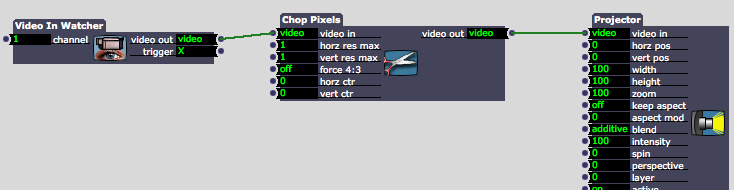
            What about Chop pixels?6e865f-screen-shot-2012-07-01-at-13.43.45.png

            Graham Thorne | www.grahamthorne.co.uk
            RIG 1: Custom-built PC: Windows 11. Ryzen 7 7700X, RTX3080, 32G DDR5 RAM. 2 x m.2.
            RIG 2: Laptop MSI Vector 16 HX AI: Windows 11, Intel Ultra 9. RTX5070ti, 32G RAM (DDR5 6000htz), NVME M.2 SSD.
            RIG 3: Apple Laptop: rMBP i7, 8gig RAM 256 SSD, HD, OS X 10.12.12

            1 Reply Last reply Reply Quote 0
            • DusX
              DusX Izzy Guru last edited by

              I need to test in non YUV mode, but my first test with Chop Pixels with horz and vert set to 1 was still outputting a 1x2 video stream (YUV), even if I converted to RGB right before the chop.
              Going to give it another quick try right now. AND
              The results, ys Chop Pixel will work rather well in combination with Measure color for my purpose, but ONLY if I am not in YUV mode.. which currenlty is a problem.
              Maybe @Mark can shed some light on this. Anyway to remain in RGB mode using chop pixel if the system is set to YUV?

              πŸŽ›οΈ TroikaTronix Professional Services
              https://troikatronix.com/professional-services

              🎫 Support Tickets
              https://support.troikatronix.com/support/tickets/new

              πŸ’» Add-ons
              https://troikatronix.com/add-ons/?u=dusx

              πŸ§ͺ GitHub Projects
              https://github.com/rwebber

              πŸ–₯️ Win11 | i7 | RTX 4070 | 32GB RAM | Ontario, Canada

              1 Reply Last reply Reply Quote 0
              • G
                gavspav Beta Silver last edited by

                As you talk of vvvv, you are probably using Windows?

                If not and you have the Core version of Isadora, you could explore the Image Pixel actor of Quartz Composer.

                http://www.digitalfunfair.co.uk I'm using M1 MBP 14" mostly but sometimes use older Mac & Windows machines.

                1 Reply Last reply Reply Quote 0
                • mark
                  mark last edited by

                  Regarding the 1 x 2 limit: when using YUV422 system (which is what Isadora uses when in YUV mode), there is no way to express an individual pixel. Instead, pixels are expressed in pairs as four 8 bit values: (u, y1, v, y2) -- y1 and y2 are the brightness of the two pixels, u and v together express the color of bothΒ pixels. Thus, the YUV422 standard does not have the capability to express a single pixel.

                  Why YUV422? Because the whole point of YUV was to reduce the bandwidth as compared to YUV. YUV422 expressed two pixels in 32 bits; RGB requires 64 bits to do the same.
                  For those who are interested, you can read all about YUVΒ [here](http://en.wikipedia.org/wiki/YUV#Converting_between_Y.27UV_and_RGB).
                  As mentioned above, when in RGB mode there is no problem cutting down to a 1 x 1 pixel.
                  Best Wishes,
                  Mark

                  Media Artist & Creator of Isadora
                  Macintosh SE-30, 32 Mb RAM, MacOS 7.6, Dual Floppy Drives

                  1 Reply Last reply Reply Quote 0
                  • DusX
                    DusX Izzy Guru last edited by

                    Mark, I fully understand the reasoning behind YUV and how it works, I guess what surprised me is that converting the video stream to RGB directly before it enters the Chop Pixel didn't cause the Chop Pixel actor to process the video as RGB but rather converted it to YUV.
                    Perhaps it might be nice to have a behavior control on actors that support YUV to change there default behaviors.

                    πŸŽ›οΈ TroikaTronix Professional Services
                    https://troikatronix.com/professional-services

                    🎫 Support Tickets
                    https://support.troikatronix.com/support/tickets/new

                    πŸ’» Add-ons
                    https://troikatronix.com/add-ons/?u=dusx

                    πŸ§ͺ GitHub Projects
                    https://github.com/rwebber

                    πŸ–₯️ Win11 | i7 | RTX 4070 | 32GB RAM | Ontario, Canada

                    1 Reply Last reply Reply Quote 0
                    • mark
                      mark last edited by

                      So you're saying that the output of the YUV -> RGB actor was YUV? Or that the Chop Pixels actor converted it to YUV?

                      Media Artist & Creator of Isadora
                      Macintosh SE-30, 32 Mb RAM, MacOS 7.6, Dual Floppy Drives

                      1 Reply Last reply Reply Quote 0
                      • DusX
                        DusX Izzy Guru last edited by

                        The Chop Pixel actor converted it. It accepted the RGB in but output YUV even when set to a size of 1x1.

                        πŸŽ›οΈ TroikaTronix Professional Services
                        https://troikatronix.com/professional-services

                        🎫 Support Tickets
                        https://support.troikatronix.com/support/tickets/new

                        πŸ’» Add-ons
                        https://troikatronix.com/add-ons/?u=dusx

                        πŸ§ͺ GitHub Projects
                        https://github.com/rwebber

                        πŸ–₯️ Win11 | i7 | RTX 4070 | 32GB RAM | Ontario, Canada

                        1 Reply Last reply Reply Quote 0
                        • DusX
                          DusX Izzy Guru last edited by

                          Can't remember if I entered this as a bug?

                          πŸŽ›οΈ TroikaTronix Professional Services
                          https://troikatronix.com/professional-services

                          🎫 Support Tickets
                          https://support.troikatronix.com/support/tickets/new

                          πŸ’» Add-ons
                          https://troikatronix.com/add-ons/?u=dusx

                          πŸ§ͺ GitHub Projects
                          https://github.com/rwebber

                          πŸ–₯️ Win11 | i7 | RTX 4070 | 32GB RAM | Ontario, Canada

                          1 Reply Last reply Reply Quote 0
                          • DusX
                            DusX Izzy Guru last edited by

                            Just confirmed that this is still the case in F33 on windows.
                            Attached a simple patch that shows a 2x1 coming from a chop pixels when in YUV mode even though set to RGB right before.

                            Will enter bug now.
                            4ccad4-noisechop.izz

                            πŸŽ›οΈ TroikaTronix Professional Services
                            https://troikatronix.com/professional-services

                            🎫 Support Tickets
                            https://support.troikatronix.com/support/tickets/new

                            πŸ’» Add-ons
                            https://troikatronix.com/add-ons/?u=dusx

                            πŸ§ͺ GitHub Projects
                            https://github.com/rwebber

                            πŸ–₯️ Win11 | i7 | RTX 4070 | 32GB RAM | Ontario, Canada

                            1 Reply Last reply Reply Quote 0
                            • mark
                              mark last edited by

                              Dear DusX,

                              Thanks for the bug report. Will follow up.
                              Best Wishes,
                              Mark

                              Media Artist & Creator of Isadora
                              Macintosh SE-30, 32 Mb RAM, MacOS 7.6, Dual Floppy Drives

                              1 Reply Last reply Reply Quote 0
                              • R
                                Rick last edited by

                                I recently did this with the Measure Color Actor with it set to 0% size in both directions. I wasn't trying to output each and every pixel though, and since it's position is described by percentages, that might be a problem.

                                1 Reply Last reply Reply Quote 0
                                • DusX
                                  DusX Izzy Guru last edited by

                                  What does setting its size to 0% accomplish?
                                  I suppose the other option would to create a custom plugin/
                                  @Mark, if making a actor (with sdk in C++) is there a limit to the number of outputs I would be able to send per frame? (frame rate X cycle rate ?)
                                  Or would outputting another data format be faster.. eg comma delimited list for each row of data?
                                  I don't expect to work with large video files, even 80 x 60 px would be enough.

                                  πŸŽ›οΈ TroikaTronix Professional Services
                                  https://troikatronix.com/professional-services

                                  🎫 Support Tickets
                                  https://support.troikatronix.com/support/tickets/new

                                  πŸ’» Add-ons
                                  https://troikatronix.com/add-ons/?u=dusx

                                  πŸ§ͺ GitHub Projects
                                  https://github.com/rwebber

                                  πŸ–₯️ Win11 | i7 | RTX 4070 | 32GB RAM | Ontario, Canada

                                  1 Reply Last reply Reply Quote 0
                                  • R
                                    Rick last edited by

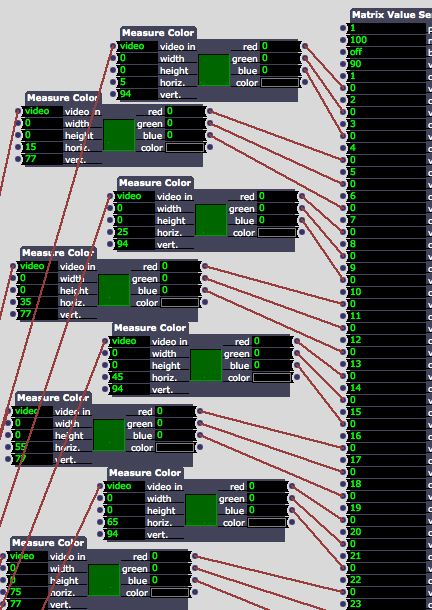
                                    0% outputs a single pixel with the Measure Color Actor - I was using a grid of them to pixel map video to a grid of individual RGB LEDs.

                                    1 Reply Last reply Reply Quote 0
                                    • DusX
                                      DusX Izzy Guru last edited by

                                      Looking at the actor, I wonder if the help text for the input fields is correct?
                                      It states that setting the hor and vert locations to 0 causes it to read data for a single pixel.
                                      However this should leave you stick in the top left corner.
                                      Seems that setting the width and height to zero should give the single pixel read, and then you can use the hor and vert positions to move your reader around.
                                      The actors display show ti working this way as well, so it seems the help text must be wrong.

                                      πŸŽ›οΈ TroikaTronix Professional Services
                                      https://troikatronix.com/professional-services

                                      🎫 Support Tickets
                                      https://support.troikatronix.com/support/tickets/new

                                      πŸ’» Add-ons
                                      https://troikatronix.com/add-ons/?u=dusx

                                      πŸ§ͺ GitHub Projects
                                      https://github.com/rwebber

                                      πŸ–₯️ Win11 | i7 | RTX 4070 | 32GB RAM | Ontario, Canada

                                      1 Reply Last reply Reply Quote 0
                                      • R
                                        Rick last edited by

                                        You're right - I forgot about that. Horiz and Vert are percentage positions starting in the upper-left corner, it's one pixel when width and height are set to 0. You can see in the screen cap that the small feedback window shows one pixel being sampled in different positions, depending on the H and V settings. -Rick b3f0e0-screensnapz.jpg
                                        1 Reply Last reply Reply Quote 0
                                        • DusX
                                          DusX Izzy Guru last edited by

                                          Thanks Rick. I was just pointing out the error in the help docs.
                                          I once tried to use this method to read each pixel.. but found the positioning rather difficult.
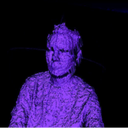
                                          I have been (like you I guess) using it to read a matrix of values from video and map to DMX.. works well.
                                          Β Just haven't got it down to scanning ever pixel, I'm defining tiled regions.
                                          πŸŽ›οΈ TroikaTronix Professional Services
                                          https://troikatronix.com/professional-services

                                          🎫 Support Tickets
                                          https://support.troikatronix.com/support/tickets/new

                                          πŸ’» Add-ons
                                          https://troikatronix.com/add-ons/?u=dusx

                                          πŸ§ͺ GitHub Projects
                                          https://github.com/rwebber

                                          πŸ–₯️ Win11 | i7 | RTX 4070 | 32GB RAM | Ontario, Canada

                                          1 Reply Last reply Reply Quote 0
                                          • First post
                                            Last post